Bushido
Members
-
Joined
-
Last visited
Everything posted by Bushido
-
For some reason I thought as long as you had a parity drive equal or greater than your largest drive, then it would work. That makes total sense. Thank you for taking the time to explain. It seems obvious in hindsight.
-
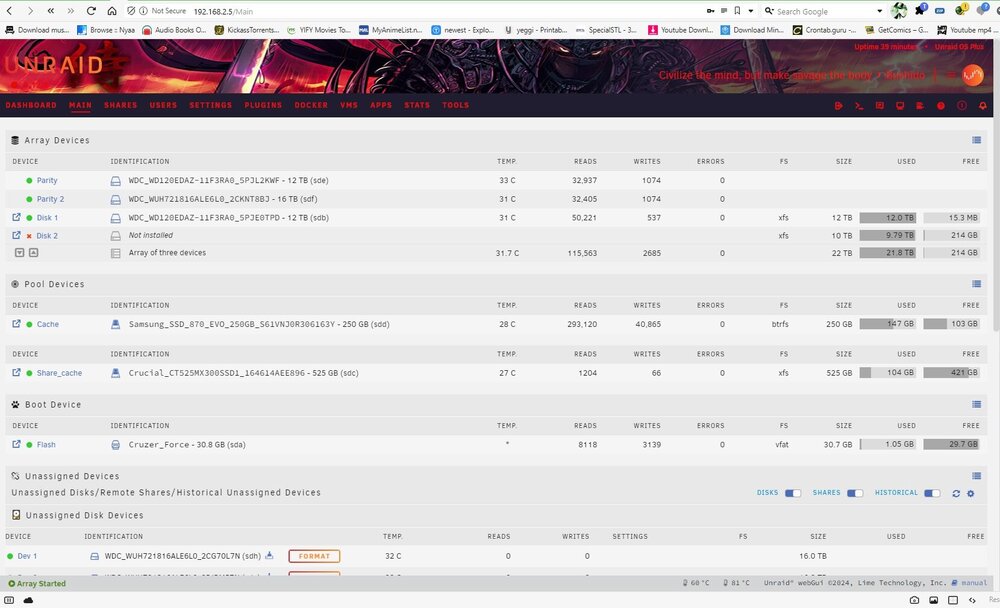
Hey guys, I recently bought 3 new 16TB drives to finally have 2 parity disks and add some capacity. After shutting down the server to add the drives and clean the server, I had a drive fail (10TB disk 2 in the screenshot). Since my new drives are larger than my largest drive in the parity, I added 1 of the new drives to the parity and it finished the parity rebuild today. Now, I'm trying to replace the failed drive, but any time I select one of the new drives, it won't allow me to start the array. Screenshot and diagnostics included. I'm hoping one of you guys can help. I've been running Unraid for years now, but am at a loss. If I click on Disk 2, there's an option to erase the drive, but I'm not sure if I need to select that or if that will cause irreparable harm. Thanks in advance bushido-diagnostics-20240503-1844.zip