TonyStew
Members
-
Joined
-
Last visited
-
TonyStew changed their profile photo
-
Hello again, I've moved onto Disk 2 and the xfs_repair again ran successfully restoring most everything, but this time there are a couple folders' worth of files in lost+found. Using "file *", it looks like a FLAC album and a few mkv, html, and jpeg files out of a Plex season folder. Do I need to do anything with these files before I rebuild the disk, or can I clean up this drive's mess alongside possible lost+found from other drives once everything is rebuilt?
-
A couple more questions about the rebuild process: do those xfs_repair /dev/mdXp1 commands need to be done with the given disk in an emulated state, or could I do them with the array in maintenance and the drive still assigned, thus (I think?) avoiding a data-rebuild? If that's not the case but my current drive rebuild completes successfully without parity issues, data issues, or new SMART errors on the drives, since I have dual-parity I should be able to rebuild 2 at a time in this way, right? Even if it would be inadvisable to drop to 0 parity for the time.
-
I'll get right on that, price isn't as much of an issue for me these days as when I first built the system. Thank you so much, absolute lifesaver!
-
It seems to be good! Correct amount of data on it (10.5 TB used, 1.5 left) and no lost+found folder in /mnt/disk1. The computed share sizes all add up to that 10.5TB and opening a handful of files to check all seem good! So at this point would I reinsert the disk back into the array and let it rebuild, then repeat this process down the drive list? Also what do you think caused this issue, so I don't repeat it in the future?
-
That seems to have done a lot, the initial output got cutoff from my console window. Here's what I got out. output.txt
-
root@Unraid:/# xfs_repair -n /dev/md1p1 Phase 1 - find and verify superblock... bad primary superblock - bad magic number !!! attempting to find secondary superblock... .found candidate secondary superblock... verified secondary superblock... would write modified primary superblock Primary superblock would have been modified. Cannot proceed further in no_modify mode. Exiting now.
-
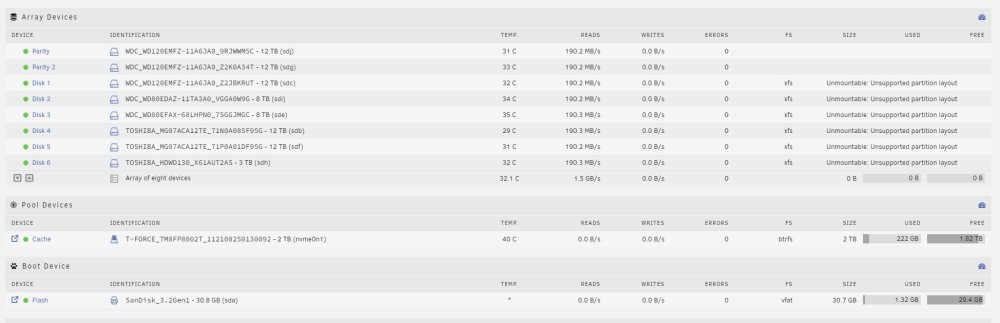
Hi, the past couple of days I've been upgrading my Unraid system from a 4790K Z97 setup to a 12900k Z690 setup, and this morning finally booted into unraid only to find ALL my array disks are marked Unmountable: Unsupported partition layout. After the immediate heart attack I stopped my Docker service and paused the parity check Unraid had automatically started. I've unchecked "Write corrections to parity" before and that setting is still off, so not worried about that. I run an Adaptec 71605 so this thread caught my eye, but unmounting an array disk did NOT show a mountable emulated disk in the array when it started back up, gave another similarly-worded error, and the disk I took out (the first non-parity) is not mountable or showing a file system in the unassigned devices plugin. I also found this similar-looking thread, but did not have the identifier issues described and can't mount the removed disk. Attached are logs from I think immediately after I realized the issue (I think, was in a bit of shock) and after I tried restarting the array with a disk removed. I still have the original system and a USB backup taken before I finally shut it down for my upgrade, so those variables can be changed if need-be, and a possibly important change was that my old system was using a legacy boot sequence but my new system is using UEFI boot as required for the integrated graphics. Looking for guidance on how I should proceed, I've seen related posts talking about running xfs_repair on either the emulated or physical disk, but not sure which I should do for this situation. The disks were all xfs. I also have a guinea pig drive for testing any commands on, a 3TB drive I upgraded out of my array a few weeks ago but never removed from my machine and which is similarly afflicted, not showing its XFS partition in Unassigned Devices. Thanks unraid-diagnostics-20230817-0617.zip unraid-diagnostics-20230817-0701.zip