ph15h
Members
-
Joined
-
Thank you! Yeah the memtest completely failed. I gotta buy new RAM to see if it's the RAM and if it's not the RAM then it's the RAMslot
-
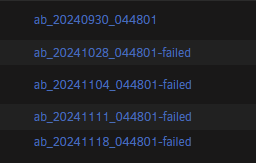
I got home and family was telling me multiple functions of my Unraid server weren't working (Home Assistant, Plex, etc). I checked my server and none of my containers were accessible through webUI but logs didn't state anything wrong with those. I stopped and re-started my array. Upon restarting I saw that none of my docker containers were present any more and that my cache_nvme01 had this error. Unmountable: Unsupported or no file system At this point my questions are: Is there any way to get the data off that drive at this point? Is the drive just dead? I used it for tiered storage before moving to the array but I don't think mover moved anything in the past 3 days since none of that is available on my array. Can Appdata Backup restore from a failed backup? I should have checked logs earlier but my past 5 backups are marked as failed and I didn't notice until now. I think everything except plex backed up fine, so I'm probably not missing much. I bought two drives the other day to make a new cache pool but I guess I was too late 😅 This is the log from that drive if it helps. Nov 21 10:38:48 IDIOT emhttpd: read SMART /dev/nvme0n1 Nov 21 10:38:49 IDIOT emhttpd: Samsung_SSD_970_EVO_1TB_#### (nvme0n1) 512 1953525168 Nov 21 10:38:49 IDIOT emhttpd: import 30 cache device: (nvme0n1) Samsung_SSD_970_EVO_1TB_#### Nov 21 10:38:49 IDIOT emhttpd: read SMART /dev/nvme0n1 Nov 21 10:39:00 IDIOT emhttpd: #011devid 1 size 931.51GiB used 927.01GiB path /dev/nvme0n1p1 Nov 21 10:39:00 IDIOT kernel: BTRFS: device fsid ###-###-###-###-### devid 1 transid 2925432 /dev/nvme0n1p1 scanned by mount (22472) Nov 21 10:39:00 IDIOT kernel: BTRFS info (device nvme0n1p1): first mount of filesystem ###-###-###-###-### Nov 21 10:39:00 IDIOT kernel: BTRFS info (device nvme0n1p1): using crc32c (crc32c-intel) checksum algorithm Nov 21 10:39:00 IDIOT kernel: BTRFS info (device nvme0n1p1): using free space tree Nov 21 10:39:00 IDIOT kernel: BTRFS info (device nvme0n1p1): bdev /dev/nvme0n1p1 errs: wr 0, rd 0, flush 0, corrupt 6688, gen 0 Nov 21 10:39:00 IDIOT kernel: BTRFS info (device nvme0n1p1): enabling ssd optimizations Nov 21 10:39:00 IDIOT kernel: BTRFS info (device nvme0n1p1): start tree-log replay Nov 21 10:39:00 IDIOT kernel: BTRFS error (device nvme0n1p1): incorrect extent count for 1977854459904; counted 6059, expected 6051 Nov 21 10:39:01 IDIOT kernel: BTRFS info (device nvme0n1p1): leaf 7991882825728 gen 2925433 total ptrs 146 free space 4895 owner 2 Nov 21 10:39:01 IDIOT kernel: BTRFS error (device nvme0n1p1): unable to find ref byte nr 17141982846976 parent 0 root 5 owner 130576960 offset 438247424 Nov 21 10:39:01 IDIOT kernel: BTRFS: error (device nvme0n1p1: state A) in __btrfs_free_extent:3074: errno=-2 No such entry Nov 21 10:39:01 IDIOT kernel: BTRFS error (device nvme0n1p1: state EA): failed to run delayed ref for logical 17141982846976 num_bytes 4096 type 178 action 2 ref_mod 1: -2 Nov 21 10:39:01 IDIOT kernel: BTRFS: error (device nvme0n1p1: state EA) in btrfs_run_delayed_refs:2150: errno=-2 No such entry Nov 21 10:39:01 IDIOT kernel: BTRFS: error (device nvme0n1p1: state EA) in btrfs_replay_log:2417: errno=-2 No such entry (Failed to recover log tree) Nov 21 10:39:01 IDIOT kernel: BTRFS error (device nvme0n1p1: state EA): open_ctree failed