Namarath
Members
-
Joined
-
Last visited
Everything posted by Namarath
-
My server was running fine for some time now. Here are the specs: Unraid version: 6.9.2 Asus Prime B350-PLUS Ryzen 7 1700 @ 3000 MHz 32 GB DDR4 with 4 Dimms (2x 8GB @ 3000 MHz + 2x 8GB @ 3200 MHz) running at 3000 MHz The CPU was overclocked to 3.7 GHz before, as I used my gaming setup as VM on the server. Since moving to a dedicated gaming rig, I restored all overclocking settings in the BIOS to stock values. After this the server started to randomly freeze up - usually daily. When this happens it is apparently still running (case lights are up ) but is not accessible in any way, since the network stack just stops working. Only way to bring it back is to hard reset the device. Since this behavior started I'm getting following error messages in the syslog: Mar 3 08:39:49 Nexus kernel: mce: [Hardware Error]: Machine check events logged Mar 3 08:39:49 Nexus kernel: mce: [Hardware Error]: CPU 3: Machine Check: 0 Bank 5: bea0000000000108 Mar 3 08:39:49 Nexus kernel: mce: [Hardware Error]: TSC 0 ADDR 1ffff813c3054 MISC d012000100000000 SYND 4d000000 IPID 500b000000000 Mar 3 08:39:49 Nexus kernel: mce: [Hardware Error]: PROCESSOR 2:800f11 TIME 1646293169 SOCKET 0 APIC 6 microcode 8001138 After seeing this, I run an memtest check overnight, which did not bring up any errors. I attached diagnostics. It is however from a running system, i.e. NOT taken after a crash, as like I said when the server crashes, it crashes for good and I cannot access any logs. Only changes between a perfectly running system and one crashing often is reverting the CPU to stock settings and exchanging the crappy PSU for a good one. Maybe one more thing: I used two of the RAM sticks in my new gaming rig for a moment, before the new ram arrived. After that the sticks were put back into the server. At the same time memtest did not detect any errors - I do know this does not mean there are none, but still. My ideas for further troubleshooting are: - run the server with only 2 RAM sticks at a time to see if this changes anything - resetting BIOS settings to default, in case I f*** something up cleaning the overclocking Any further ideas? Especially about the error message, as I don't really get what it is trying to tell me nexus-diagnostics-20220303-2019.zip
-
Oh, that's how it's done. Thanks Thanks for this I think I know now what people meant when talking about the unraid community being so great
-
Wonderful, thank you @itimpi, @Squid and @trurl. This ^^ did the trick. I did not know you can use a directory instead of an image file. Must have actually f** something up here in the settings during initial server setup. Now the FCP is not reporting any problems anymore. Thanks again PS. how does one change the topic title to add [SOLVED]? Or does a mod have to do it?
-
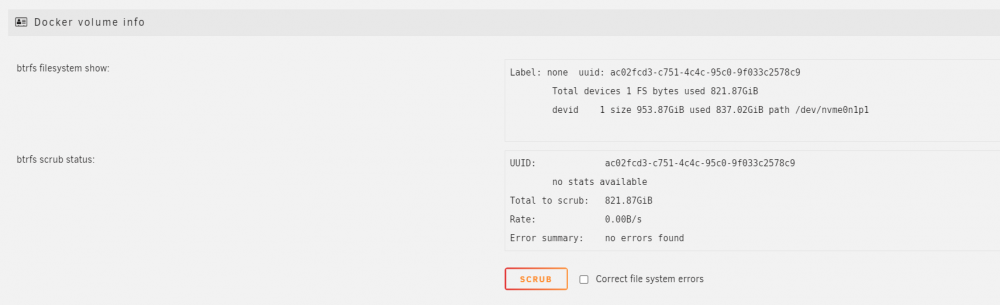
Thank you for all the replies 👍 Attaching diagnostics dump: nexus-diagnostics-20210922-0935.zip Well, Docker is enabled per default anyway. I never specified the path to my nvme. What I however did, was to move the share location to this drive from another one - the drives and data on them were migrated gradually from my old NAS running OMV. The nvme drive was the last to be moved, as it was used by my main system's OS until I finished setting up unraid. Is there a way to make unraid use only the actual docker.img file, instead of the whole drive? Like for example disabling docker, deleting the share, and re-enabling it. Would this recreate the share and the docker.img?
-
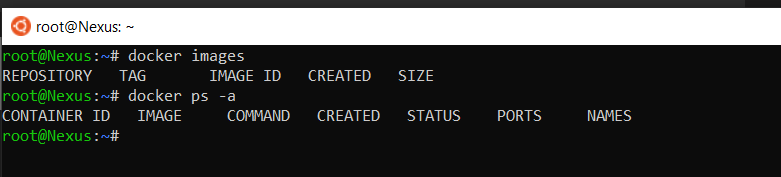
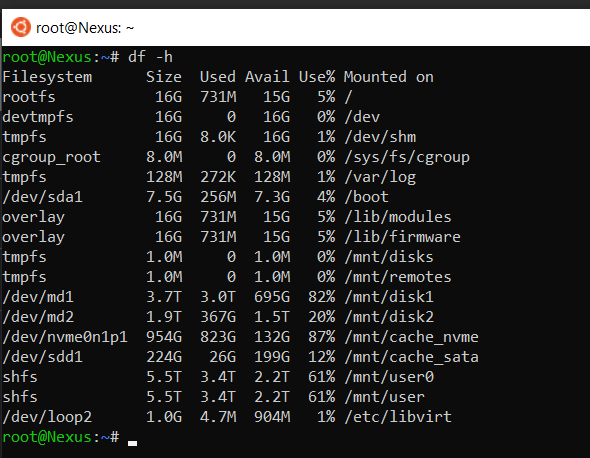
A bit of a weird one here. The fix common problems plugin is pestering me, because apparently my docker image is getting full. This is an issue that can be found all over the forum. I did not however find this particular scenario described anywhere. The thing is, I do not use docker at all... don't have one container running. There is a docker.img file in my system share. It is around 20GB in size. At the same time there is nothing mounted under /var/lib/docker -> not sure about that. Under settings > Docker > advanced settings I see this: It kind off looks to me like the whole drive /dev/nvme0n1p1 is the "docker image". Looking at the size of the drive and how full it is I actually come at those 87% utilization that the common problems plugin is reporting. There also is no option to resize the image here. Any suggestions? I do know the drive is getting full, this is ok. It is used for storing the game library, VM images and docker images.