AndrewGough
Members
-
Joined
-
Last visited
-
I did.
-
Hi all, Update to this post: Seemingly this has happened again, however I was about to perform the same process as before and rebuild the array onto the drive (Following https://docs.unraid.net/unraid-os/manual/storage-management/#rebuilding-a-drive-onto-itself) and encountered a bunch of disk errors 6minutes into the rebuild process. I will be swapping this drive out (Or very least adding another parity drive for peace of mind if this happens again) but could someone take a look at my latest diag file to ensure that this course of action is still correct? Many thanks. unraidserver-diagnostics-20250213-2126.zip
-
An update on this - I just rebuilt on top as JorgeB suggested which went without problem, marking as solved. Thanks for your help
-
Hi all, Looking for some guidence on how to deal with a disabled drive. Drive was disabled at 5:40am this morning, however smart data seems fine. I've ran a short smart test which came through without issues (attached). Currently running an extended test. I've attached the logs however I can see read/write errors just as the device is disabled. Looking for a bit of guidence on what I can do to verify that this drive is okay. Cheers. unraidserver-smart-20240601-1008.zip unraidserver-diagnostics-20240601-1004.zip
-
The tricky thing with answering that question is that I'm on the opposite side of the country from the server so can't do any hardware-based troubleshooting. So the answer is I don't know. Sorry.
-
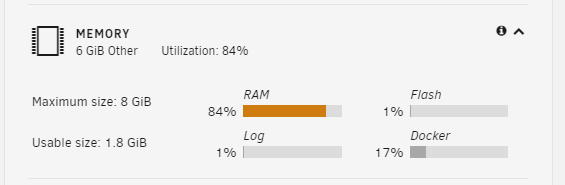
I have a N36L microserver that I'm using as an offsite backup destination. Physically, it has 6GB of RAM installed (2GB and 4GB) Unraid can seemingly see 6GB of the memory, however is only able to use 2GB of it. Can anything think of what the issue is? I'm at a bit of a loss. Command outputs: dmidecode -t17 Handle 0x0016, DMI type 17, 28 bytes Memory Device Array Handle: 0x0014 Error Information Handle: Not Provided Total Width: 64 bits Data Width: 64 bits Size: 4 GB Form Factor: DIMM Set: None Locator: DIMM0 Bank Locator: BANK0 Type: Other Type Detail: Synchronous Speed: 1333 MT/s Manufacturer: Manufacturer00 Serial Number: SerNum00 Asset Tag: Not Specified Part Number: ModulePartNumber00 Rank: Unknown Handle 0x0018, DMI type 17, 28 bytes Memory Device Array Handle: 0x0014 Error Information Handle: Not Provided Total Width: 64 bits Data Width: 64 bits Size: 2 GB Form Factor: DIMM Set: None Locator: DIMM1 Bank Locator: BANK1 Type: Other Type Detail: Synchronous Speed: 1333 MT/s Manufacturer: Manufacturer01 Serial Number: SerNum01 Asset Tag: Not Specified Part Number: ModulePartNumber01 Rank: Unknown lshw -short /0 bus Motherboard /0/0 memory 64KiB BIOS /0/3 processor AMD Athlon(tm) II Neo N36L Dual-Core Processor /0/3/4 memory 256KiB L1 cache /0/3/5 memory 2MiB L2 cache /0/14 memory 6GiB System Memory /0/14/0 memory 4GiB DIMM Synchronous 1333 MHz (0.8 ns) /0/14/1 memory 2GiB DIMM Synchronous 1333 MHz (0.8 ns) /0/100 bridge RS880 Host Bridge /0/100/1 bridge AMD RS780/RS880 PCI to PCI bridge (int gfx) /0/100/1/5 display RS880M [Mobility Radeon HD 4225/4250] /0/100/6 bridge RS780 PCI to PCI bridge (PCIE port 2) /0/100/6/0 eth0 network NetXtreme BCM5723 Gigabit Ethernet PCIe /0/100/11 scsi2 storage SB7x0/SB8x0/SB9x0 SATA Controller [IDE mode] /0/100/11/0 /dev/sdb disk 14TB WDC WD140EDGZ-11 /0/100/11/0/1 /dev/sdb1 volume 12TiB EFI partition /0/100/11/1 /dev/sdc disk 14TB WDC WD140EDGZ-11 /0/100/11/1/1 /dev/sdc1 volume 12TiB EFI partition /0/100/12 bus SB7x0/SB8x0/SB9x0 USB OHCI0 Controller /0/100/12.2 bus SB7x0/SB8x0/SB9x0 USB EHCI Controller /0/100/13 bus SB7x0/SB8x0/SB9x0 USB OHCI0 Controller /0/100/13.2 bus SB7x0/SB8x0/SB9x0 USB EHCI Controller /0/100/14 bus SBx00 SMBus Controller /0/100/14.1 storage SB7x0/SB8x0/SB9x0 IDE Controller /0/100/14.3 bridge SB7x0/SB8x0/SB9x0 LPC host controller /0/100/14.4 bridge SBx00 PCI to PCI Bridge /0/100/16 bus SB7x0/SB8x0/SB9x0 USB OHCI0 Controller /0/100/16.2 bus SB7x0/SB8x0/SB9x0 USB EHCI Controller /0/101 bridge Family 10h Processor HyperTransport Configuration /0/102 bridge Family 10h Processor Address Map /0/103 bridge Family 10h Processor DRAM Controller /0/104 bridge Family 10h Processor Miscellaneous Control /0/105 bridge Family 10h Processor Link Control /0/1 system Motherboard registers /0/2 system AT Real-Time Clock /0/4 system Motherboard registers /0/5 system Motherboard registers /0/6 system Motherboard registers /0/7 system System Board /0/8 scsi0 storage /0/8/0.0.0 /dev/sda disk 64GB Flash Drive FIT /0/8/0.0.0/0 /dev/sda disk 64GB /0/8/0.0.0/0/1 /dev/sda1 volume 59GiB Windows FAT volume Free total used free shared buff/cache available Mem: 1907192 595476 163860 833428 1147856 293636 I have also attached the diagnostics file if that'll be of use. Thanks for your help. backupserver-diagnostics-20230815-1152.zip
-
Great, that worked for me. Thanks for your help.
-
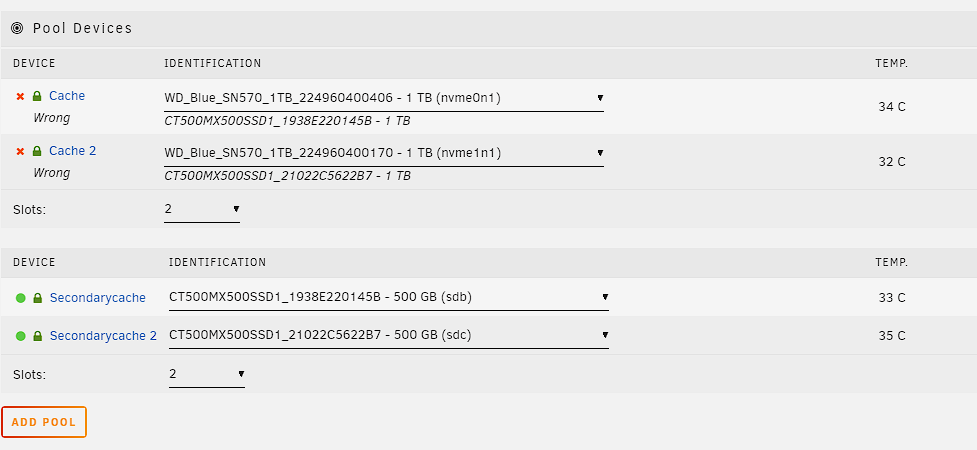
Hi, I'm having issues after a reboot with my server. Last month I replaced my main cache (called Cache) (which consisted of two 500gb sata SSDs (CT500MX500SSD1_1938E220145B and CT500MX500SSD1_21022C5622B7) with two new NVME 1tb SSDs (WD_Blue_SN570_1TB_224960400406 and WD_Blue_SN570_1TB_224960400170). After doing this I created a new secondary cache (called SecondaryCache) of just my old 500gb sata SSDs. In order to move the data from the old SSDs to the new ones, I: 1. Moved the data on the cache utilising the mover to the array 2. Confirmed no data was left on the old SSDs 3. Stopped Array 4. Removed Old SSDs from Cache 5. Added new SSDs to Cache 6. Added old SSDs to SecondaryCache 7. Started Array 8. Moved data back from array to Cache utilising the mover (opposite of step 1) 9. Set shares back to cache only where appropriate. This was all working fine with no issues, however after a reboot my Cache is showing a device configuration change where it is listing my new drives as incorrect. Can anyone help out? I'm confident all data is still on those drives, however I obviously want to be cautious when it comes to starting up the array again so some advice would be great. I've uploaded a diagnostics log and an image of the warning. My unraid version is : 6.11.5. unraidserver-diagnostics-20230507-1642.zip