




Skip to content
View in the app

A better way to browse. Learn more.

Unraid

A full-screen app on your home screen with push notifications, badges and more.

To install this app on iOS and iPadOS
  1. Tap the Share icon in Safari
  2. Scroll the menu and tap Add to Home Screen.
  3. Tap Add in the top-right corner.
To install this app on Android
  1. Tap the 3-dot menu (⋮) in the top-right corner of the browser.
  2. Tap Add to Home screen or Install app.
  3. Confirm by tapping Install.

redjason2373

Members
  • Joined

  • Last visited

  1. Hi Trurl, Yes tried to access a public share and even the server to see all the shares.
  2. redjason2373 started following Login domain
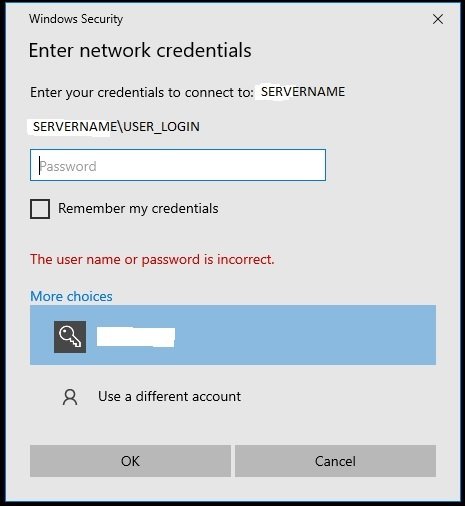
  3. Howdy all, Can anyone help me with a error I'm having logging into my shares. I have a number of Windows machines that have no issues accessing my shares (After enabling unsecure shares in lanman workstation) but with one laptop I'm unable to connect. It seems to point me in the direction of requiring me to add the Domain in front of the user name. I have tried a putting my servername\username, Local\username with but stuggling to think what else it could be. Any help is appreciated. I'm sure it will be something logical that I'm just not thinking about. PS. I'm definitely using the correct password too
Account

Navigation

Search

Search

Configure browser push notifications

Chrome (Android)
  1. Tap the lock icon next to the address bar.
  2. Tap Permissions → Notifications.
  3. Adjust your preference.
Chrome (Desktop)
  1. Click the padlock icon in the address bar.
  2. Select Site settings.
  3. Find Notifications and adjust your preference.