





Harald D
Members
-
Joined
-
Last visited
-
For anyone else wondering, it was the missing boot argument "agdmod=pikera" that fixed my problem. And a HUGE thanks to ghost82 for getting me there!👍 Harald
-
Thanks again ghost82! I have done some more tests, but still no luck unfortunately ☹️ - I have made the changes to the xml file. - I have switched the cards bios from advanced to regular. - I have tested without vbios, with my own dumped vbios, and with the one from your link. - I have tried all the display ports (one of them gives the same result as the hdmi port). And I have combined the above in all possible ways. My card has no usb-c port, only 3x dp's and 1x hdmi. I have attached the output from the lspci. lspci.txt
-
Hi again. Thanks for your answer ghost82. I tried adding 'agdpmod=pikera' to the boot-args in config.plist, but the result is still the same😟 I have attached my config.plist, Monterey xml file and a screenshot from GPU-Z on the GPU specs. It would be greatly appreciated if anyone would take the time to have a look at it, and help me solve this. Maybe there are others out there having the same issues as well? Thanks in advance! Harald config.plist Monterey.xml
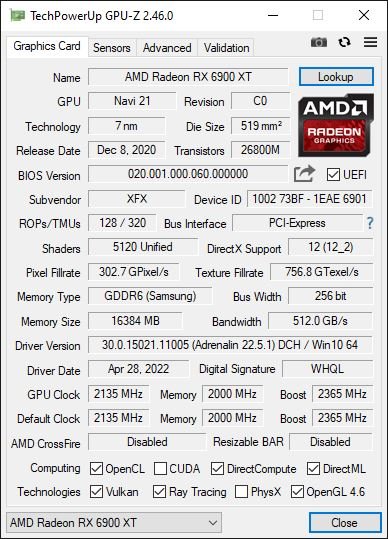
-
Hi. I just upgraded my Unraid box with a new graphics card, the XFX RX 6900 XT Merc 319 black. I previously had the Radeon 580, that worked great with all my VM's, but the reset bug became too much of a pain ☹️ The 6900 works great in all my VM's, exept osx Monterey. I get half the way on the boot screen and then I am stuck. Monterey will fully boot, but the display is stuck half way. So my question is: Has anyone got this card working with Monteray, or can anyone point me in a direction of getting this working? All help is greatly appreciated! Harald Hardware: ASUSTeK COMPUTER INC. X99-WS/IPMI , Version Rev 1.xx American Megatrends Inc., Version 4001 BIOS dated: Tuesday, 28-05-2019 Intel® Xeon® CPU E5-2697 v3 @ 2.60GHz
-
Hi. I have a fully working Big Sur 11.4 VM with gpu (RX580) passthrough. I have updated osx earlier with no issues, but when I try to update to Big Sur 11.6.1 or Monterey, Unraid seem to chrash halfway through the installation. I am unable to reach the GUI, and I have to restart the server. My setup is: Unraid 9.10.0-RC1 Asus X99-WS/IPMI Intel 6800K OC 0.7.0 Are there any configuration changes I would have to make to get this update working? Any known problems I should know about? Any help or pointers in the right direction would be much appreciated.

