





advplyr
Members
-
Joined
-
Last visited
Everything posted by advplyr
-
For the seek bar we are also working on having the track on the notification use the chapter track setting if you have that enabled. I'm not sure if you are aware of that setting but you can enable use chapter track which will convert the progress bar to be for each chapter instead of the entire audiobook. The notification doesn't respect that setting yet though, you can track that issue here: https://github.com/advplyr/audiobookshelf-app/issues/239 Agreed, Android permissions have been a nightmare to work with.
-
You can adjust the jump back amount to up to 30 seconds. We plan on adding some form of history on when you took various actions such as play/pause/seek so you can see your playback time and jump back to it if you made an error. That should help with accidental changes. You can also lock the player now but that doesn't lock the progress bar shown on the lockscreen yet though. I'm not sure how PlexAMP detects vehicle movement unless it is getting some extra permissions from you.
-
Not sure about donations yet. You are correct on the number of days you have listened and I agree it is confusing. I'm open to suggestions on stats. I built the page off of a design that was requested: https://github.com/advplyr/audiobookshelf/discussions/167
-
I think I closed most of the goodreads requests in github but it has been mentioned a lot. Goodreads won't be supported because they discontinued their public API and Abs is not going to do any web scraping itself. If someone built out a solid reliable Goodreads api that was free and public we would implement it.
-
I think this github request opened today is relevant to what you're saying https://github.com/advplyr/audiobookshelf/issues/870 but not regarding the folder structure. There was another issue brought up a while ago about folder structure for something like this but no good solution was found. Abs is not going to pull in your folder structure correctly and I don't see that being supported until we figure out a way to allow customizing the folder scanner. I think your best option is to either put the books in a folder structure for the sub-series and add the overarching series manually in the UI, or vice-versa. I want to add that I'm open to solving this since it's been brought up a few times but no one has put forward a solid solution. If you have ideas and want to chat about it the discord server is very active.
-
How did that book get scanned in? Looking at that folder structure I think abs would scan that in as an audiobook named "D01" with 1 audio file. You'll need to remove those D01 folders or rename them CD01. Abs will detect the disc folders if they are CD01, CD02, etc.
-
This is great, thanks for the overview and the screenshots. I will make note of this feature.
-
Unfortunately that metadata will only be filled in if you download the episode from audiobookshelf. The match feature only matches the podcast metadata and not the individual episodes. This is something we still need to build out and I forgot about it actually since there is no github issue opened for that yet.
-
When you sort by pub date and the pub date is set for your podcast episodes then it should be working. Have you checked if the pub date actually got set? When the pub date is set it will show "Published ..." The mobile app currently only allows for sorting by pub date. The podcast portion of audiobookshelf is only a few months old and could definitely use some help in designing a good user experience. The entire podcast experience needs to be thought through again. We have the developers to build it but deciding how things should function and where should be placed is another skillset. I'm not an iOS user regularly so may be misunderstanding. We are planning to build CarPlay support but I'm not sure if AirPlay is something completely different that we should also plan for. CarPlay hasn't been built yet. Bluetooth should work since nothing extra is necessary for that.

-
Not yet. It is planned but we are lacking in experienced iOS developers that will help. That feature is available for android.
-
You are mistaken about #2, but that path is not necessary to map anymore the /audiobooks one. the /usr/share/audiobookshelf/audiobooks is your own path not the path inside the docker container. You cannot use a subfolder yet, it is not supported. This is something being worked on now but you are limited to using a subdomain.
-
Port 80 is inside the docker container
-
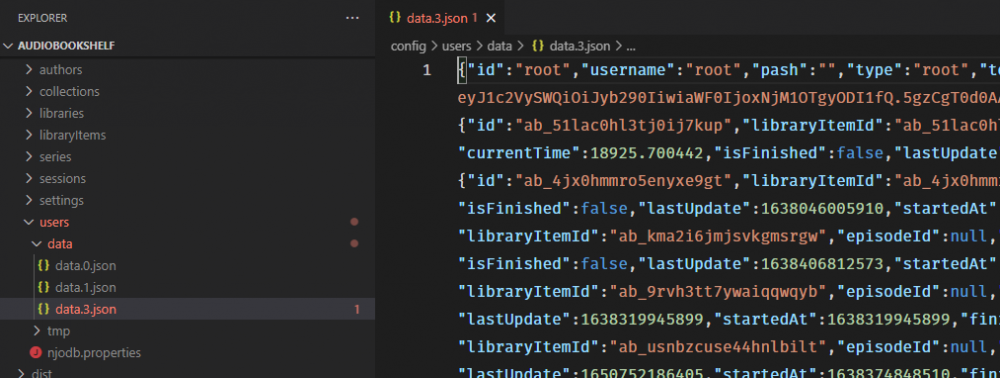
Currently the only way to do this is to open up the JSON file containing the root user and manually change the password. The JSON files are located in /config/users/data and then you need to find the data.json file that has a JSON object id root. These are not actually valid JSON files because each line will have a JSON object for each user, so don't edit these files in anything that will auto-format on save. Once you find the root user object the attribute after id and username is "pash". Update the value of pash to empty quotes "". Make sure you have turned down the server for this and do a backup of that data file you are updating so if something weird happens you can just copy in the old one and try again.
-
If you update the server to 2.0.13 this is fixed.
-
Oddly I just came across this issue, checked my notifications and here you are. This will be fixed in the next server or mobile update. What is happening is the local audiobook on your phone is not linked to an item on the server but is still sending a request to the server to update the media progress. One workaround is to re-download the audiobook from your server so it is linked, or just wait for the next server release which will be set to ignore these requests and will probably be put out tonight.
-
This is an issue with your specific network setup and is difficult to provide any guidance since there are so many. This is a relatively common issue people have but I rarely hear back on how they solved the problem. I would like to get together a page on the site with all the common setups and troubleshooting common issues, so if you do find a solution please share or join the discord and connect.
-
I've not yet heard this one before. It sounds like a network issue. Look at any firewalls you have, try streaming from other services, try different audiobooks like maybe a small single mp3 file. Not something I can help much with.
-
Is this using the mobile app? Android or iOS? Have you tries using the browser on your phone?
-
Not possible now, but will be added in an upcoming release. The authors page is new as of v2 so still early days. You can follow the github issue for that here: https://github.com/advplyr/audiobookshelf/issues/498 where I will post updates when that is live.
-
In an upcoming release audio files in the root of library folders will be treated as audiobooks
-
I think you need to completely remove the audiobookshelf appdata folder, remove the docker container, and start fresh. Then share your docker run command if it happens again.
-
Can you try removing that audiobook and see if you can narrow it down to a specific audiobook?
-
This is still a permission issue on your end. Abs doesn't have permission to read stats on the files/folders in your audiobooks directory.
-
Can you `journalctl -u audiobookshelf`
-
I pushed version 2.0.1 recently, are you using that debian package?


