



Skip to content
View in the app

A better way to browse. Learn more.

Unraid

A full-screen app on your home screen with push notifications, badges and more.

To install this app on iOS and iPadOS
  1. Tap the Share icon in Safari
  2. Scroll the menu and tap Add to Home Screen.
  3. Tap Add in the top-right corner.
To install this app on Android
  1. Tap the 3-dot menu (⋮) in the top-right corner of the browser.
  2. Tap Add to Home screen or Install app.
  3. Confirm by tapping Install.

Helicanic

Members
  • Joined

  • Last visited

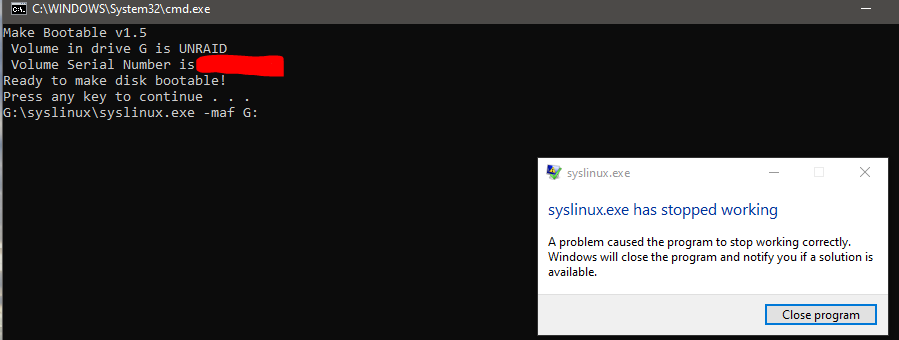
  1. Hi - New here and could use some help. Trying to create a USB drive for my new server. I have tried the following: USB Creator - Hung in syncing files - change the usb name so it does not hang up in syncing files. - This results in the creator saying "done" however the drive is not bootable. Complete the Manual process: when I run the make_bootable.bat file (as admin) I get - Not sure what is causing this - I have spent about 2 days on it now and just cant find a solution. I could do this in another computer (looks like some have had success doing this) however, I would like to understand the reason and fix. Thanks in advance for help,
Account

Navigation

Search

Search

Configure browser push notifications

Chrome (Android)
  1. Tap the lock icon next to the address bar.
  2. Tap Permissions → Notifications.
  3. Adjust your preference.
Chrome (Desktop)
  1. Click the padlock icon in the address bar.
  2. Select Site settings.
  3. Find Notifications and adjust your preference.