matman505
Members
-
Joined
-
Last visited
-
Yep, that's the one I'm using, didn't realize it wasn't supported. PC parts picker led me astray. Correct if I'm wrong as I know very little, but would the computer even be able to boot if the cpu was not compatible with the board? Everything works just fine with this until Plex starts up.
-
It's repeated the same behavior twice since the original post, the first time i rebooted before fetching the syslog so I had an empty log, but this second time I think I got it. It doesn't have any entries between the time plex was started and me doing the hard reset, so I have no clue what's going on. I'm a total noob to all of this so I'm not sure at all what steps to take next. syslog (2)
-
Okay, done and done. Here's the diagnostics zip, and syslog is ready to go. tower-diagnostics-20210727-2155.zip
-
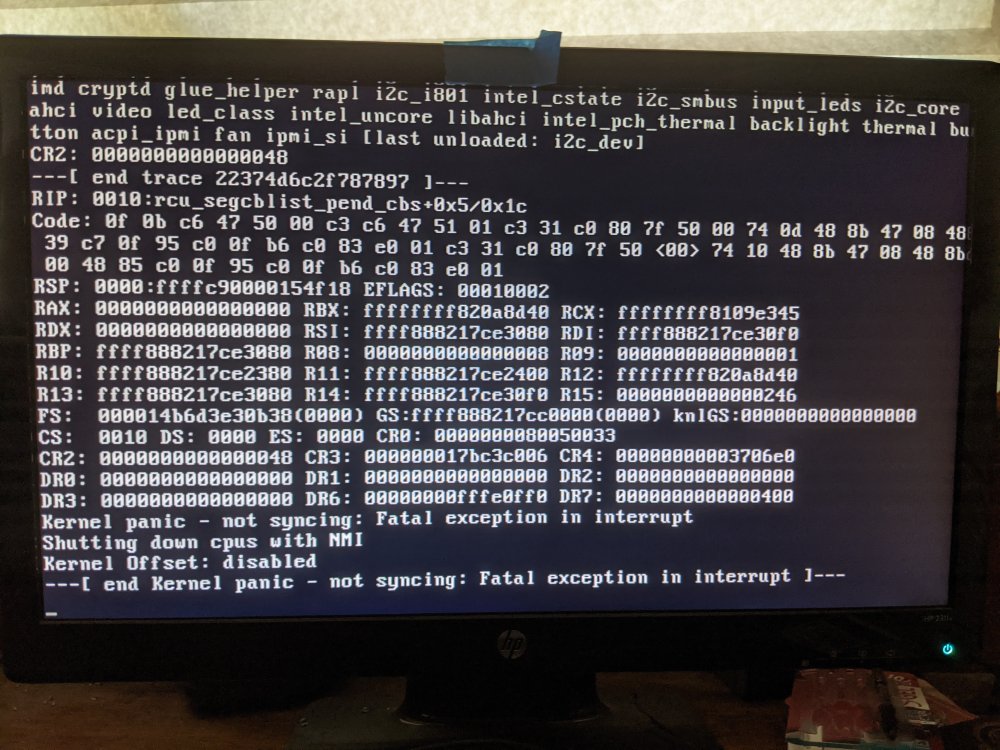
So I just finished building my first attempt at a server last week, transferred all my data to it and started running plex on Saturday. I thought everything seemed fine, but I awoke Sunday morning to my server being offline and the monitor connected to it displaying some error messages that I can't make any real sense of. The server was still powered on but completely unresponsive. After doing a hard reboot and a parity check on Sunday, the server proceeded to do the same thing that night, and again Monday night. Monday morning I went into the BIOS and turned off turbo on my cpu, which I thought might have been causing the system to overheat, but that did not seem to fix the issue. I've attached a picture of the attached monitor with the same message I've seen each morning. Plex is the only thing running on the server, and this only started once I began running plex, so it must be related to that but I don't know enough about any of this to diagnose the issue. I'm running an intel cpu if that's useful. Any help or advice would be greatly appreciated!