rogueone
Members
-
Joined
-
Last visited
-
So I am full fiber now. Brand new, all connected to the new USW aggregation switch.
-
I am going to look into option 3
-
Thank you very much for your response, Did you ever faced random disconnection? What's your setup and config like if its not too much to ask?
-
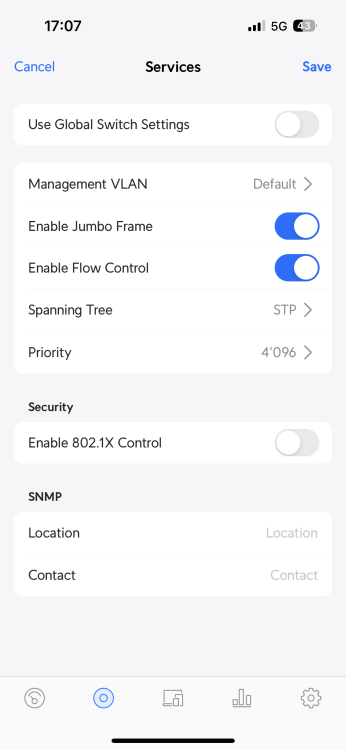
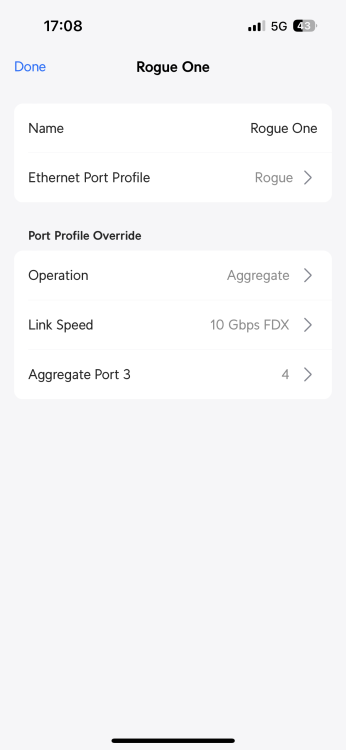
Ah perfect. I did remove them and remove the mtu as well. here is a screenshot for the usw setup I hope I won’t get any disconnections again.
-
When I was planing to use VLANS it was to isolate Unraid from the rest of the network (office network) on the screenshot I put, does those vlan option do that or its for the docker services? As this I don’t care for
-
Thank your for your response, I am not sure I understand your question, however the USW-Aggregation is connected over fibre to the UDM PRO, I have setup the VLAN for an isolated network as it is on my office network. Also I can connect, it drops from time to time. I thought jumbo frames were a good thing.
-
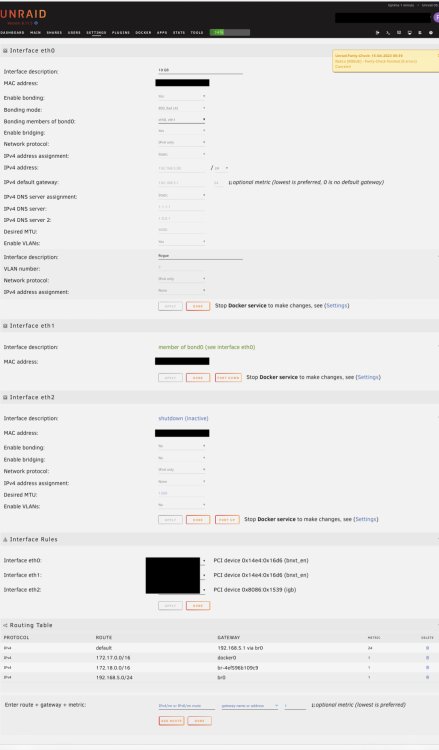
Thank you for all of your responses, So I now have receive the entire material, I have installed a Broadcom network card SFP+ P210P PCI-Express- x8 with both ports connected with Ubiquiti Module SFP+ 10 Gbps, and Lightwin Cable patch LC-LC, Multimode, OM4, Both are connected to a USW-Aggregation switch with aggregation turned on on port 3&4 on the aggregation switch, with jumbo frames, flow control ON and spanning tree (STP) with priority set at 28'672. The unraid server is connected to both ports with: - ETH0 and ETH1 on bond with 802.3ad turned on, - Static IP and DNS: 1.1.1.1 and 1.0.0.1 - Jumbo frames on at 9000 - Vlan On as the traffic needs to be isolated from the rest of the network, I still get connection on some of the dockers, Plex, sonarr and radarr, but deluge and the unraid interface are not working, I don't understand, I do not know how to get diagnostics as I have the server running headless, I also cannot access the server on the local network, however I can ping it and it responds. I am entirely lost, I have had this problem every time I am trying to make it work on 10GB, 1 gb connected to a router A7501 from zyxel that works perfectly fine. Anyone with an idea would be welcomed Thank you EDIT: Managed to reboot the server via SSHing into it through unified USW debug console, I can access now, here is my current screenshot of my config, and managed to download the diagnostics rogue-diagnostics-20230415-1446.zip
-
Yes I have them, but I am replacing with an sfp+ card. On this network I wanna put only the unraid on the USW Aggregation switch. Do you know how to do that?
-
Thank you i have bought currently 1 PCIE Card with 2 nic of 10GB Intel NIC X710-T2L PCI-Express- x8 2x RJ45 which I am going to replace with the same in sfp+.
-
Thank you, yes that’s something I’ve experienced. I’m waiting for an USW-Aggregation 8 port switch from UniFi. Hoping that would stabilize the network and avoid disconnections. Can I see your config? thanks
-
Thank you, really appreciate it, Indeed but each time I do the un-bonding, I loose connectivity, something is odd, I cannot seem to figure it out
-
Dear All, I am currently running the latest unpaid version, I have a 1 GB nic on the motherboard and a PCIE Car with 2 nic of 10GB Intel NIC X710-T2L PCI-Express- x8 2x RJ45 I would like to connect to my 10gb SFP+ on unpaid the main connection, Use a backup connection of 1GB incase it drops from an other router and inter provider and Connect my second 10GB to a synology for an extra disk link as I cannot put additional disk in my machine, I have spent 3 days to make it work, I cannot seem to be able to, Here is a screenshot of my actual config, your help would be highly appreciated, Have a good day