Skip to content
View in the app

A better way to browse. Learn more.

Unraid

A full-screen app on your home screen with push notifications, badges and more.

To install this app on iOS and iPadOS
  1. Tap the Share icon in Safari
  2. Scroll the menu and tap Add to Home Screen.
  3. Tap Add in the top-right corner.
To install this app on Android
  1. Tap the 3-dot menu (⋮) in the top-right corner of the browser.
  2. Tap Add to Home screen or Install app.
  3. Confirm by tapping Install.

GoodwinYoung

Members
  • Joined

  • Last visited

Everything posted by GoodwinYoung

  1. 现在确实是用的 ip 地址来将就用的。。。。。关键的是我另外一个容器 nextcloud 连 mysql 都可以直接用容器名连。。就这个swag 里面的nginx 配置不行。。就很郁闷☹️
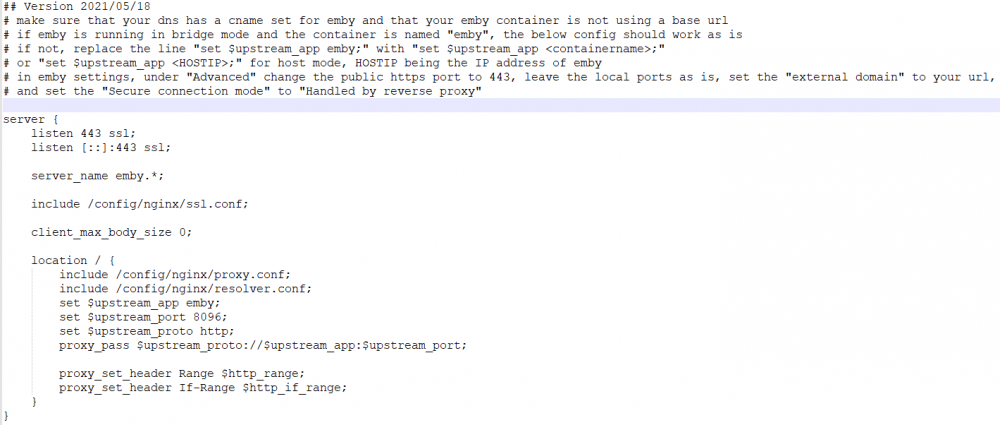
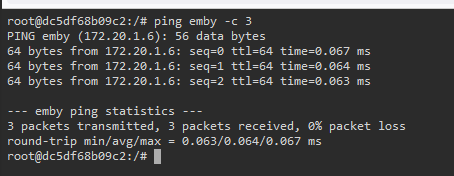
  2. 我用的是 linuxserver/swag 这个镜像,主要是想给容器访问添加 https 支持 所有容器都连的自定义网桥网络且固定 ip 打开swag控制台进入容直接 ping emby 能正常解析到 172.20.1.6 然后 swag 内 nginx 配置使用 emby.subdomain.conf.sample 模板的配置,改名成 emby.subdomain.conf 后重启swag 容器。 奇怪的是当我访问 emby.xxxx.xxx 时,报了 502 Bad Gateway 错误。然后查看nginx 错误日志发现无法解析 emby 然而我把 emby.subdomain.conf 内参数 upstream_app 的值从emby 改成 172.20.1.6 时,就可以正常访问。 我想知道为什么 swag 容器在能ping通emby容器名的情况下,内置的nginx却无法解析容器名。拜托大家了!!!

Account

Navigation

Search

Search

Configure browser push notifications

Chrome (Android)
  1. Tap the lock icon next to the address bar.
  2. Tap Permissions → Notifications.
  3. Adjust your preference.
Chrome (Desktop)
  1. Click the padlock icon in the address bar.
  2. Select Site settings.
  3. Find Notifications and adjust your preference.