Dapeacenforcement
Members
-
Joined
-
Last visited
-
Hallo, ich hab's dann hingekriegt. Das Problem war das es einen Format Button direkt unter MAIN gibt und zwar wenn das System auf START steht. Aber ich denke der steht nur da wenn du was an der Platte veränderst. Ich denke am Filesystem... Ich denke es war so: 1. Gehe zu MAIN 2. Drücke STOP 3. Gehe auf eine Platte, auf die die du willst. 4. Versuche auf 'File system' zu klicken, wenn das nicht geht. 5. Klicke wieder auf MAIN 6. Nimm die Festplatte raus, so dass 'no device' da steht. 7. Dann klickst du auf die Platte drauf und schon kannst du 'File System' verändern. 8. Verändere Sie z.B.: ändere das Dateisystem auf XFS (das ist standart und wird sowieso genommen), kliche 'APPLY' und nimm die Platte wie in den Slot. 9. Klicke auf START 10. Jetzt siehst den 'FORMAT' Button aber er ist ausgegraut. 11. Klicke auf den Button daneben und mach den Haken rein. 12. Jetzt klickst du auf Formatieren. Fertig, glaub ich.
-
Hallo beieinander, also ich habe ein Docker Problem, er sagte zu mir dies hier: "Docker Service failed to start." Ich habe aus den anderen Schreiberlingen schon rausgelesen worauf man achten sollte. Aber scheinbar war das nicht das Problem. 1. Ich habe den Prozess neugestartet. 2. Ich habe den Server neugestartet. Wo ist das Problem? Vielen Dank gz-unr01-diagnostics-20240204-1726.zip
-
@mgutt Ich habe auch das schon probiert und nein es funktioniert nicht. @hawihoney OK gibt es da denn auch eine Neuere Version? Und wie sieht die manuelle Methode aus? Das Problem ist nicht das ich es nicht zum Laufen gebracht hätte, es ist das es nicht erreichbar ist! LG
-
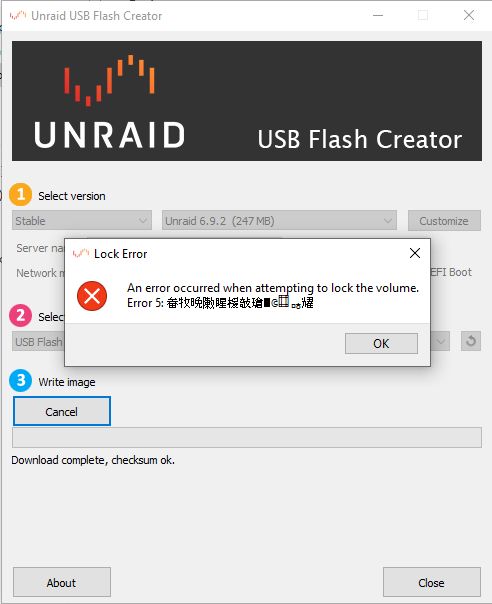
Hallo zusammen, wenn der Thread falsch angelegt ist bitte mal in das richtige Verzeichnis/Kategorie verschieben. Also bei mir macht des Ding etwas ganz blödes, es schmiert ab. Egal welchen Port, welchen USB Stick 2.0/3.x ja sogar welchen Rechner ich nehme - es schmiert immer mit der gleichen Fehlermeldung ab (siehe Bild). Und ich habe nichts dazu gefunden. Reihenfolge: - Starten (egal ob als Admin oder nicht) - Nichts einstellen (außer dem USB Stick auswählen) - Klicke auf Write (Ja habe meldungen dazwischen bejaht) - Er lädt das doofe Image runter und bleibt stehen - Nach 5-10 Sekunden geht es weg - Ich dann geguckt in nem anderen Fenster, wieder auf das fokussiert und zack war die Fehlermeldung da. Kommt scheinbar nicht in den Vordergrund, ist aber da. Achja die Version vom Setup: Unraid.USB.Creator.Win32-1.6 So, kann mir hier irgend jemand helfen? Danke LG