JeuTheIdit
Members
-
Joined
-
Last visited
-
Hi All, Recently installed unraid 6.10.0-rc1 and got a hardware error from fix common problems. Attached is the diagnostics file. The system components are as follows: Gigabyte Technology Z590 AORUS PRO AX, BIOS F6 Intel(R) Core(TM) i3-10105 CPU @ 3.70GHz 16x4gb CL16-18-18 D4-3000 memory running at 2666 (xmp disabled). LSI card attached to 6 hot swap drive bays, only 2 being used currently. I took a quick look and this is the first thing that stands out to me but not sure what it might indicate: Aug 15 15:41:42 Sora kernel: mce: [Hardware Error]: Machine check events logged Aug 15 15:41:42 Sora kernel: mce: [Hardware Error]: CPU 0: Machine Check: 0 Bank 6: ee0000000040110a Aug 15 15:41:42 Sora kernel: mce: [Hardware Error]: TSC 0 ADDR fef20080 MISC 3880000086 Aug 15 15:41:42 Sora kernel: mce: [Hardware Error]: PROCESSOR 0:a0653 TIME 1629067276 SOCKET 0 APIC 0 microcode ea These are a few other errors: Aug 15 15:41:42 Sora kernel: ACPI BIOS Error (bug): Could not resolve symbol [\_SB.PC00.PGON.PBGE], AE_NOT_FOUND (20210331/psargs-330) Aug 15 15:41:42 Sora kernel: ACPI Error: Aborting method \_SB.PC00.PGON due to previous error (AE_NOT_FOUND) (20210331/psparse-529) Aug 15 15:41:42 Sora kernel: ACPI Error: Aborting method \_SB.PC00.PEG3.PG03._ON due to previous error (AE_NOT_FOUND) (20210331/psparse-529) Aug 15 15:42:00 Sora ntpd[2019]: kernel reports TIME_ERROR: 0x41: Clock Unsynchronized Any help is appreciated. Thanks! sora-diagnostics-20210816-0836.zip
-
Lmao I missed that... Thanks!
-
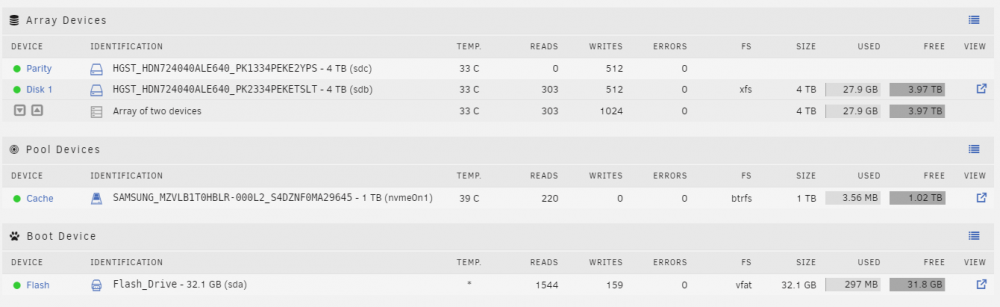
Hi All, I just completed a new install of 6.10.1-rc1. After preclearing drives, formatting, mounting, and starting the array I do not have any of the user shares that should be automatically created, only a disk1 share with no directories. Due to this Docker fails to start. I tried several reboots as that fixed the issues for some users, but no luck. Any ideas? sora-diagnostics-20210815-1611.zip