



Skip to content
View in the app

A better way to browse. Learn more.

Unraid

A full-screen app on your home screen with push notifications, badges and more.

To install this app on iOS and iPadOS
  1. Tap the Share icon in Safari
  2. Scroll the menu and tap Add to Home Screen.
  3. Tap Add in the top-right corner.
To install this app on Android
  1. Tap the 3-dot menu (⋮) in the top-right corner of the browser.
  2. Tap Add to Home screen or Install app.
  3. Confirm by tapping Install.

jecstrike

Members
  • Joined

  • Last visited

  1. @JorgeB I use the normal boot. I'm running headless. Hmm I do only have firefox in docker. Edit: I tried stopping the firefox app and it seems resolve the issue as my CPU is now working normal. I wonder why this firefox in docker might be the one causing this.
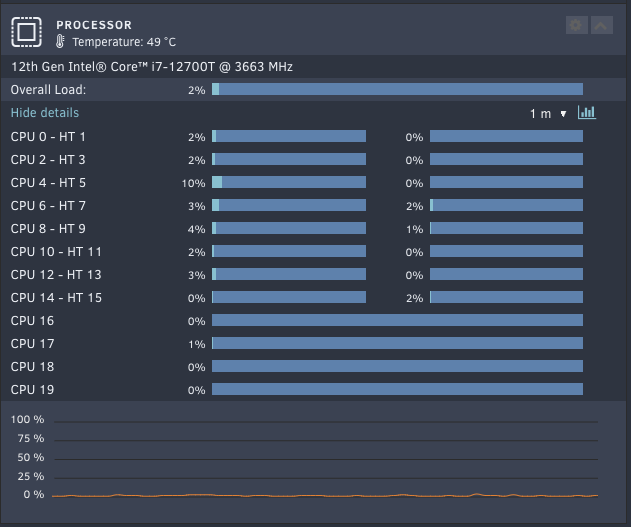
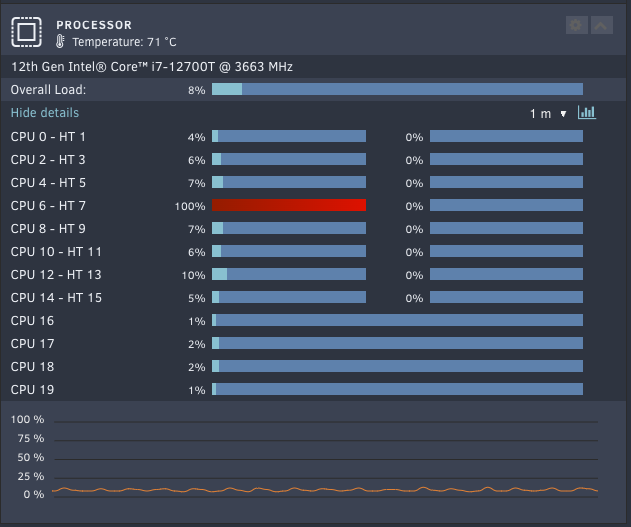
  2. Im encountering that my CPU is always high on utilization. It's swapping from CPU4 or CPU6 Anything I can check what's might be causing this issue? Just a brief history I just rebuilt my parity and its working fine until I tried to stop start the array then this happens? I have attached my latest diagnostics as well. diagnostics-20241227-1454.zip
Account

Navigation

Search

Search

Configure browser push notifications

Chrome (Android)
  1. Tap the lock icon next to the address bar.
  2. Tap Permissions → Notifications.
  3. Adjust your preference.
Chrome (Desktop)
  1. Click the padlock icon in the address bar.
  2. Select Site settings.
  3. Find Notifications and adjust your preference.