stekay
Members
-
Joined
-
Last visited
-
Thanks a lot
-
Thanks for the explenation! Alright. Yeah, normally we don´t have any problems here, it was because of the high water...but I will def. think about a UPS. Alright, I let the check correction deactivated and just correct manually then. Is there a topic somewhere, where I can read into it a bit? So for example more about stuff like if a drive is playing up...etc... ? Thanks for your help! Very appreciate it!
-
Good point, I see what you mean. The sheduled ones are set to run at every first day in the month. So...those dates, where those errors occurred are those days when the system was shut down because of my power shutdowns....So Unraid is doing a parity check after an unclean parity check on its own? And those checks are without correction? Then everything would be clear and it would explain, why the errors are gone now: Because I started a check WITH correction last night. And one without today. Is it better to set those sheduled checks to not correct? Or should I activate it again for the sheduled? Best and thank you very much
-
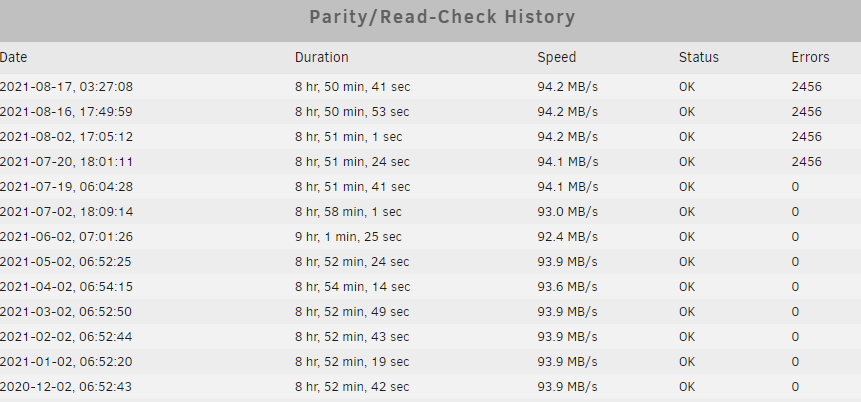
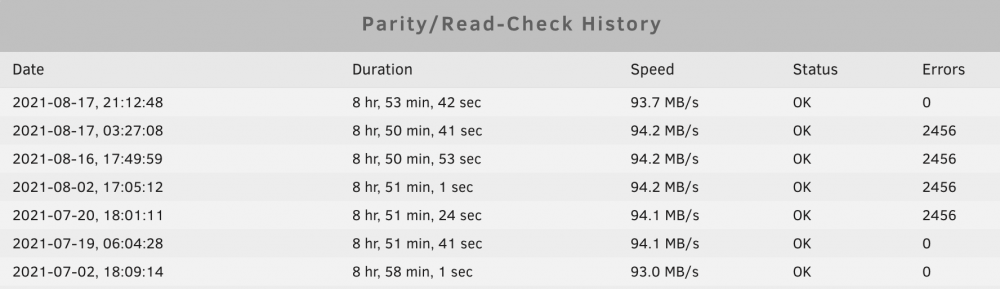
Okay, the Parity Check is done - 0 Errors. Now I´m very confused. I mean, why are there 0 Errors now - sure - I manually startet it. But like you can see, there are def. 2456 Errors 4 times - and in the sheduled check, correction was def. enabled. Don´t understand me wrong, I´m happy that it looks like there is no Error, but I would like to understand, why this happened. Is the "Standard-Setting" in the Sheduled Parity-Check buggy? Thank you for your help! skunraid-diagnostics-20210817-2123.zip
-
Thanks. I will do it. like I mentioned, in the sheduled parity check there was correction enabled. So the errors would have been gone on the last check last night, wouldn’t them ?
-
Nope. I did a reboot after the check last night to make the memtest. So should I start a parity check now again without correction and post a log when this is finished ?
-
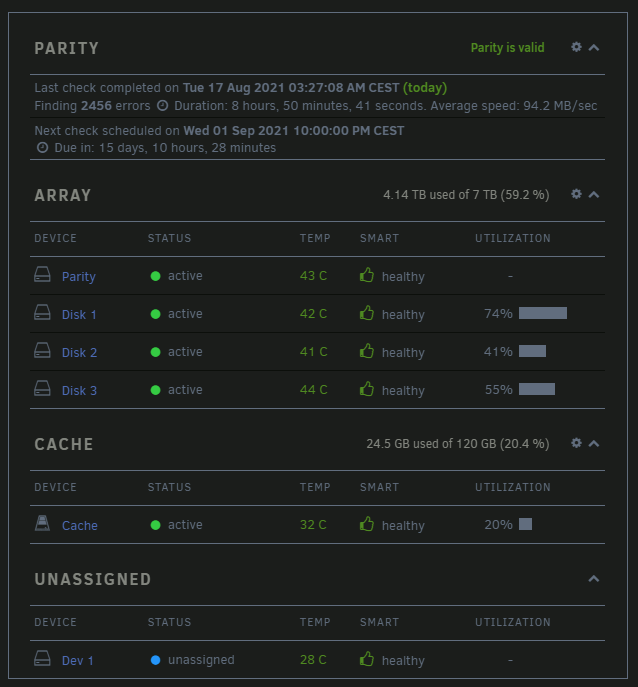
Hey guys, I have a problem with my unraid server. The Parity Check gives me 2456 Errors. What I can tell: It started at the 20.07.2021. At the 19.07.2021 I had a warning (I have the history in my Telegram Bot Message...): --------- SKUNRAID: Notice [SKUNRAID] - array health report [PASS] Array has 5 disks (including parity & cache) 00:20 SKUNRAID: Warning [SKUNRAID] - array has errors Array has 1 disk with read errors 01:29 SKUNRAID: Notice [SKUNRAID] - current pending sector returned to normal value WDC_WD20EARX-00PASB0_WD-WMAZA5358183 (sdd) 01:46 SKUNRAID: Notice [SKUNRAID] - Parity check finished (0 errors) Duration: 8 hours, 51 minutes, 41 seconds. Average speed: 94.1 MB/s 06:05 July 20 --------- 20.07.2021 SKUNRAID: Notice [SKUNRAID] - array turned good Array has 0 disks with read errors 09:10 SKUNRAID: Notice [SKUNRAID] - Parity check started Size: 3 TB 09:10 SKUNRAID: Notice [SKUNRAID] - Parity check finished (2456 errors) Duration: 8 hours, 51 minutes, 24 seconds. Average speed: 94.1 MB/s 18:02 So my question is: What can I do now? I did a Memtest with no errors. I restarted the server, I did a Parity check with Corrections enabled. (Btw. I saw, that this was also enabled in the monthly, sheduled check...I Unchecked it there for now) I forgot to mention: We had a couple of power shutdowns here... so My server... was shut down a couple of times...maybe this is the reason I have problems now? And I think we also had one back in July at when those errors popped up. Thank you in advance!