




Skip to content
View in the app

A better way to browse. Learn more.

Unraid

A full-screen app on your home screen with push notifications, badges and more.

To install this app on iOS and iPadOS
  1. Tap the Share icon in Safari
  2. Scroll the menu and tap Add to Home Screen.
  3. Tap Add in the top-right corner.
To install this app on Android
  1. Tap the 3-dot menu (⋮) in the top-right corner of the browser.
  2. Tap Add to Home screen or Install app.
  3. Confirm by tapping Install.

Rexe

Members
  • Joined

  • Last visited

  1. 降级了系统,一切恢复正常
  2. U盘插到PC也是正常访问,没有报错。 用PC硬盘修复也没有任何错误。 之前一直没有这个问题
  3. 明明可以引导进入系统,可是系统却不能识别到U盘 aio-diagnostics-20250519-1436.zip
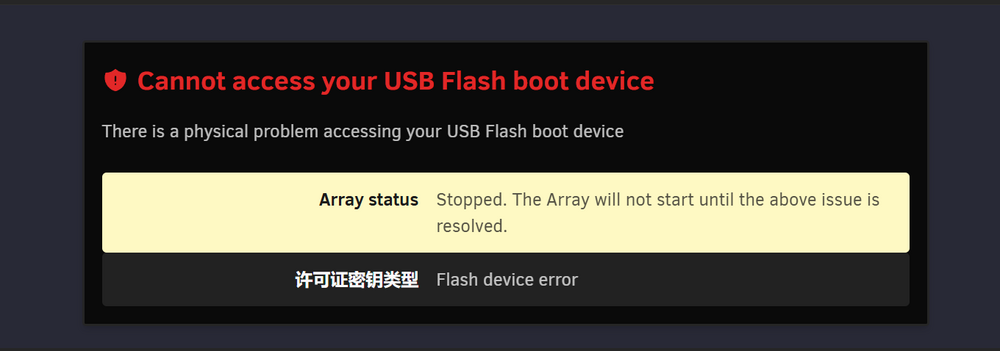
  4. 而且诊断信息不知道为什么会卡在这里,一个小时了都是这样
  5. 从F12控制台看网络连接,取消和暂停的网络请求都是502 Bad Gateway
  6. 没有奇偶校验盘,但是nas突然开始读取检查,也无法取消和暂停
  7. 如题所示,硬盘数据有些很珍贵有些是垃圾 我不清楚奇偶校验具体是怎么校验的,感觉像是软件运行的备份模式 想知道能否完成排除指定目录或者硬盘的设想 这样一来就不会因为校验盘本身IO速度和一些不重要但体量很大的数据,拖慢整个系统运行
  8. 哦,那可以关闭自动校验吗,我全都手动来行吗
  9. 长时间开机的,有办法重置计划校验任务吗?
  10. 我下面截图了奇偶校验历史记录, 没有一个是计划中的 状态是已取消的,是因为机器变卡,我上web界面才知道正在奇偶校验,然后手动取消的
  11. 定时计划如下: 但是它好像并没有按照计划进行 总是自己莫名其妙开始校验,我发现太卡就上来看才知道,然后手动取消掉 是哪里设置的问题吗?

Account

Navigation

Search

Search

Configure browser push notifications

Chrome (Android)
  1. Tap the lock icon next to the address bar.
  2. Tap Permissions → Notifications.
  3. Adjust your preference.
Chrome (Desktop)
  1. Click the padlock icon in the address bar.
  2. Select Site settings.
  3. Find Notifications and adjust your preference.