CyrilB
Members
-
Joined
-
Last visited
-
Hi Thanks everyone for your advice it is now solved. I changed the cable, did a new config with the same data disks (and indeed the data were still there), and now the parity is rebuilt and everything works like a breeze. Thanks again !
-
Thanks, i'll wait for the new cables tomorrow and I'll give it a try.
-
If I do that, I will still recover the data they contain ? I mean, it makes sense, I'm just not sure of what I'm doing. Still learning.
-
no risk to mess up more the config ?
-
Should I repair the filesystem first? I won't let me assign a disk without it right now. Or is it unnecessary if I do a new config ?
-
Hi, I think it is because the computer I used to build this array is my previous main personal computer. It's an old Motherboard, and all SATA ports are not identical. I tried to put the Data disks and the cache disk on the same ports, and used this additional port for the parity drive. I had not noticed it was considered external to say the truth. But everything is in the tower and plugged on the motherboard. The Data and Parity disks are new though, I bought them less than 2 years ago for this purpose, they are server-grade versions. The cache disk is an SSD drive that I repurposed. I didn't think that making a server would be so sensitive to the hardware (MB, memory, PSU). Unraid disables drives for those CRC errors that I never come across in any other configuration as an issue. It had happened already 6 months ago, but after testing the drive, I had just rebuilt the parity and nothing else happened until today. I ordered new SATA cables, shielded, just in case. They arrive tomorrow.
-
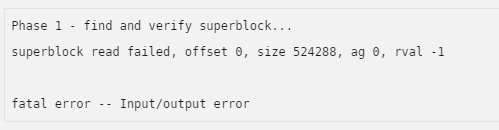
Hi, I have a simple personal array, 2 data disks, a single parity drive, and a cache disk. I had disk1 disabled , for CRC errors, it happened a month ago but since then the server was not used. As I came back from vacation yesterday i did an extended Smart test (no error apparently) decided to try and stop/dismount/start/stop/remount and rebuild the parity. the parity started to rebuild but stopped immediately. I stopped the server, tried to check all cables/connections and retried the steps above. But it did the same, and even worse, disk 2 was disabled. Then I did what I think was a huge mistake : i started the array with both data disks stopped. And now they're showing the message : no file system and I can't remount them. I started the array in maintenance mode, but a "check filesystem status" with the parameter -nv is giving me the following message: Did I lose my data ? Any method, even painful, to recover it ? I can't tell you how distressed i feel right now... Diagnostics attached. Thanks, tower-diagnostics-20210822-2117.zip