





Yegres1987
Members
-
Joined
-
Last visited
-
Any update how to compile the plesk control panel container within unraid?
-
Its type C- usb 3.0 to nuc
-
Thanks for help, all solved. I was trying to install heatsink into Nuc so I think that somehow cause that problem, so I decide to take it away and put back the original installation.
-
Thanks for the fast response, attaching the file, now the same with the cache disk 1 as well tower-diagnostics-20210825-1657.zip
-
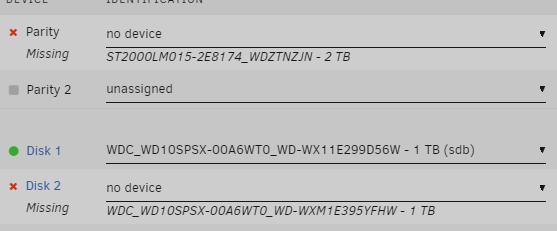
Hi everyone, I have a problem. I wanted to swap a cache disk: 1) I take out the cache drive 1 and then swap to a new one cache drive 2. So after I swap them, I started the mover and drive 2 get 24gb of cache in the same time mover started to run and completed I saw no dacker apps installed , so I realized that I do something wrong. 2) I take out drive 2 and put back the drive 1 Than I found the article https://wiki.unraid.net/Replace_A_Cache_Drive I was following step by step swapping process and now when I swap to cache drive 2 (it was formatted after step 1 3)Parity that is 2tb invisible and cannot be chosen , so its impossible to start 4) I have 2 main drives, the second one is invisible after replacing chache drive 1 5) I also see the cache drive 2 that should replace cache drive 1. When I put back cache drive 1 I can start array and all the drives are visible.
