dredge999
Members
-
Joined
-
Last visited
Everything posted by dredge999
-
You sure you have enough ram available to support the increase over 4GB? If so and still having issues, I would use the form view to edit the XML directly and increase the RAM and see if that works. I have had plenty of issues creating VM using the GUI myself. Rick
-
I was forced to delete the VM in question completely while keeping the disk and then set it back up again using the existing disk. There was something amiss with the XML file config (I hadn't edited it).
-
I have a windows 10 VM that all of a sudden fails to start VNC (QXL) with error: qxl_send_events: spice-server bug: guest stopped, ignoring I am at a loss as to how to fix this, does anyone have any ideas?
-
I copied all of the data away from my cache drive (NVME) and then unassigned the drive and used unassigned devices to clear the existing partition and then format the drive as XFS-Encrypted. However, when I reassign the drive and start the array it reports "Unmountable: Encrypted volume present" and refuses to mount the drive. The drive password is the same as my other encrypted array drives. Am I missing something here? Can we not encrypt the cache drive or did I just go about this the wrong way? I am on 6.10.0-rc2. Thanks
-
I lost a 6TB drive in my array and have been following the procedure to shrink array before my 2 new 12TB drives arrive (one as standby backup in case this happens again). This includes moving all files from the (emulated) drive to other drives in the array via unBalancer/Scatter as well as moving some to a USB disk until this process is done. I would like to upgrade parity with 12TB and place the original parity drive in the array as well. I was going to perform a multi-step process - shrink array first, recalc parity. then replace parity, recalc again, then add a new drive (10TB old parity). With new config can I not do all this at once given that I have moved all of the files from the failed 6TB drive already on to other array disks / external drive? I.E. When the new drive comes in I stop the array, set array to not auto start, power down and remove failed 6TB. Replace this with 12TB new parity. Boot server select tools/new config (retain current) and then assign the drives appropriately and let parity recalc? Let me know if I am nuts with this plan. Rick
-
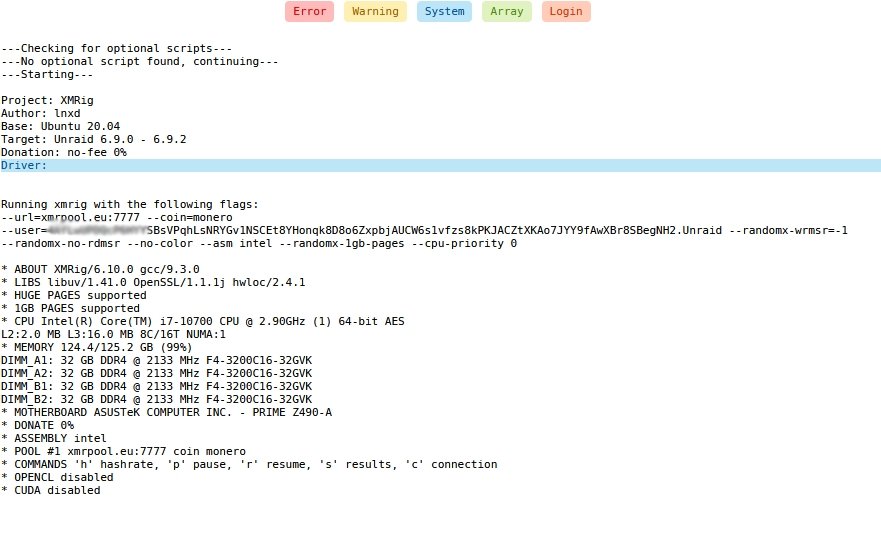
For some reason I cannot get the miner to start. It looks like it will but after the * CUDA disabled line is displayed it never starts mining and nothing more appears in the log. I am at a loss as to what is going on and I have read every page of the support forum. Anyone have any ideas?