





Unriad
Members
-
Joined
-
Last visited
Everything posted by Unriad
-
Hello All! I have a Windows 10 Virtual Machine running as my Gaming VM. All was going well until i tried to open Rainbow Six Siege. I tried to play a game of unranked, but within a minute, I was kicked from the game. I did a little research and discovered that BattlEye kicks players purely based off of the fact that they are using KVM. I'm not trying to hack, I just want to play the game normally, but it seems the only way to do that inside a vm is to hide it. how should I go about this? I downloaded and used Paranoid Fish and these 3 things seem to be causing trouble. [*] Checking the difference between CPU timestamp counters (rdtsc) forcing VM exit ... traced! [*] Checking hypervisor bit in cpuid feature bits ... traced! [*] Reg key (HKLM\HARDWARE\Description\System "SystemBiosVersion") ... traced! I know that some forums or discord servers do not condone hiding VMs, and if that is the case here, I am sorry, I'll take down the post.
-
Is there anything I should do about that or just keep it there cause it isnt harming anything? also do I need to mark this thread as solved or something?
-
YOOO THAT WORKED!! Everything seems to be working now! Everything seems to be running smoothly and all of my devices are showing up!! Thank you so much for all of your help!! I would've never thought to mess with those settings, you're a lifesaver! Thank you!!
-
Okay I deleted everything and pasted your stuff in and its still a black screen I do want to note that throughout the process, the screen has been black, but the monitor acts like theres a signal, im not sure if this helps at all
-
Would it help if at this point I just restarted the process and made a new VM from scratch?
-
tower-diagnostics-20210911-1410.zip
-
no errors, just black screen, the same state its been in for 2 or so days nowI looked up the back of my GPU and checked IRL and this is what it looks like
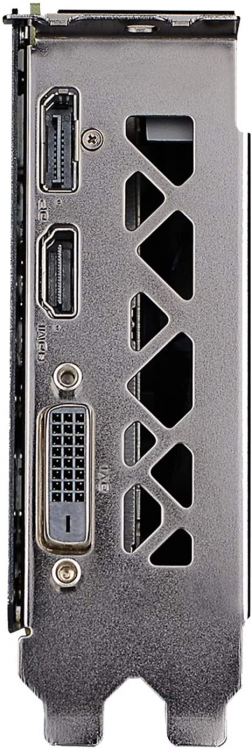 Doesn’t seem like the new XML is working, I passed through the usb controllers and it still isn’t working, also I still cannot find that port on my graphics card I know which one you’re talking about thoughI will try that, but I’m still a bit confused. There’s no doubt in my mind you’re correct, and Im gonna try it, but where is that port on my card? I can’t find it anywhere lolOkay thank you! Also btw mine does not have a USB portWhat else can I try to fix the black screen?Thank you so much for your help btw!!tower-diagnostics-20210911-1249.zipI looked in the XML file and the GPU and the Sound part are both in slot 0The XML file?Now it’s trying to do startup repair but it failedThe VNC keeps freezing on the startup TianoCore screen, what should I do? It seems like it keeps looping back to that splash screen over Andover again on vnci just realized I can VNC and use a graphics card pass through at the same time but it freezes when I try to install red hat drivers and nvidia drivers say that the gpu isn’t present. Also it seems that my ACS override settings have already put the gpu and sound component on the same slot but with different functions so I think multifunction isn’t a problemI’ll try that rqDid that from the get go, sadly didn’t change anything:(Since spalshtop isn’t working on startup I can’t install the drivers though, when I try to install drivers through VNC it says I can’t cause the GPU isn’t present, but when I pass the gpu through, Splashtop doesn’t work so I don’t have a way to install the drivers. There are some Graphics drivers in the VirtIO disk but I haven’t installed them, other than that I only have the Microsoft basic display adapter drivers, but like I said, I can’t access the vm when the gpu is passed through cause Splashtop isn’t connecting properly, anything I’m missing here?I did the Vbios dump for it and removed the header to make it VM compatible, and by gpu drivers do you mean the Redhat QXL ones? I can’t install nvidia drivers because I can’t access the pc while the gpu is passed throughI did not instal the VirtIO graphics drivers cause I heard they sometimes conflict with GPU pass through, should I update them anyway?

