wolfjung
Members
-
Joined
-
Last visited
-
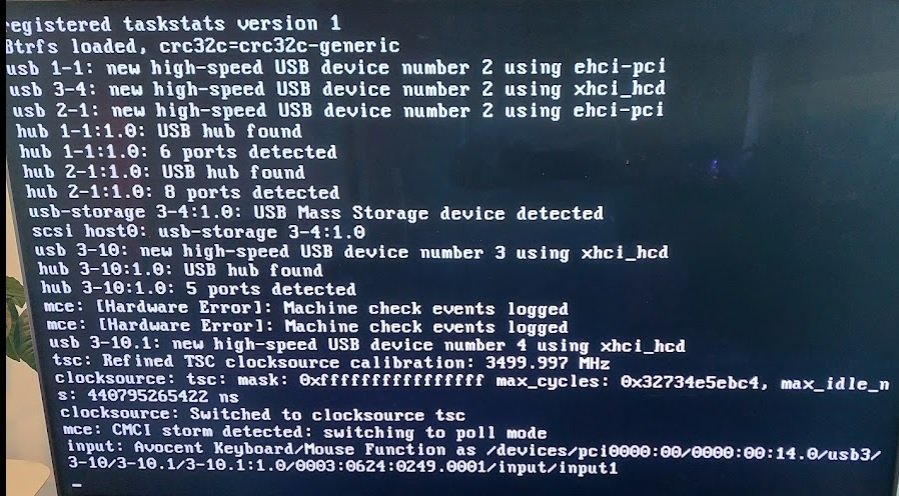
Hi all, I might be stuck with this same problem. Hopefully someone can help me: 1) System: MD70-HB01 motherboard, 2x Intel(R) Xeon(R) CPU E5-2637 v3 @ 3.50GHz, 4x 16MB memory, 2133 Mhz, 36ASF2G72PZ-2G1A2, graphics card - 1080 Ti, power supply 850 W 2) Everything was working well, until I tried to add a 2nd Graphics Card 2080 Ti, and replaced power supply to 1200 W, rebooted and always stuck in Unraid. So I removed the 2nd graphics card, reverted back to the original setup (except keeping the new power supply) and still the same problem. 3) I've tried rebooting with a newly flashed USB, with new card (2.0 and yes, plugged into a 2.0 slot - and yes, I've tried other slots also) , i've tried removing RAM - I get to the menu Unraid selection screen - boot Unraid OS, with GUI, Memory test etc, though it always gets stuck during the boot-up sequence, it looks like it might be something related to the Avocent Keyboard/Mouse (hence why I am posting here!) - see photo attached for where it gets stuck. I'm kinda of lost as to what to try, I can't get into Unraid to do any diagnosis reports, I have thought about trying to boot some sort of hardware diagnosis OS (if it exists) to check. Anyone got any ideas?