





Niyah
Members
-
Joined
-
Last visited
-
I started replacing a first disk yesterday, I'll replace the second one when the data rebuilding is done and then use unbalance. Thanks you ! :)
-
I'm currently adding less disks than I'm removing, I could do that for two disks, what about the two last ones ?
-
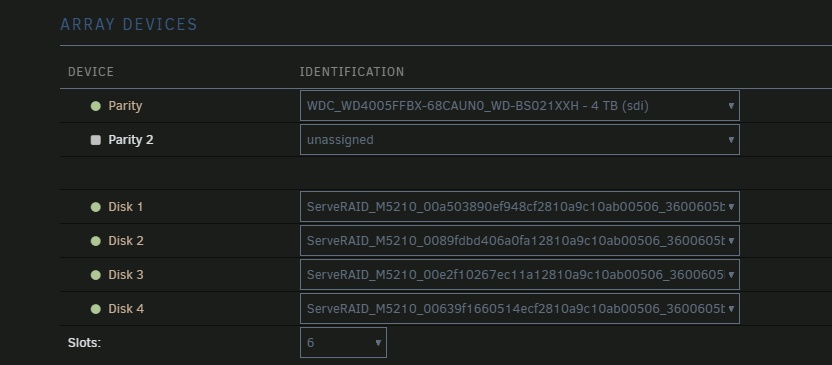
Hello lads ! I'm currently adding two 4TB disks (CMR, 7400) and removing four 2TB disks (SMR, 5400) And I am unsure of the way to actually do this. I removed the old 2TB parity disk and replaced it with a 4TB one, the parity check is done. My reason for this is, as you can see, those 4 disks stand behind a ServeRAID card I can't flash to HBA, I got a disk array, HBA card and I'm now installing 3.5 LFF drives instead of 2.5 SFF drives as well, cheaper, bigger, better, with smart access. However, I have 5TB on those disks and I am unsure of the way to do this, here's what I got from reading the forum left and right and would like one last "yeah go ahead". - Add the two new disks to the array - Copy all the files from disk 1/2/3/4 into the two new disks using unbalanced - New config, remove the 4 old disks - ??? - Profit Did I get the steps right ? I have a lot of things on the server, Would like to keep the parity running while doing all that if possible. Thank you ! :)
-
Niyah changed their profile photo
-
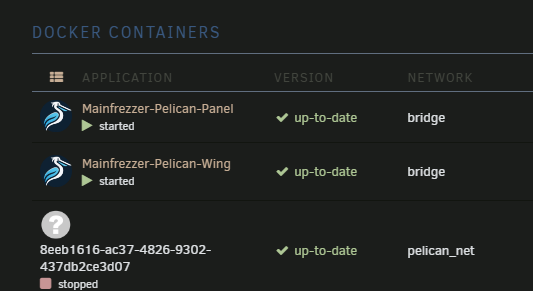
Hello ! I plan on upgrading to unraid 7 tomorrow and was looking forward folderview2, I have a simple question: Is there a way to add every dockers from a specific network in a folder ? If not, is there somewhere I could request that feature ? I use Pelican, which is a game server panel and every created dockers look like the last one here: But as you can see, they have a specific network, I'd like to automatically put those input a folder Edit: It simply use a UUID, so a simple regex work for this usecase, but I still believe grouping them by network could be a cool feature as I have other dockers that are grouped like this already :3
-
That was the issue, I completely forgot to change the app_url and it was still using the http / IP adress. Thank youi !

-
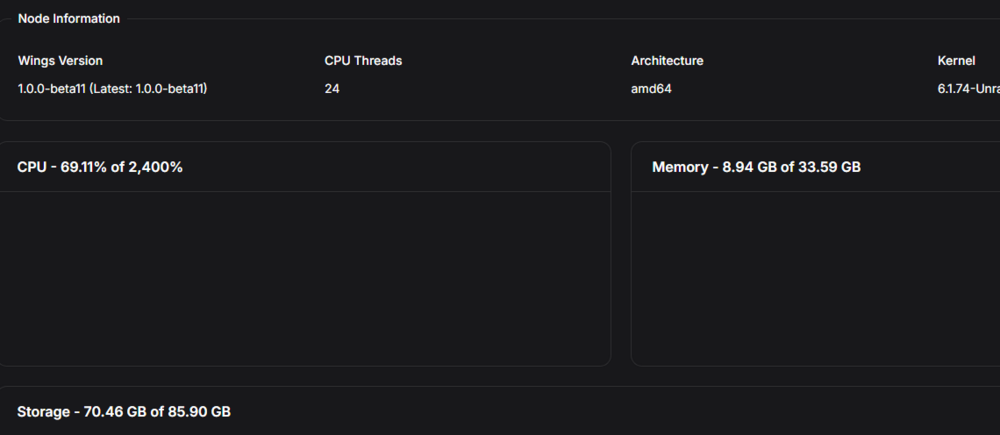
Hey ! Yeah sorry the nginx screenshots are accidentally doubled, the games.domain.eu is pointing toward 8002. I have both domains proxied trough cloudflare to my reverse proxy (a nginx proxy manager docker) that forward entrance of both those domains to the pelican dockers. I noticed that when I click on "edit" on the node, those values (cpu usage, memory, storage) actually change, so I guess it is somewhat successfully connecting to each others ? But the status is still "?" and I can't create a server or see the node anywhere.
-
It seems that I have no laravel logs at all. Do I need to turn anything on to get said logging to start ?

-
Hey there ! I'm currently trying to install Pelican and I'm met with some issues, from what I see, the panel can't reach the wing but I'm not even sure that's the case, before this, I will tell you my setups: I run a domain name behind cloudflare, wesockets enabled My unraid server is running nginx proxy manager Both sudomains games.domain.eu and nodegames.domain.eu point toward the nginx proxy manager the nginx proxy manager forward the games.domain.eu like this: the nginx proxy manager forward the nodegames.domain.eu like this: both have websockets turned on and run behind SSL. Here are my dockers port mapping: I can access the Panel without a problem. When accessing the wing it tell me: { "error": "The required authorization heads were not present in the request." } When going to the "Nodes" section of the Panel, here is what I see: debug: false app_name: pelican uuid: 0a711821-55e1-41d0-b2a6-59c15d9be6ba token_id: 9cq3cC5koqEq2FgR token: uAX7qKh6i4SaPfJsY7GAyzgDEXBAV572GpUJ3PfjDkJJAVj7RWuTj449VVDSECdf api: host: 0.0.0.0 port: 8080 ssl: enabled: false cert: /etc/letsencrypt/live/nodegames.domain.eu/fullchain.pem key: /etc/letsencrypt/live/nodegames.domain.eu/privkey.pem disable_remote_download: false upload_limit: 256 trusted_proxies: [] system: root_directory: /mnt/user/appdata/pelican-wing/ log_directory: /mnt/user/appdata/pelican-wing/log data: /mnt/user/appdata/pelican-wing/data archive_directory: /mnt/user/appdata/pelican-wing/data/archives backup_directory: /mnt/user/appdata/pelican-wing/data/backups tmp_directory: /tmp/pelican username: nobody timezone: Europe/Paris user: rootless: enabled: false container_uid: 0 container_gid: 0 uid: 99 gid: 100 mount_passwd: true passwd_file: /etc/passwd disk_check_interval: 150 activity_send_interval: 60 activity_send_count: 100 check_permissions_on_boot: true enable_log_rotate: true websocket_log_count: 150 sftp: bind_address: 0.0.0.0 bind_port: 2022 read_only: false crash_detection: enabled: true detect_clean_exit_as_crash: true timeout: 60 crash_detection_activity_lines: 2 backups: write_limit: 0 compression_level: best_speed remove_backups_on_server_delete: true transfers: download_limit: 0 openat_mode: auto docker: network: interface: 10.16.5.1 dns: - 1.1.1.1 - 1.0.0.1 name: pelican ispn: false IPv6: true driver: bridge network_mode: pelican_net is_internal: false enable_icc: true network_mtu: 1500 interfaces: v4: subnet: 10.16.5.0/24 gateway: 10.16.5.1 v6: subnet: fd00:10:16:5::/64 gateway: fd00:10:16:5::/64 domainname: "" registries: {} tmpfs_size: 100 container_pid_limit: 512 installer_limits: memory: 1024 cpu: 100 overhead: override: false default_multiplier: 1.05 multipliers: {} use_performant_inspect: true userns_mode: "" log_config: type: local config: compress: "false" max-file: "1" max-size: 5m mode: non-blocking throttles: enabled: true lines: 2000 line_reset_interval: 100 remote: https://games.domain.eu remote_query: timeout: 30 boot_servers_per_page: 50 allowed_mounts: [] Search: blacklisted_dirs: - node_modules - .wine - appcache - depotcache - vendor max_recursion_depth: 8 BlockBaseDirMount: true allowed_origins: [] allow_cors_private_network: false ignore_panel_config_updates: false I am surely overlooking something, but I have no ideas on what the next step would be. If you have any informations, I will gladly take them. (Note: I changed the domain name to dummy domain name in the posted config file, they do match in the actual env.) Thanks a lot for your time and work !







