




Skip to content
View in the app

A better way to browse. Learn more.

Unraid

A full-screen app on your home screen with push notifications, badges and more.

To install this app on iOS and iPadOS
  1. Tap the Share icon in Safari
  2. Scroll the menu and tap Add to Home Screen.
  3. Tap Add in the top-right corner.
To install this app on Android
  1. Tap the 3-dot menu (⋮) in the top-right corner of the browser.
  2. Tap Add to Home screen or Install app.
  3. Confirm by tapping Install.

LWM2017

Members
  • Joined

  • Last visited

  1. Thanks JorgeB, that worked, i was able to get the array up and running again. I've found the Xpress BIos Recovery option in bios and have turned it off, funny thing I updated the bios to the latest version and that was the problem prior to this version it didn't have this HPA feature! In regards to the other drives that have the the HPA issue but are still working correctly in unraid, should i fix them the same way? thanks again.
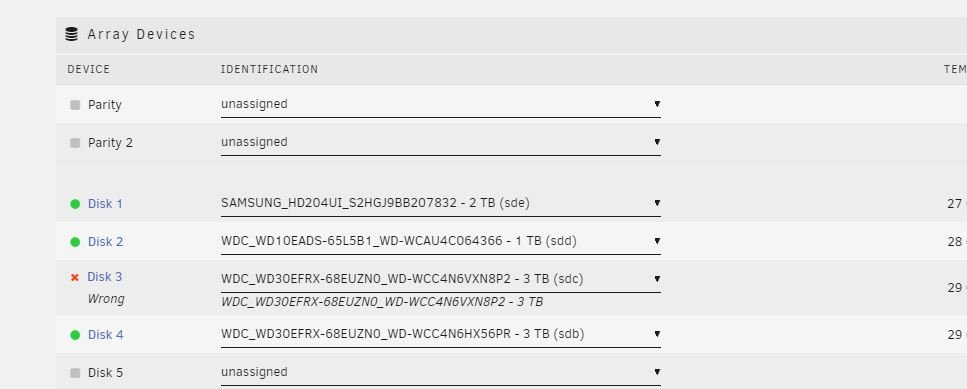
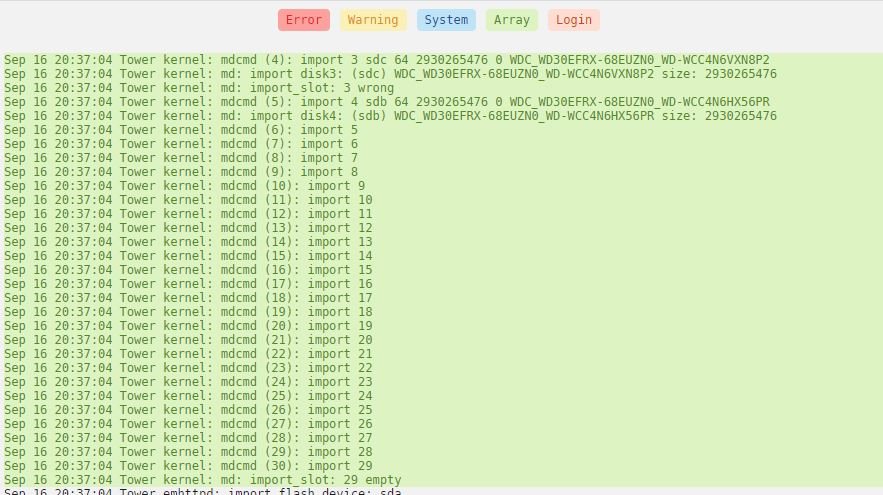
  2. Hi Guys, New to unraid and it was running fine until installed a new harddrive and had to swap a sata port on one of the existing drives. Now it shows up with the error as per screen shot below, is there any way to recover this? thanks tower-diagnostics-20210916-2047.zip
Account

Navigation

Search

Search

Configure browser push notifications

Chrome (Android)
  1. Tap the lock icon next to the address bar.
  2. Tap Permissions → Notifications.
  3. Adjust your preference.
Chrome (Desktop)
  1. Click the padlock icon in the address bar.
  2. Select Site settings.
  3. Find Notifications and adjust your preference.