




Skip to content
View in the app

A better way to browse. Learn more.

Unraid

A full-screen app on your home screen with push notifications, badges and more.

To install this app on iOS and iPadOS
  1. Tap the Share icon in Safari
  2. Scroll the menu and tap Add to Home Screen.
  3. Tap Add in the top-right corner.
To install this app on Android
  1. Tap the 3-dot menu (⋮) in the top-right corner of the browser.
  2. Tap Add to Home screen or Install app.
  3. Confirm by tapping Install.

Glaceon

Members
  • Joined

  • Last visited

  1. Glaceon changed their profile photo
  2. Of the VM or the Unraid server? In either case, probably not.
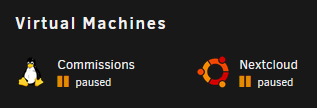
  3. Last night, I had a power outage and before I could get the Unraid server gracefully shut down, the battery ran out that gave the server a network uplink. So, I decided to force the server (r720xd) off using the physical power button. When the VMs initially start, they seem to work fine for a moment then just freeze. This leads them to the permanent Paused state where resuming has no effect. Forcing them off will kill them, however. I believe both VMs that I am trying to run are Ubuntu based. All help is greatly appreciated! Thanks frost-diagnostics-20210916-1442.zip
Account

Navigation

Search

Search

Configure browser push notifications

Chrome (Android)
  1. Tap the lock icon next to the address bar.
  2. Tap Permissions → Notifications.
  3. Adjust your preference.
Chrome (Desktop)
  1. Click the padlock icon in the address bar.
  2. Select Site settings.
  3. Find Notifications and adjust your preference.