





rjdipcord
Members
-
Joined
-
Last visited
Everything posted by rjdipcord
-
Hello all, I am trying to setup a fast Lancache on my network. I would like to use a 500GB Nvme drive as the primary disk the lancache will use. I am using this type of disk because I want to remove bottlenecks as much as possible, since my network bandwidth to each client will be 10Gbe. I know the Nvme can keep up to the demand within reason. I am getting reads up to 3 Gbps off the disk using lancache. However for the initial download of a Steam game, I am only getting about 500 Mbps. I have deduced this is because the SSD is in my primary array, and the parity writes are slowing down the read performance to the maximum bandwidth of the parity drive. I want to assign mount this disk without parity. Since it's a cache, there will be no files stored which are important. I realize I can assign this drive to a cache pool, and point the Lancache share to the cache, but I don't know that this is the best way to do it since Mover will eventually move the files to the main array at some point - which uses slower disks. What are my options? Thanks!
-
So my SSD can only truly write at 10MB/s? That sounds crazy low. If that's the case, should I look into replacing it? That is what I would expect. I was copying MKV files (so rather large) and I figured those would be sequential and wouldn't take up too much random I/O.
-
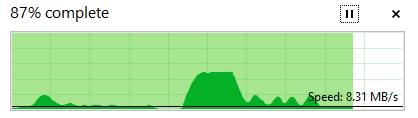
Hey folks, I have a little bit of a strange issue with my SSD Cache. I am using two 256 GB SSDs in my system alongside two 6TB WD RED HDDs. I have a media SMB share that I use for my movie and TV show collection. It is set to "Yes" on the 'use cache pool' setting. My problem is, that when I upload to my array, the upload speed is pretty good right out of the gate. I max out my network connection when doing so, uploading right around 100MB/s. Then, as the transfer proceeds, I lose that speed. I have attached a graph of my transfer speeds, the big hump in the middle is immediately after I 'unpaused' the file transfer. That hump is where my speeds averaged around 100MB/s. After then, you can see it dropped significantly. After this point, I do not see the speeds return. And the files are video files, so it all should be sequential? Thank you for any insight.
-
This solved my problem! Had to do with C-states. Turned those off, and I am seeing an uptime thus far of 5 days!
-
Hello Unraid community, I come in dire need of support with a problem i've been fighting with my Unraid server for over two months. This is a completely new installation but i'm running on used components. I'm working on a tight budget and am unable to afford brand new components. However many of the core things came out of my already working gaming PC. My problem is that the server doesn't make it to 16 hours of uptime before crashing and being completely unusable. When it crashes, the webGUI is inaccessible, the physical console does not respond to keyboard input, and any SMB shares go dark. The system remains powered on, and will, after a considerable amount of time reboot and be back to normal - and begin running a parity check due to the unexpected shutdown. I have tried running a tail on the syslog from the console, but the console always times out before a crash occurs. So when I try to wake up the console after a crash, I cannot see the syslog since it won't respond to keyboard input. To remedy this, I tried porting my syslogs to the installation media. It records the syslog correctly, but there is absolutely no valuable information that points to a reason for the crash. My system has the following hardware: Items with a "~" were not installed when these problems first occurred, and may have been installed to try and fix the problem. ~MSI X470 GAMING PLUS MAX motherboard ~PNY NVIDIA Quadro NVS 300 graphics card (PCIx1) Ryzen 7 1700x processor LSI IBM ServeRAID SAS9220-8i in (IT mode) as the HBA Emulex OCE11102 2-port 10Gbe SFP card EVGA 110-BQ-0500-K1 Power supply And here is what I have tried so far with no luck: Removing individual PCI components Changing RAM Changing RAM slot New Motherboard Re-seat and analysis of CPU pins PSU supply voltage check So with all of that and no luck, what would your suggestions be to try next? Or do you know of a way I can get more verbose logs? I am really wanting to use Unraid as it seems to be the best platform for my NAS, but these issues are getting extremely frustrating. I would even be up for installing a bootable Linux distro to another flash drive if it means I get more debugging tools. I just don't know what would be the most beneficial distro to use, or the process for collecting the data on that... Thank you! P.S. I didn't see anything remarkable in the syslog, but I attached a few of the last lines in the file in case you guys see something I don't... syslog.txt
