





jcofer555
Members
-
Joined
-
Last visited
Everything posted by jcofer555
-
can you do cat /boot/config/rclone/rclone.conf from unraids terminal and then blur out the sensitive parts but show a screenshot of that
-
update is pushed, please retest when you can
-
ok now that i have all the information i'll see what is possible
-
it's shouldn't be a token issue, ive confirmed the token is working, if you are seeing wrong csrf_Token where are you seeing this? can you show the full console request and response
-
I might have broadened the restriction not to account for this, ill take another run at it soon
-
new build out if you could test please
-
it'd be better if your vms used a share path that way your destination could be a share path, if you cannot do that then you can use user0 which is "array only" disks which would then do the spillover you are talking about to another disk assigned to the share used
-
right, you could put it on say /mnt/disk1/sharename/foldername that way it goes onto the array and then you are transferring disk to disk which is safe
-
Transferring data from a direct disk path to a share path can lead to data loss as the share pathvcan encompass a pool as well so you could potentially write over itself which ends in a deleted file
-
i've pushed another update if you can see if it fixes it for you
-
could you share your full debug from a run, maybe something will stick out but it's working fine for my few webhooks i've tried
-
i cannot reproduce, so your webhook looks like this correct just with your details of course but it has the https://discord.com/api/webhooks/ in the beginning? https://discord.com/api/webhooks/1315892117591298139/-flHGSHeG_CDiRsl4oGOW5wNGPAlcPNsO4HPYecfereck7Ts9PamYXkerercfsafdfDpWRGk8x
-
gotcha, yea s3 wasn't on my list of approved tested, but i got a fix in place so whenever i get the next update pushed it should fix things to allow for s3 storage types
-
should be fixed in next update hopefully. should be sometime today that i push the update
-
is the b2 bucketname field showing when you select your wasabi s3 config or do you also have a backblaze b2 config selected? I fixed for where it can source configs from, i checked the paths for the rclone container out there and added that as an option to be read from so now no matter which rclone you use it should load
-
yes minutes and custom was removed do to how difficult it was to manage those options with the other functions of the scheduling, it's using your old setting because that one isn't wiped from the configs on update of the plugin and it's still valid cron so it'll keep working. i left it from changing the old so it'd keep running how it has been for users but if they want to change anything they are gonna have to change to the new options
-
My plugin doesn't support rclo e docker containers for the configs, only the plugin and the plugin uses the path i hardcoded. Unraid 7.3 also has rclone installed builtin so I've updated the plugim to account for that config file as well. I'll look into supporting the containers on top of the plugin and the builtin. Could you tell me the exact container of rclone you are using and the exact path to the conf and ill start digging.
-
what version of the plugin are you on? and can you send a screenshot of the settings you have selected when clicking move
-
got a beta going where i converted to multi schedule so in turn automover will now support multiple pools soon :)
-
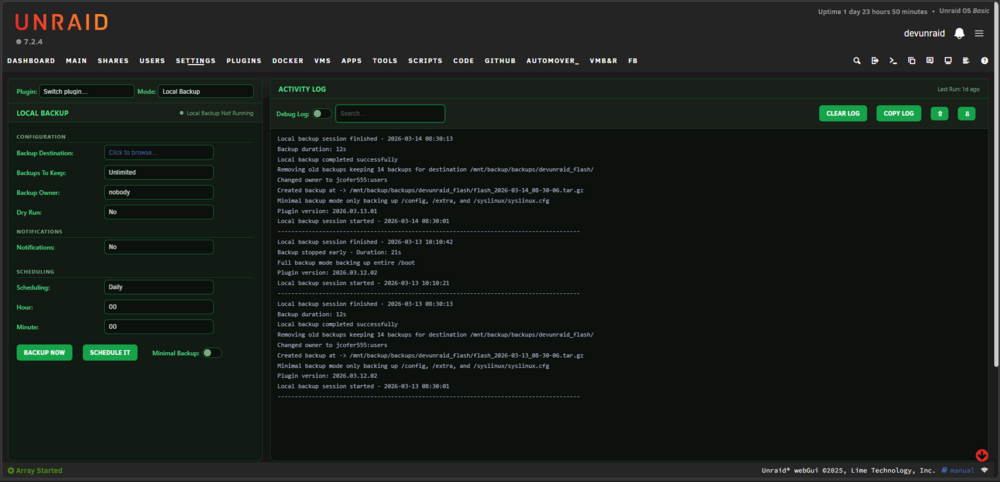
Flash Backup Github link - https://github.com/jcofer555/flash-backup A utility to backup the unRAID flash drive Development has ended and no further updates will be released ## Features ## - Backing up to local storage - Backing up to cloud storage using rclone (can use the plugin, any of the current docker containers, or the built in rclone if using unraid 7.3+) - Confirmed working with mega, box, onedrive, google drive, backblaze b2, dropbox, and s3 providers cloud storages - Offers scheduling of both local and remote cloud storage backups - Ability to set how many backups you want to keep - Dry run support - Notification support for discord, gotify, ntfy, pushover, slack, and unraids built in - Ability to set an owner for your local backups - Logging available in the webui and at /tmp/flash-backup
-
it's on the list of things i'd like to accomplish yes
-
yes it can, my guess is you just installed and tried using the move now button? if so other users are reporting the bug the move now button doesn't work until the first scheduled run runs
-
can only control a single pool
-
can't have different settings per pool, automover only works for one pool at a time but i'm working on a conversion to allow multiple but not guaranteeing i'll crack that as it's a almost entire rewrite of the plugin
-
yea the save and start are combined glad you sorted that one :) the manual move not finding something is something a user mentioned awhile back but i've not been able to reproduce and iirc the manual move started working just fine after the first scheduled move ran so i'm still trying to work that bug out. the user0 being shown is how the internal moving needs to be as user0 specifies array only disks so there wouldn't be a situation where you're writing from pool to user since user is both array disks and the pool disk assigned to the share that could cause data overwriting itself. yes cleanup takes care of any empty folders on the pool drive




