





Lman
Members
-
Joined
-
Last visited
-
Hi JorgeB, Mate, I just created new VMs as you informed. All my VMs are now up and running as usual. I am so happy and have to drink a lot tonight. Thanks a lot for your great advice and prompt response even on Saturday. I will keep a VM/Docker backup here after. I now can treat this thread as a fully resolved case.... Thanks
-
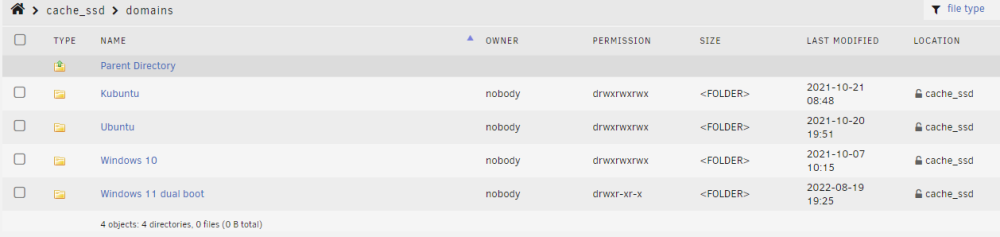
Hi JorgeB, Thanks for the swift reply. Unfortunately I don't have a backup of libvirt.img (yes, it is my mistake). Would you please explain me how to create VM(s), pointing to the old vdisk(s)? I have no idea how to do this....My VMs are; My most important VM is Window 10.

-
Hi JorgeB, Thanks again. I set docker and VM services and set both paths to /mnt/disk2/system/etc, and start and reboot again. My VMs and Dockers are still not back. I then set the back to /mnt/cache_ssd/system/etc to try my luck, and there was no luck. Please inform me if you need any information from my side. Looking forward to receiving a response from you. My first priority is VMs.
-
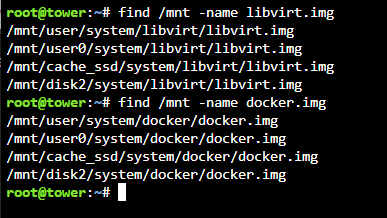
Hi JorgeB, Thanks for your helping hands. Below is the output as you informed; Please be informed that I didn't create any VMs/Dockers recently. My Unraid is a dual parity system with two disks (disk 1 and disk 2). Your continuous help is much appreciated.
-
Hi JorgeB, Thanks for the response and apology on insufficient details in my previous post. I followed this YouTube instructions during my Cache drive upgrade.... I did following key steps during the upgrade; 1. stopped all Docker Containers 2. Stopped all VMs 3. Disable Docker 4. Disable VM Manager 5. Compute Shares 6. Set "Use Cache" to Yes 7. Invoked Mover 8. Upgrade Cache drive to two SSD, BTRFS 9. Set Use Cache to previous settings 10. Invoked Mover again and enabled Docker and VM Manager I can see all Shares folders and files (appdata, domians, isos etc...) with correct names and files sizes in new Cache SSD, BTRFS along with libvirt.img and vdisk1.img though my VMs and Dockers disappeared. Please help me to restore (or any method) of my VMs recovery. If needed, I can send more information which you need.
-
I recently upgraded my "Pool Devices" from single SSD, XFS to dual SSD, BTRFS. Once I completed to process. both VM and Dockers disappeared. libvirt.img and vdisk1.img are in usual places. I tired my best to recover VM and Dockers during past few weeks without any luck. I have to admit that I don't have a VM backup. Diagnostics zip is attached herewith. Your help is highly appreciated. tower-diagnostics-20221028-1520.zip



