





datagnome
Members
-
Joined
-
Last visited
-
In the end it was indeed a failed module but I ended up running through the updated memtest86 through all the modules just in case
-
I didn't realize the version of memtest86 thats included with Unraid is older so I downloaded the latest and greatest. 25min into it and getting some ECC errors so hopefully by the time it is done I'll be able to determine which modules
-
For those curious, here is the output of /var/log/mcelog. Now to figure out how this relates to the physical DIMMs dgstore_mcelog.txt
-
Hm still seeing these "mce: [Hardware Error]: Machine check events logged" being logged though its only this line, not seeing the memory correction messages I did see before. Maybe it could be due to the way I'm copying the data? Info: Array -> Disks are all formatted ZFS Synology NAS -> Mounted the share using SMB using the unassigned devices plugin Using rsync with the -azvhp syntax so its: rsync -avzhp /mnt/remotes/location1/ /mnt/user/Destination/ Anyone have any recommendations on what else I can test this with? dgstore-syslog-20240316-1848.zip dgstore-diagnostics-20240316-1448.zip
-
Well memtest86 passed. I decided to pull the Supermicro AOC-SLG3-2M2 I installed earlier yesterday and kicked off the copy I was doing. So far no issues so I'm wondering if the machine check errors were coming from the card/NVME even though I actually wasn't using it (drive was detected but not mounted anywhere). I'll see how this looks later this evening.
-
I totally forgot memtest86 is a thing, I'll kick that off now
-
Hey all Shortly after installing the "Fix Common Problems" plugin, my new server started posting the above mentioned error (FCP is totally not the problem, I've got it on another server w/o issue). I reviewed the post about this error and decided to post here with my diagnostics. I'm pretty confident that it is likely the RAM that is at fault but having trouble determining which slot it could be. The motherboard and CPU are brand new though the RAM was canablized from a different server that was running w/o issues the last time I had it turned on. Server details: Motherboard: SuperMicro X11SPH-nCTF CPU: Intel Xeon Bronze 3204 RAM: 8x16GB DDR4 ECC, Hynix HMA42GR7MFR4N-TF Unraid v6.12.8 3 of the drives do have SMART reported errors though only one is of concern (ST8000NM0105_ZA11TE8Y, Disk 5) though it hasn't incremented the attribute in a while Let me know if you need any more details! dgstore-diagnostics-20240316-0926.zip
-
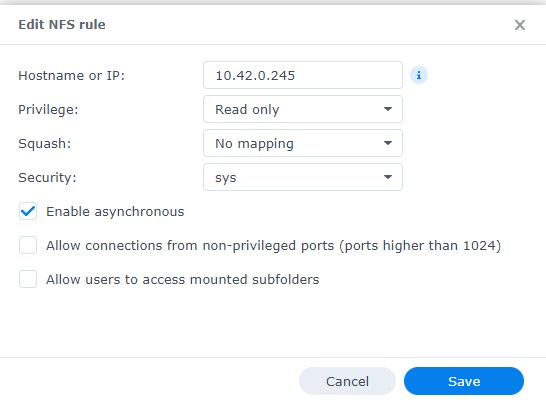
Okay for those curious, yes indeed it was a permission issue. I think due to me using the WEBUI on the Synology to transfer the data from the QNAP -> Synology, "users" group somehow didn't get added to the Media folder. Once I explicitly gave the "users" group read only acces, the Plex app was able to access the data. TL;DR -> Make sure the permissions are set correctly and have both users AND groups added.
-
Current setup: Unraid v6.11.5 Synology DSM 7.1.1 - Synology hosts a folder called Media and is shared out by SMB and NFS, the NFS share is read-only and the SMB user has read-only access to the share (no guest access) - Have Unassigned Devices mounting the folder with both protocols (one is using the FQDN, the other just the HOST name) - Both mount points show the same data as expected - I have binhex-plexpass container running (attached the docker compose file) - Plex doesn't see the data under NFS path - I can use the console to list the folder contents on both but when I do "su nobody", I get a permission denied when listing the NSF share - This WAS working with a QNAP NFS share prior I'm sure this is a permission issue but not quite sure how to proceed dgunraid-diagnostics-20230208-1952.zip plexpass_dockerrun.txt
-
Yep that did the trick! The drives are showing up in Unraid GUI now
-
Yup my Google-fu wasn't strong. It looks like its due to the Netapp's default 520 sector size. DannyG put a great guide to fixing it here: I'm currently formatting the drives over night so hopefully this should be fixed by tomorrow
-
I've got a Del R630 with a Dell 12Gbps HBA card connected to a NetApp DS2246. Unfortunately the drives in the shelf are not showing up in the web gui as unassigned drives. The card is being seen under Tools -> System Devices along with the individual disks. I've attached the hardware profile and the diagnostics from Unraid. I'm sure it is something really silly on my part but my Google-fu is not strong enough dgunraid_hardwareprofile.txt dgunraid-diagnostics-20210926-1521.zip
