




Skip to content
View in the app

A better way to browse. Learn more.

Unraid

A full-screen app on your home screen with push notifications, badges and more.

To install this app on iOS and iPadOS
  1. Tap the Share icon in Safari
  2. Scroll the menu and tap Add to Home Screen.
  3. Tap Add in the top-right corner.
To install this app on Android
  1. Tap the 3-dot menu (⋮) in the top-right corner of the browser.
  2. Tap Add to Home screen or Install app.
  3. Confirm by tapping Install.

悟空想回家

Members
  • Joined

  • Last visited

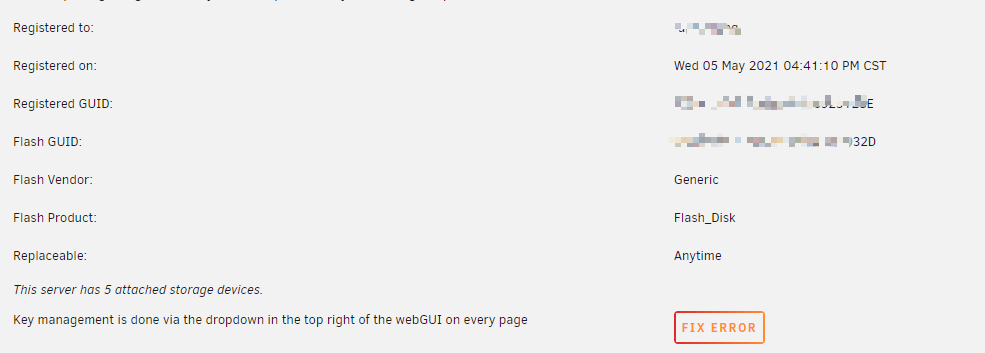
  1. 今天本来想升级6.10.3,升级到最后告诉我U盘写入报错,更换了U盘,从备份恢复,最后一步在Tools/Registration页面里并没有replace key,而是告诉我: Key management is done via the dropdown in the top right of the webGUI on every page 右侧只有一个FIX ERROR,如图所示: 点击FIX ERROR,系统无任何响应,我要如何才可以更换新U盘呢?
  2. 抱歉,刚发现微力同步已经有DSM7的版本了,所以现在没有任何限制了。
  3. 为何不把文件从Unraid同步到群晖,再从群晖同步到百度云? 这样还能多一个物理备份。 从Unraid同步到群晖的方法还挺多的,VerySync,Resillo等等都可以。
  4. 悟空想回家 joined the community
  5. 一直用的VerySync,微力同步。 优点是国内出产的,文档和客服都比较方便。 目前我跑了200G的一个文件夹的三地同步,稳定跑了两个月左右,没有什么问题。 需要注意的是微力同步尚不支持群晖DSM7(权限问题),所以我的群晖一直停留在6.x版本。 其他没问题。
Account

Navigation

Search

Search

Configure browser push notifications

Chrome (Android)
  1. Tap the lock icon next to the address bar.
  2. Tap Permissions → Notifications.
  3. Adjust your preference.
Chrome (Desktop)
  1. Click the padlock icon in the address bar.
  2. Select Site settings.
  3. Find Notifications and adjust your preference.