




Skip to content
View in the app

A better way to browse. Learn more.

Unraid

A full-screen app on your home screen with push notifications, badges and more.

To install this app on iOS and iPadOS
  1. Tap the Share icon in Safari
  2. Scroll the menu and tap Add to Home Screen.
  3. Tap Add in the top-right corner.
To install this app on Android
  1. Tap the 3-dot menu (⋮) in the top-right corner of the browser.
  2. Tap Add to Home screen or Install app.
  3. Confirm by tapping Install.

QuadT

Members
  • Joined

  • Last visited

  1. This is great info, thank you for that!
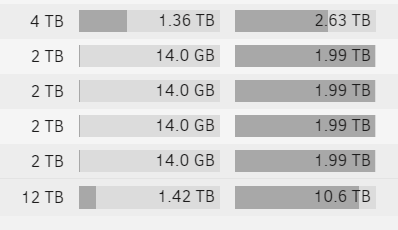
  2. Sorry about that, the parity disk is on the line above that isn't pictured. That disk that is in use is the only disk in the array that looks to be storing any data. Here's a more complete picture: tower-diagnostics-20211007-1907.zip

  3. Question from a super newb- I set up my unraid server a while back and haven't tinkered with it much since then but I'm curious as to why it looks like only the parity disk is in use? Is that normal or a setting I messed up? I thought I set it up for redundancy but if I'm looking at this chart right I think there's only data on one Hdd. Here's a snip to show what I mean: This has probably been answered already somewhere else but I couldn't find it in my, admittedly short, searching. Thanks!

Account

Navigation

Search

Search

Configure browser push notifications

Chrome (Android)
  1. Tap the lock icon next to the address bar.
  2. Tap Permissions → Notifications.
  3. Adjust your preference.
Chrome (Desktop)
  1. Click the padlock icon in the address bar.
  2. Select Site settings.
  3. Find Notifications and adjust your preference.