





Gummy
Members
-
Joined
-
Last visited
-
Installed a PCIe NIC, back online so that is solved, thank you. Swapped out Sata cables and the array is rebuilding my drive as well.
-
If I'm able to use the same ethernet cable successfully on a different device, does this mean my onboard network controller has died?
-
Hello everyone, I was away from home/my server for a few weeks, returned and decided I should probably see what all needed updating on the server. First thing I noticed was a message saying my #2 drive had failed. Before further investigating the drive I figured I would try a reboot and see if maybe it would come back on its own. Upon rebooting I was no longer able to access the server over the network. I am able to locally access the server and booted it into GUI mode, to take a look. I tried multiple ethernet cables that work on other devices and verified my static IP address is still setup on my router. I'm not sure if this is all related, it could be. I verified the "failed drive" has power and spins up. I've attached my diagnostics as well. Thanks in advance. matrix-diagnostics-20240721-1157.zip
-
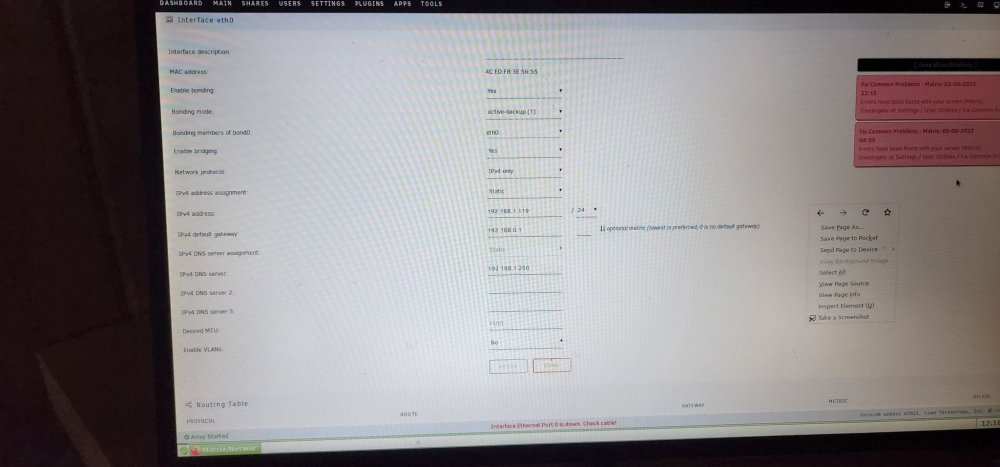
I was successful in getting local GUI mode working by enabling CSM from my BIOS thus allowing me to boot to my USB stick without UEFI enabled, doing so allowed GUI mode to work as suggested in other posts. In my specific scenario with my ASUS motherboard my steps were: Boot into BIOS Go to advanced Boot CSM Launch CSM > Enabled Change Boot Option from UEFI Sandisk Cruzer to Sandisk Cruzer As for my network issues, still a little stumped here, my IPV4 default gateway was 192.168.0.1 and my understanding is that needs to be the router's IP, which it is. However with ipconfig in windows it shows my default gateway as 192.168.1.1. I tried both and now I am getting Interface Ethernet Port 0 is Down. I have tried getting rid of my static IP and going back to automatic with no luck. Open to suggestions to try: Edit: Seemed to have got it working -Tried different Ethernet cable, no luck, tried that ethernet cable on my desktop and it worked no problem -Disabled bonding -Tried Fix Common Problems suggestion of setting my DNS Server to 8.8.8.8 and 8.8.4.4 -Tried Rebooting -Tried once again setting my server assignment to automatic from static and it started working again, it set my DNS Server to 1.1.1.1 and 8.8.8.8 -Switched back to my static IP and kept those DNS servers and it seems to still be working. -Reenabling bonding caused it to stop working again, so went back to leaving it disabled -Successfully went back to original ethernet cable Hopefully this helps someone else in the future. From my understanding bonding allows you to run two network controllers and two ethernet cables for a more stable connection, is this correct? Due to me only having one network controller, I imagine I do not need it. Makes me wonder why the server worked beforehand with bonding enabled.
-
Had some networking issues out of the blue for no apparent reason, no recent changes just couldn't see my server anymore. Thought nothing of it and did a restart only to find I still could not see my server. Thought that was odd but no problem I'd just take a look locally in the GUI. Unable to boot to GUI / GUI in safe mode. I get the load up text then the dreaded blinking cursor I have seen in a few threads on here. No idea what has happened, as the server was working great with no major issues the past six months. Hardware was upgraded about halfway through that with zero issues. Hoping someone might be able to see an easy thing to fix in my logs. Thanks in advance. matrix-diagnostics-20220529-2055.zip
-
TLDR: Win10 Machine connected to UNRAID server, having seemingly random short disconnects. I have two folders mapped via IP with Win10 Map network drive, no issues there. Can almost always see the drives, access files, play back videos from the server, and copy files from the server to the Win10 Machine. Copying files to the server however, small files - no problem. Larger files or a group of files I get a drive unavailable message, or sometimes unexpected network error after a considerable time spent "calculating". I've also noticed programs set with the downloads folder on the server seem to fail usually before the download completes. Attached is my diagnostics which the server hasn't been running for long but still had three attempted but failed transfers to the server. Hopefully one of you can make more sense of it than me, Thanks! matrix-diagnostics-20211116-1438.zip
-
Following, I have the same problem, usually unable to copy to my unRAID share, however sometimes it works at a cripplingly low speed, with random drops to 0 inbetween.
