T_P
Members
-
Joined
-
Last visited
-
Thank you @JorgeB ! All is back up and running. Appreciate your assistance.
-
Seems to have fixed the issue. Thank you for your help. My dockers and VMs are all gone, while still being in appdata, but I will google/reddit around before making another post about that issue. Posting the diagnostics anyway just in case I missed anything. altair-diagnostics-20250602-0640.zip
-
Got the following.

-
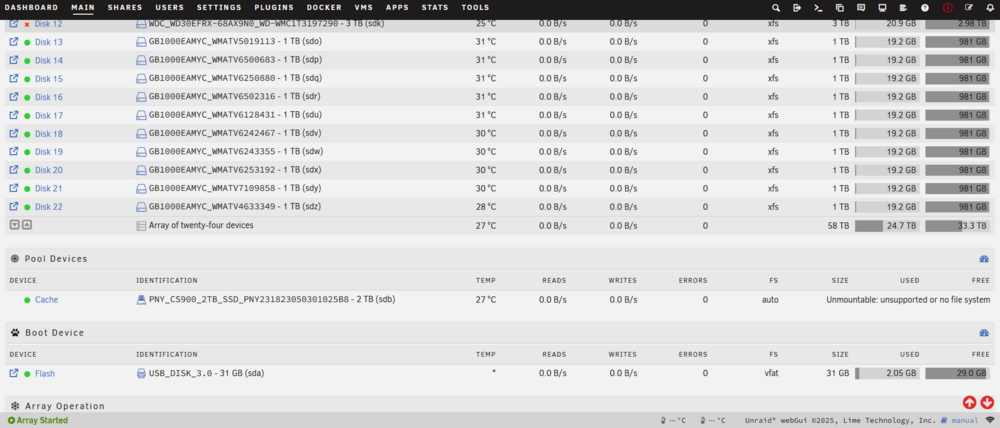
Searched similar posts across reddit and forums, but I'm out of ideas/depth. Upgraded to 7.1.2 from 7.0.1 and now cache shows as Unmountable: Unsupported file system. I tried stopping the array, removing the cache drive, removing the pool, starting the array back up, stopping the array, and adding the pool and cache drive back in, and starting the array again, but that did not work. Tried booting in safe mode, shut off turn back on again, the classics, I got nothing. Anyone have any ideas? All other drives appear fine (Ignore disk 12 failure, i need go replace that drive one day) I have appdata backup plugin, should I just format the drive and restore my appdata folder (only other thing on cache drive was VM isos). Im fine if I lose my VMs, didnt really have anything important on there anyway. Maybe I should downgrade my OS back to 7.0.1, lemme know. Edit: Tried starting the array in Maint Mode and ran xfs_repair on the cache drive with the -n option. Could not find primary, and could not find secondary block. altair-diagnostics-20250531-1315.zip