bills
Members
-
Joined
-
Last visited
Everything posted by bills
-
I was able to boot using these commands. Thank you!
-
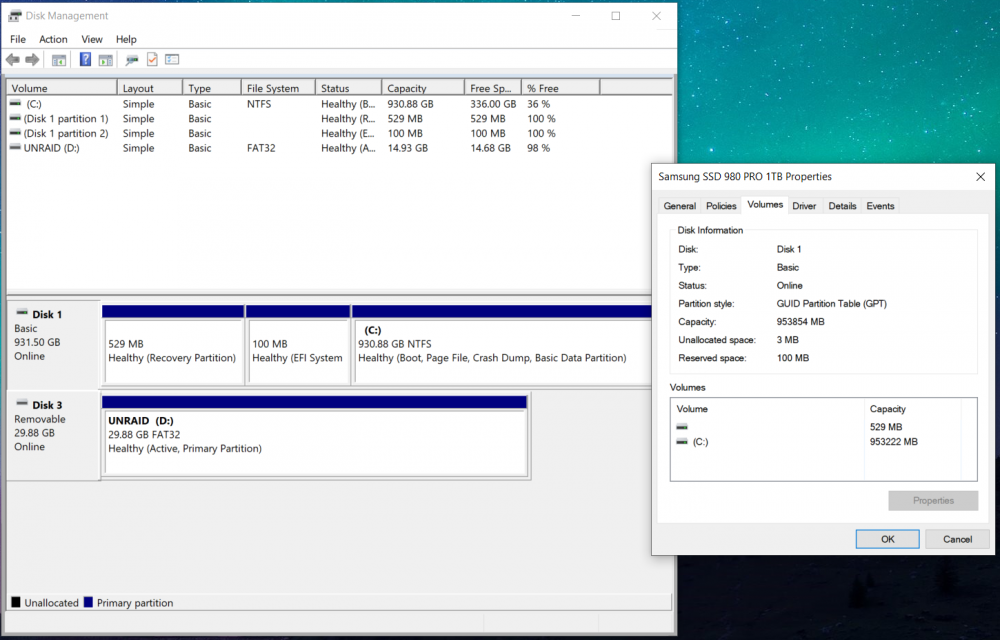
I'm trying to convert my desktop pc to a home server where I run some linux VMs to run some services in the background and boot Windows 10 occasionally to play games. Therefore, I am trying to set it up using Unraid. I have an existing Win10 installation on an NVMe and I'm trying to pass it through to a new VM. I followed SpaceInvader One's video on dual boot setup. However, when I boot the new VM, it boots into the interactive UEFI shell. If I exit it and boot into my NVMe drive, I get "System BootOrder not found. Initializing defaults. Reset System" message. After I add <boot order='1'> to my NVMe device block, it straight away goes to the error above and restarts in a loop instead. Does anyone have any ideas? My disk layout screenshot and IOMMU group information for the NVMe controller are attached. My current VM config: <?xml version='1.0' encoding='UTF-8'?> <domain type='kvm'> <name>Windows 10</name> <uuid>7176a4af-1950-f1ff-e71e-804c92c5c7a7</uuid> <metadata> <vmtemplate xmlns="unraid" name="Windows 10" icon="windows.png" os="windows10"/> </metadata> <memory unit='KiB'>16777216</memory> <currentMemory unit='KiB'>16777216</currentMemory> <memoryBacking> <nosharepages/> </memoryBacking> <vcpu placement='static'>12</vcpu> <cputune> <vcpupin vcpu='0' cpuset='0'/> <vcpupin vcpu='1' cpuset='8'/> <vcpupin vcpu='2' cpuset='1'/> <vcpupin vcpu='3' cpuset='9'/> <vcpupin vcpu='4' cpuset='2'/> <vcpupin vcpu='5' cpuset='10'/> <vcpupin vcpu='6' cpuset='3'/> <vcpupin vcpu='7' cpuset='11'/> <vcpupin vcpu='8' cpuset='4'/> <vcpupin vcpu='9' cpuset='12'/> <vcpupin vcpu='10' cpuset='6'/> <vcpupin vcpu='11' cpuset='14'/> </cputune> <os> <type arch='x86_64' machine='pc-i440fx-5.1'>hvm</type> <loader readonly='yes' type='pflash'>/usr/share/qemu/ovmf-x64/OVMF_CODE-pure-efi.fd</loader> <nvram>/etc/libvirt/qemu/nvram/7176a4af-1950-f1ff-e71e-804c92c5c7a7_VARS-pure-efi.fd</nvram> </os> <features> <acpi/> <apic/> <hyperv> <relaxed state='on'/> <vapic state='on'/> <spinlocks state='on' retries='8191'/> <vendor_id state='on' value='none'/> </hyperv> </features> <cpu mode='host-passthrough' check='none' migratable='on'> <topology sockets='1' dies='1' cores='6' threads='2'/> <cache mode='passthrough'/> <feature policy='require' name='topoext'/> </cpu> <clock offset='localtime'> <timer name='hypervclock' present='yes'/> <timer name='hpet' present='no'/> </clock> <on_poweroff>destroy</on_poweroff> <on_reboot>restart</on_reboot> <on_crash>restart</on_crash> <devices> <emulator>/usr/local/sbin/qemu</emulator> <disk type='file' device='cdrom'> <driver name='qemu' type='raw'/> <source file='/mnt/user/isos/virtio-win-0.1.208.iso'/> <target dev='hdb' bus='ide'/> <readonly/> <address type='drive' controller='0' bus='0' target='0' unit='1'/> </disk> <controller type='usb' index='0' model='ich9-ehci1'> <address type='pci' domain='0x0000' bus='0x00' slot='0x07' function='0x7'/> </controller> <controller type='usb' index='0' model='ich9-uhci1'> <master startport='0'/> <address type='pci' domain='0x0000' bus='0x00' slot='0x07' function='0x0' multifunction='on'/> </controller> <controller type='usb' index='0' model='ich9-uhci2'> <master startport='2'/> <address type='pci' domain='0x0000' bus='0x00' slot='0x07' function='0x1'/> </controller> <controller type='usb' index='0' model='ich9-uhci3'> <master startport='4'/> <address type='pci' domain='0x0000' bus='0x00' slot='0x07' function='0x2'/> </controller> <controller type='pci' index='0' model='pci-root'/> <controller type='ide' index='0'> <address type='pci' domain='0x0000' bus='0x00' slot='0x01' function='0x1'/> </controller> <controller type='virtio-serial' index='0'> <address type='pci' domain='0x0000' bus='0x00' slot='0x03' function='0x0'/> </controller> <interface type='bridge'> <mac address='52:54:00:6b:2b:80'/> <source bridge='br0'/> <model type='virtio-net'/> <address type='pci' domain='0x0000' bus='0x00' slot='0x02' function='0x0'/> </interface> <serial type='pty'> <target type='isa-serial' port='0'> <model name='isa-serial'/> </target> </serial> <console type='pty'> <target type='serial' port='0'/> </console> <channel type='unix'> <target type='virtio' name='org.qemu.guest_agent.0'/> <address type='virtio-serial' controller='0' bus='0' port='1'/> </channel> <input type='tablet' bus='usb'> <address type='usb' bus='0' port='1'/> </input> <input type='mouse' bus='ps2'/> <input type='keyboard' bus='ps2'/> <hostdev mode='subsystem' type='pci' managed='yes'> <driver name='vfio'/> <source> <address domain='0x0000' bus='0x0b' slot='0x00' function='0x0'/> </source> <rom file='/mnt/user/isos/vbios/rtx 3070ti.rom'/> <address type='pci' domain='0x0000' bus='0x00' slot='0x04' function='0x0'/> </hostdev> <hostdev mode='subsystem' type='pci' managed='yes'> <driver name='vfio'/> <source> <address domain='0x0000' bus='0x0b' slot='0x00' function='0x1'/> </source> <address type='pci' domain='0x0000' bus='0x00' slot='0x05' function='0x0'/> </hostdev> <hostdev mode='subsystem' type='pci' managed='yes'> <driver name='vfio'/> <source> <address domain='0x0000' bus='0x01' slot='0x00' function='0x0'/> </source> <boot order='1'/> <address type='pci' domain='0x0000' bus='0x00' slot='0x06' function='0x0'/> </hostdev> <hostdev mode='subsystem' type='usb' managed='no'> <source> <vendor id='0x046d'/> <product id='0xc077'/> </source> <address type='usb' bus='0' port='2'/> </hostdev> <hostdev mode='subsystem' type='usb' managed='no'> <source> <vendor id='0x2516'/> <product id='0x003c'/> </source> <address type='usb' bus='0' port='3'/> </hostdev> <memballoon model='none'/> </devices> </domain>