





MrTouchy
Members
-
Joined
-
Last visited
-
Finally fixed it. After about 40 hours and a couple of weeks, it was the firmware. I had updated the card bios but not the firmware. Updated and it's working flawlessly.
-
Lately, I've had a ? share that has appeared 3 times. I notice when it kills my samba share and I have to rename it then delete it. How should I go about finding what's creating it?
-
Bingo. No idea how that got in there. Deleted the share and the problem is fixed
-
All of a sudden my Unraid is in a starting services loop with these errors. I believe this is why I can not all of a sudden copy files to the unraid share from Windows either. Ideas? Nov 23 16:16:54 Tower winbindd[20429]: initialize_winbindd_cache: clearing cache and re-creating with version number 2 Nov 23 16:16:54 Tower winbindd[20429]: [2021/11/23 16:16:54.455660, 0] ../../lib/util/become_daemon.c:135(daemon_ready) Nov 23 16:16:54 Tower winbindd[20429]: daemon_ready: daemon 'winbindd' finished starting up and ready to serve connections Nov 23 16:16:55 Tower emhttpd: error: put_config_idx, 598: Invalid argument (22): fopen: /boot/config/shares/?.cfg Nov 23 16:16:55 Tower emhttpd: Starting services... Nov 23 16:16:55 Tower emhttpd: shcmd (859): /etc/rc.d/rc.samba restart Nov 23 16:16:55 Tower nmbd[20419]: [2021/11/23 16:16:55.543367, 0] ../../source3/nmbd/nmbd.c:59(terminate) Nov 23 16:16:55 Tower nmbd[20419]: Got SIGTERM: going down... Nov 23 16:16:55 Tower winbindd[20431]: [2021/11/23 16:16:55.543388, 0] ../../source3/winbindd/winbindd.c:244(winbindd_sig_term_handler) Nov 23 16:16:55 Tower winbindd[20431]: Got sig[15] terminate (is_parent=0) Nov 23 16:16:55 Tower winbindd[20429]: [2021/11/23 16:16:55.543386, 0] ../../source3/winbindd/winbindd.c:244(winbindd_sig_term_handler) Nov 23 16:16:55 Tower winbindd[20429]: Got sig[15] terminate (is_parent=1) Nov 23 16:16:57 Tower root: Starting Samba: /usr/sbin/smbd -D Nov 23 16:16:57 Tower root: /usr/sbin/nmbd -D Nov 23 16:16:57 Tower smbd[20503]: [2021/11/23 16:16:57.705970, 0] ../../lib/util/become_daemon.c:135(daemon_ready) Nov 23 16:16:57 Tower smbd[20503]: daemon_ready: daemon 'smbd' finished starting up and ready to serve connections Nov 23 16:16:57 Tower root: /usr/sbin/wsdd Nov 23 16:16:57 Tower nmbd[20508]: [2021/11/23 16:16:57.712887, 0] ../../lib/util/become_daemon.c:135(daemon_ready) Nov 23 16:16:57 Tower nmbd[20508]: daemon_ready: daemon 'nmbd' finished starting up and ready to serve connections Nov 23 16:16:57 Tower root: /usr/sbin/winbindd -D Nov 23 16:16:57 Tower winbindd[20518]: [2021/11/23 16:16:57.742537, 0] ../../source3/winbindd/winbindd_cache.c:3203(initialize_winbindd_cache) tower-syslog-20211123-2314.zip
-
Thank you very much. That helps a bunch. I'm going to try moving the card to another machine and see what happens.
-
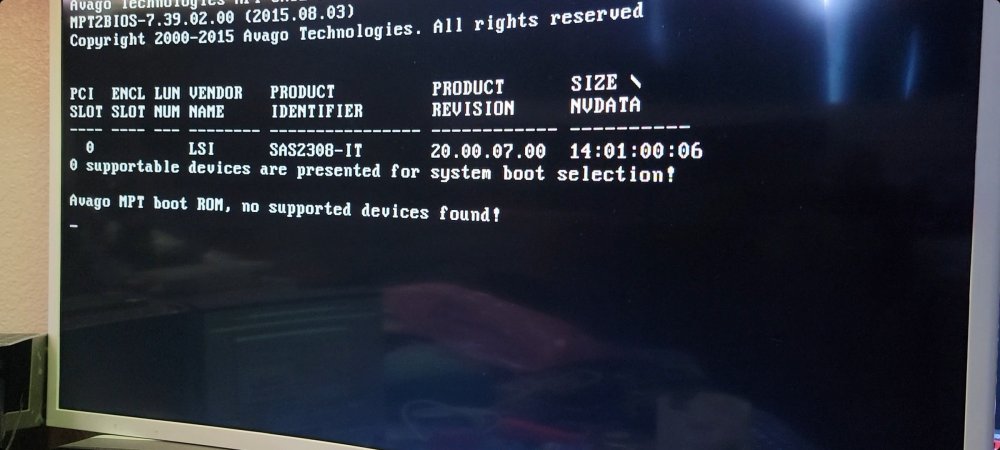
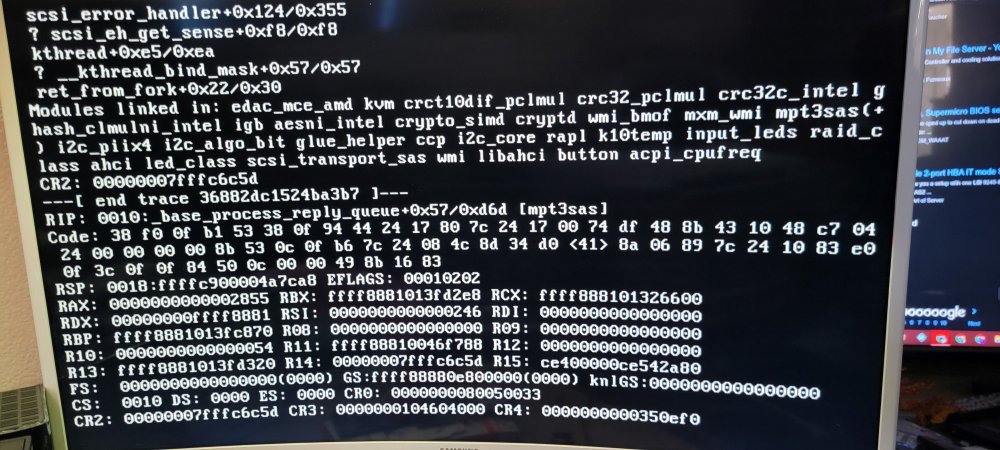
I had a rocketraid raid card and a netstor external 8 bay enclosure. I could not get it to read the drives in unraid so I purchased the lsi card per the recommendations, 9207-8e. It's on the latest firmware and IT. It shows in the unraid config but still no drives. Tried a couple of the pci ports and even the tape trick for pins 5 and 6. It connects with external mini sas plugs to the enclosure. 2 questions, should I see the drives in the card bios/boot and how do I get unraid to recognize it. Here are some pics of stuff that looks unusual.
-
I have a Highpoint RocketRAID 4522SGL and a netstor box. Unraid detects the card but the card requires HighPoint RAID Management (WebGUI) to run and configure. I can't install it from terminal and I do not see any dockers for it. what are my options?


