hunsbct
Members
-
Joined
-
Last visited
-
Will do. I'll be able to stop by and do that in a few hours and I'll report back. Can't thank you enough for your help so far, really appreciate you taking the time.
-
Yes, I have a few new drives such that I could do both simultaneously if that is safe and feasible. More than happy to take it one step at a time if that has any meaningful advantages.
-
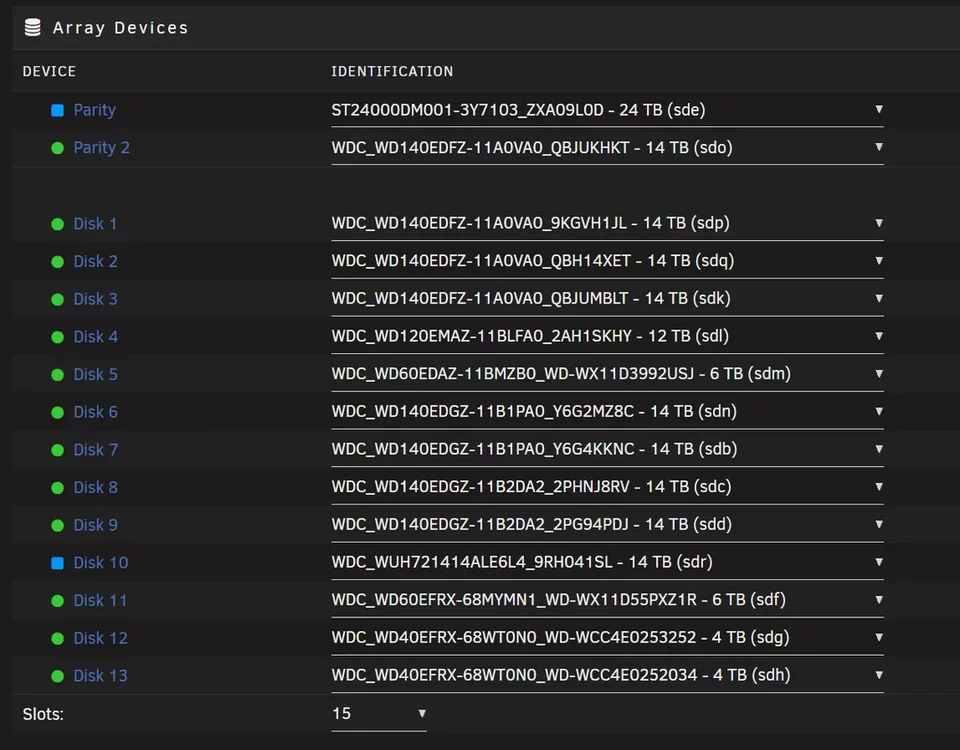
Disk 10 in this case is the former Parity 1 disk. It is slated for immediate replacement anyway so I can remove it and replace with a new disk for the rebuild. You're thinking I rebuild that first and then add back the new 24T disk as parity 1 once I have a full data array correct?
-
When I unassign both of those disks, I see a warning that the array is missing a disk which makes sense: I was able to start the array and generate the attached diagnostics diagnostics-20251009-0922.zip

-
May be worth clarifying that since there is dual parity I thought it was safe to move both drives. My current thinking is maybe I can emulate the data disk and just focus on getting parity back, then rebuilding the data disk in a secondary step? But obviously I'm deferring to the experts on this one.
-
Attached are the current diagnostics. Unfortunately I did not capture them before the upgrade so again, lesson learned for next time. Essentially, instead of only removing the old parity drive and replacing it with a new one, I moved the old parity drive to a data drive slot and added a new disk as the replacement parity disk. I thought it would be copying parity from the second parity disk. diagnostics-20251009-0903.zip
-
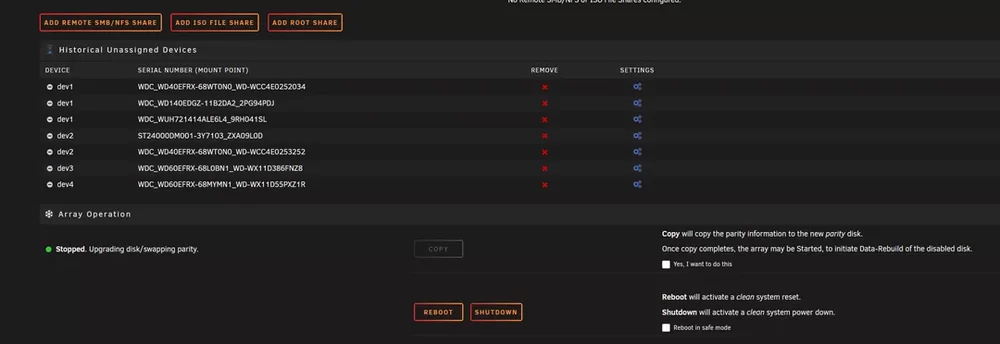
My storage array had one drive that was offline and being emulated for too many SMART errors and needed replacing. I moved a healthy 14tb parity disk into its place and upgraded the parity slot to a 24tb disk per the parity swap instructions (or so I thought, more on that in a moment). I have a few more 24tb disks with the intention of getting both parity drives and a few data drives updated in the span of a few operations. I got through step 14 in that doc, where I copied parity but now I am not seeing a way to start the array back up: I thought at first that maybe some other operation is happening post-copy but no disks show any read/write traffic on the Main screen and it remained like that for 5-6 hours yesterday after the copy finished. I tried checking the box and running it again to no avail. I've also rebooted the server without any change. Someone on reddit pointed out that I should not have modified both disks at the same time. The good news is that I am using two parity disks so I don't think anything is lost yet but I need to be very careful at this point trying to unwind this mess. If I can provide any other info to inform a solution please let me know and I will respond quickly with anything needed. Rookie mistake, I know, but hopefully there is a way to get this thing back on track.