JeanClaudeCannedYams
Members
-
Joined
-
Last visited
-
SOLVED! TL;DR don't specify vbios. OK, for anybody who has a similar issue here's what I did: Stub the GPU and bind VFIO as per Ghost's recommendations. Create a new VM, use SeaBIOS and Q35-5.1, hyper-v disabled. Have a monitor connected, and a usb input device passed through. Follow SpaceInvader One's GPU Passthrough instructions EXCEPT for specifying the vbios. Don't specify one at all. Boot the VM. Celebrate. I stumbled on this completely by accident while trying many, many combinations. Glad I found one that stuck. I hope this post saves someone else the dozen or so hours I've invested trying to fix this issue.
-
Thanks @ghost82. I'll try binding the GPU. You also mentioned that the issue I had with the GPU in use by the host would cause the hanging VM on boot, so I'll have to look into that. Is there any truth to the theory that you can't create a VM with the VNC as primary display adaptor and add the GPU as the secondary without causing Error 43 issues? If I can VNC to the VM it makes it easier to install the OS, drivers, Geforce Experience, etc instead of connecting to the bare metal and passing through a kayboard/mouse.
-
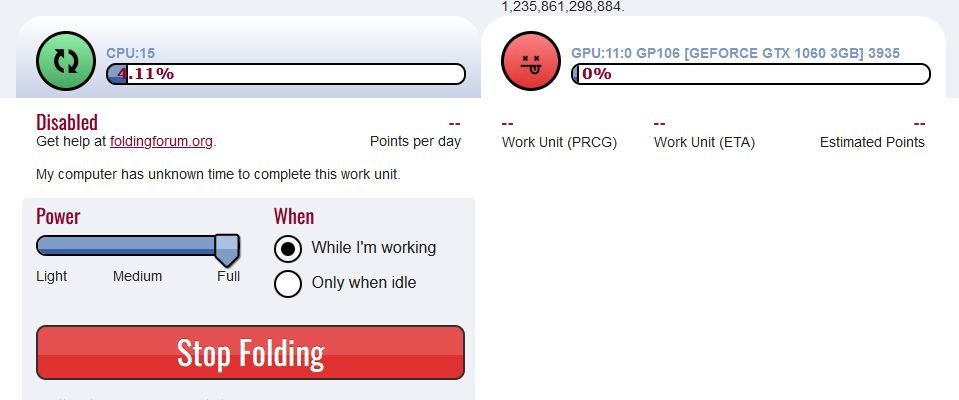
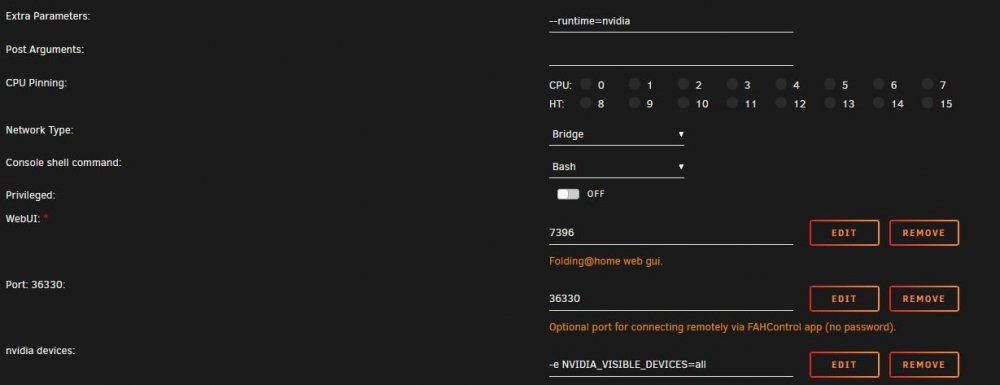
Quick update on the Folding @ home settings, I was seeing this in the logs which relates to GPU drivers not being passed through to the container. 01:16:21:FS00:Initialized folding slot 00: cpu:14 [93m01:16:21:WARNING:FS01:No CUDA or OpenCL 1.2+ support detected for GPU slot 01: gpu:11:0 GP106 [GeForce GTX 1060 3GB] 3935. Disabling.[0m This was using the linuxserver build. I've since switched to the mobiusnine version and that seems to be working properly. Now I'm only left with the question of the VM passthrough...
-
Hi Unraiders! I seem to be hitting brick walls all over the place when it comes to utilising my GPU in Unraid. First up, machine specs: AMD Ryzen 7 3700X 8-Core @ 3600 MHz Gigabyte B550 AORUS PRO AX motherboard EVGA GeForce GTX 1060 LSI 9300-8i 12Gbps SAS HBA + bunch of drives 32GB DDR4 ECC RAM First I thought I'd create a gaming VM. As a newbie I tried creating a VM with VNC as well as the GPU passthrough via SpaceInvader One's awesome video. Of course I kept getting Error 43, so then looked a bit further and saw that somebody mentioned it would continue to get this unless you install with only the GPU as display adaptor, and only with a display physically connected to the graphics card. Tried that but couldn't get it to boot at all. Black screen, no post. Things I have tried so far: Tried different BIOS options. Tried setting PCIe ACS override to Both in VM settings Made sure Plex docker was off so I knew the GPU wasn't in use Made sure NVTop plugin was removed so it wouldn't conflict Made sure I had CPUs pinned and isolated for the VM Tried the GPU unlock script that SpaceInvader One recommended here Nothing seemed to work so I thought I'd throw that idea away and stick with the GPU for Plex/Tdarr transcoding and Folding@home. Again, I followed SpaceInvader One's guide to setting up F@H but the GPU is showing as disabled. I've attached screenshot 1 and 2 for reference. Checked my settings and they seem OK, but I can't enable the GPU, even via FAHControl. It feels as if I've got something completely wrong somewhere, but my searching of the forums and watching videos isn't showing me anything new so far. I even tried another GPU, a 1050ti and had the same problems. Ideally I'd rather use the GPU on a VM and maybe get something else for transcoding but maybe something about my hardware or config won't allow that, in which case I'll use it for F@H and contribute to a team. What am I missing here? Any suggestions? blackknight-diagnostics-20220607-0745.zip