ztywyj
Members
-
Joined
-
Last visited
-
I can only reach to my server twice a month. I'll let you know when I try this. Thank you for your reply.
-
I think unraid is shutting down, I've plugged a monitor, the screen turned off, but the sever is still on, with fans running etc. It will keep on until I manually power off the machine.
-
It can reboot cleanly. And after reboot, if I hit shutdown right away, It can cleanly shutdown, but if I use for a long period, it can't. So the diagnostics shows everything was normal ? I have my bios settings when AC back power will on automatically, will this cause this issus ?
-
My server can never fully shutdown, even after I manually stop the array and shutdown, the power is just always on, never goes down. Here is the diagnostics file, please help tower-diagnostics-20241020-1737.zip
-
Can anybody help? Still have this problem.
-
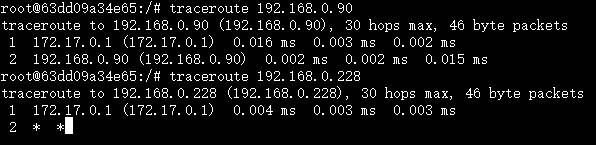
I have two network interfaces, and unraid set two macvlan for me, one br0 and one br1, my docker setting is like this: br0 : subnet 192.168.0.0/24 gateway 192.168.0.2 ip-range 192.168.0.0/25 br1 : subnet 192.168.0.0/24 gateway 192.168.0.1 ip-range 192.168.0.128/25 They have two different gateways so I can controll which container goes which gateway. But then I have a problem, containers on bridge network can access my containers on br0, but not on br1 If I set network type to host then everything is fine, but I don't want to do it. Anyone knows what's going on? Am I doing something wrong? Btw my unraid ip is 192.168.0.98.