





justinporteus
Members
-
Joined
-
Last visited
-
Alrighty, guess I'll begin the return process 🙃
-
Hey, Just got a brand new drive (8 tb Seagate Ironwolf) Plopped it in the server, and it had an immediate SMART error (Reported Uncorrect is 59). Per some advice on this thread, I have moved the drive to a known good slot in my chassis...same error. I've attached the SMART report. Is this anything to worry about? tower-smart-20250508-2144.zip
-
I have done that, and due to how intermittent this problem is, I have marked that as the solution. I will start a new thread if it happens again; I still have persistent syslog going just in case.
-
My bad, here is the persistent one. syslog
-
It's been a while, I was hoping the problem had spontaneously solved itself, but after having to shut down the server yesterday due to a power outage (it is on a UPS), it booted back up, worked fine for several hours, and then went unresponsive sometime overnight. I have attached the syslog file. syslog
-
Ok, I have set the syslog to mirror to flash, and will post it here next time it crashes.
-
Every now and then, the server will just lock up. No webgui, no video output if I connect a monitor directly to the server, no response to SSH requests, but the power is still on. Sometimes, if I catch the problem early, I can telnet into the server and send a reboot command (SSH does not work at this point). I posted about this in February, and was advised to disable C states and make sure my RAM was not overclocked, which I did at that point...but the problem persists. Diagnostics are attached. System is a Ryzen 3 3200G 32 gb RAM MSI B450 Gaming Pro Carbon AC I mostly use it for storage, but have 3 docker containers: UrBackup, DuckDNS, and Plex. I have 6 data drives and one parity drive, all are connected through a Dell H310 SAS HBA which has been flashed with IT firmware. Any idea what's going on? tower-diagnostics-20230401-1535.zip
-
Thanks. I have disabled C-states and removed a mild RAM overclock that I had forgotten about. Hopefully this fixes it...only time will tell.
-
Hey, This has happened a few times, though not for a while. Every now and again, the server will just...lock up. It stops working; no webgui, no video output from the iGPU, but power is still on. In these cases, I have had to resort to a hard shutdown; it always powers back up, and appears to operate without issue after the parity check, at least for a while. Today is the first time this has happened in a while; last time was back in January, and seemed to be triggered by adding a new disk (I recently added 3 new disks to the array, and this happened after clearing, but before mounting the first two disks, third disk went in without issue.) I've tried searching for similar issues, but it seems like everybody's problem was caused by something different, and I'm at a loss trying to figure it out for myself. Can someone tell me what happened? tower-diagnostics-20230227-1105.zip
-
Everything that is important enough to be more than an inconvenience if lost is backed up on the cloud. Everything not backed up is a level of importance where it would be annoying to lose, but I'm a data hoarder, so it's mostly just archival stuff for work I've done over the last 6 years and will likely never revisit. I ended up shrinking the array down to the two good disks and parity. Parity is rebuilding at the moment, and it looks like I've suffered minimal data loss (some very recent files are missing, but everything else seems to be accounted for). Disk 3 is going to be discarded due to smart reports. The original disk 4 I am going to check in another machine using tools I am more familiar with to see whether the problem was with the disk, or just with the cable and/or motherboard. If it's good, I'll think about adding it back into the array (I've been considering moving to an HBA card to expand capacity, so if there's a problem with the motherboard SATA ports, that should bypass it.) Same for the new disk. If it's also good, and the problem is with the cable/mobo, then yay I get 4 more TB of capacity. Thanks for your help, I know I've done some stupid shit here that could have been avoided if I were more patient or thought things through better, and none of you made me feel like the impatient n00b that I am.
-
The problem is, I don't have anywhere off the array that is large enough to store everything. I assigned the disk 4 replacement disk as disk 5 in order to begin the clearing procedure (as explained in the post where I included my diagnostics); I probably should have posted before beginning that, but it didn't occur to me that it might be an issue until now. And I did add it after disk 4 had already been disabled - unraid didn't give me any issue with it. Well...sh*t. It's a brand new disk, and it's plugged into a different SATA port than when it was rebuilding slowly, and with a different cable. Should I be looking at RMAing it? No, like I said, its contents are emulated, and I'm using the disk that was supposed to become disk 4 as the potential data dump disk. Yes, I already mentioned that I had begun the clearing process. Yep, posting screenshot now...but as I was typing this, the disk clearing process errored out because of a read error (good call 😂😭), so it is no longer showing as doing anything. Also feels weird that it would get cancelled because of a read error when my understanding is that it's a writing operation? The disk is reporting zero reads, so that seems...wrong.
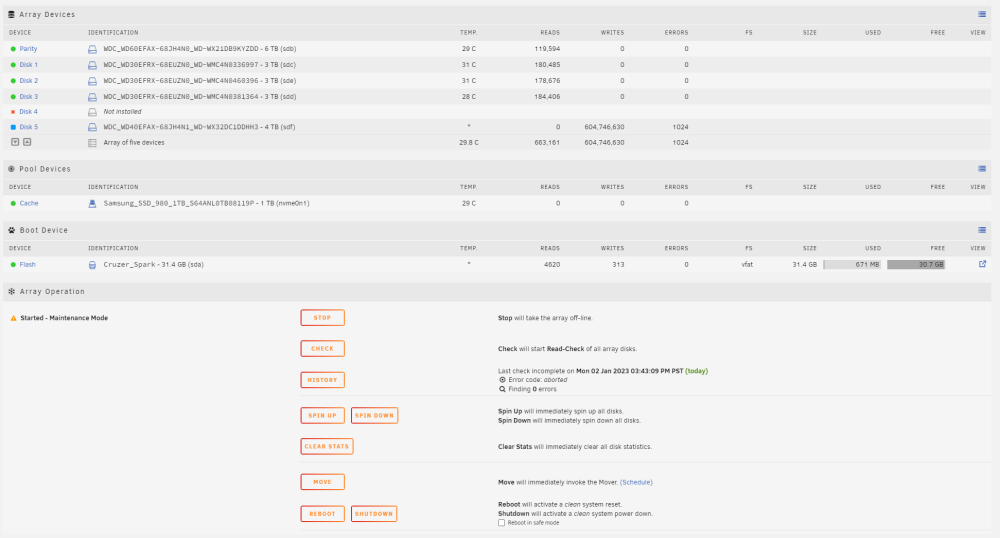
-
Apologies, didn't think that'd be necessary for a hypothetical "will this work" question. Here they are. I have already begun the preclearing process on the disk that I am looking to add as disk 5. It is the same disk that I was trying to rebuild disk 4 to, which was only rebuilding at 2-6 mb/s. It has been preclearing most of the day, fluctuating between 90-150 mb/s, so the speed problem doesn't seem to reside on that disk (it is also plugged into a different SATA port on the motherboard than it was previously). tower-diagnostics-20230102-1743.zip
-
Bit of background, this started with this thread: DATA REBUILD GOING AT LESS THAN 10 MB/S Turns out, it's not the cable. I'm beginning to suspect a faulty SATA port on the motherboard. The rebuild that I said was working at 150 mb/s ended up slowing down to 2-6 mb/s after a couple hours. My array is currently: Parity - 6tb, healthy Disk 1 - 3 tb, healthy Disk 2 - 3 tb, healthy Disk 3 - 3 tb, Current pending sector: 6 error Disk 4 - 3 tb, Read error, contents emulated Before beginning any of the troubleshooting in the last post, I used unBalance to move all the contents from disk 4 to disks 1, 2, and 3 (3 was showing healthy at the time, the only issue then was the read error). It appears to have been successful, but there were still a few gigabytes showing as being on disk 4 (if I lose what's left there, I won't be too bothered; it wasn't of critical importance). As my troubles progress, I've become more concerned about disk 3 than disk 4, given disk 4's mostly empty state...but there isn't room on 1 & 2 to empty disk 3, and I know if I try to replace & rebuild it, that'll bork parity. So my question is - can I leave disk 4 emulated for the moment, and add the disk that I was replacing it with to the array as disk 5 in order to empty the contents of disk 3? At that point, there wouldn't be much use in rebuilding disks 3 or 4, so I could just use the proper procedure to shrink them out of the array. Thanks for your input
-
Yes I misread it. My bad. The cable had been working fine previously, so unless there was a jostle that unseated it, I wouldn't have expected the cable to be a problem. However, I just snagged a cable from an old motherboard box, replaced it, and now the rebuild is going at 150 mb/s, so probably I didn't even need to replace the drive in the first place 😂 Oh well. It's got more capacity now which I wanted to do eventually anyway.
-
It has a locking cable, and I triple checked to make sure all cables were properly seated before firing it up. I can try a different cable, but I don't think I have any spare locking ones; it's actually got one of the newest sets of cables in my house, specifically purchased for this system. I assume that it's safe to cancel the rebuild to shut down and change cables?

