rt_layton
Members
-
Joined
-
Last visited
Everything posted by rt_layton
-
Thank you very much for your help
-
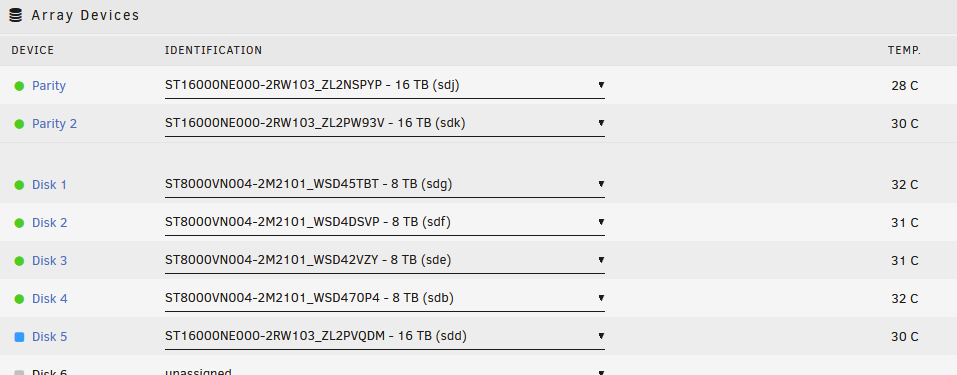
Yup you are correct. I did use the parity drive before i added it and did not pre-clear it. parity (sdj) root@NAS:~# fdisk -l /dev/sdj Disk /dev/sdj: 14.55 TiB, 16000900661248 bytes, 31251759104 sectors Disk model: ST16000NE000-2RW Units: sectors of 1 * 512 = 512 bytes Sector size (logical/physical): 512 bytes / 4096 bytes I/O size (minimum/optimal): 4096 bytes / 4096 bytes Disklabel type: gpt Disk identifier: 969E3CEE-0602-3C4B-8C24-CCB4AF681B02 Device Start End Sectors Size Type /dev/sdj1 2048 31251759070 31251757023 14.6T Linux filesystem Parity 2 (sdk) root@NAS:~# fdisk -l /dev/sdk Disk /dev/sdk: 14.55 TiB, 16000900661248 bytes, 31251759104 sectors Disk model: ST16000NE000-2RW Units: sectors of 1 * 512 = 512 bytes Sector size (logical/physical): 512 bytes / 4096 bytes I/O size (minimum/optimal): 4096 bytes / 4096 bytes Disklabel type: gpt Disk identifier: 0373AE92-FB71-44E1-84F2-5740B340029F Device Start End Sectors Size Type /dev/sdk1 64 31251759070 31251759007 14.6T Linux filesystem drive I'm trying to add (sdd) root@NAS:~# fdisk -l /dev/sdd Disk /dev/sdd: 14.55 TiB, 16000900661248 bytes, 31251759104 sectors Disk model: ST16000NE000-2RW Units: sectors of 1 * 512 = 512 bytes Sector size (logical/physical): 512 bytes / 4096 bytes I/O size (minimum/optimal): 4096 bytes / 4096 bytes Disklabel type: dos Disk identifier: 0x00000000 Device Boot Start End Sectors Size Id Type /dev/sdd1 1 4294967295 4294967295 2T 0 Empty Partition 1 does not start on physical sector boundary. So it looks like I need to take this new drive and make it the Parity drive. correct?
-
I had an array of six 8TB drives with two of them parity drives. I needed some more drives for another project so i got three 16 TB drives and planned on swapping them for the 8 TB drives. I swapped out the parity drive and rebuilt the array then did the same for Parity 2 with no issues. Now when i try and add(or replace) the last 16 TB drive to the array it says i cant start the array because "Disk in parity slot is not biggest." All three of these 16 TB drives are the same model and the exact same size. I tried to pre-clear the drive before adding and that didn't help either. I have attach the diagnostics zip. Any help would be greatly appreciated. nas-diagnostics-20221120-1924.zip