





Tetromino
Members
-
Joined
-
Last visited
-
So ensured all sessions were closed with the server, cleared the cache on all machines that touched the GUI but the error still persisted. So i downgraded the server back to 6.9.2, which cleared the error; rebuild the drive I unassigned and everything came back up.
-
Now that I can access my shares I'm going to take another back up of my data, then I'll restore to see if that resolves my GUI issue, then I'll rebuild. I'll update this thread when done. Thank you for the help thus far!
-
Would reverting to my previous OS version resolve the issue? I updated to 6.10.3 recently, I could restore back to 6.9.2.
-
From earlier this morning on a different pc. Would rebooting unraid + clearing browser cache on my current pc clear the stale configuration GUI error? Thus far I have closed all open browser windows, cleared browser cache & rebooted my machine. Still getting the GUI error.
-
I closed all browser sessions on my current pc; I may have a session open on a different pc I dont have access to atm. Currently stale configuration error is still there even after clearing browser cache.
-
Omg, yea it looks like my dockers are up and running; although it says "Array must be started to view docker containers" at the top of the screen. Should I reassign the drive and let it rebuild? I'm assuming it will take a while but the GUI wont tell me?
-
No nothing was changed in between diagnostics & screenshot & no cache disk. Been meaning to add one.
-
Starting the array with Disk 6 unassigned results in a stale configuration. tower-diagnostics-20220622-0950.zip
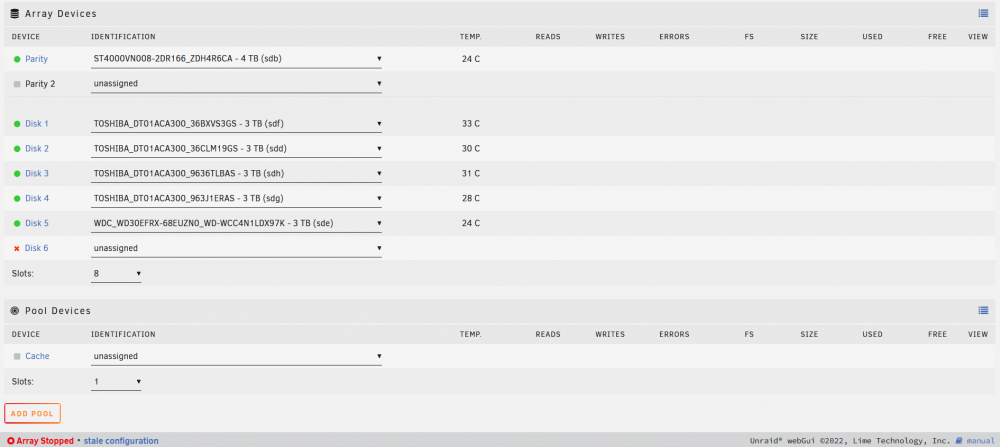
-
No, its not started now. Shall i start it and upload diagnostics?
-
Sorry to clarify: I unassigned the disk -> reassigned it -> then started the array in maintenance mode; disk 6 was assigned when starting the array (I did not start the array with an unassigned disk) After which I noticed the "device contents emulated" icon on disk 6. Its quite possible I interrupted something but there was no indication or warning of doing so.
-
No, I did not. It says device contents emulated on disk 6.
-
tower-diagnostics-20220622-0914.zip
-
-
I did not physically remove it; I unassigned it.
-
I had a genius show up at my house and shut off the main breaker without telling me; UPS lasted long enough for me to just get there and watch it shut down... FML. Now I'm getting a stale configuration error when starting the array. I fear I have made it worse by removing a drive and re-adding it; now disk 6 is emulated. How screwed am I? tower-syslog-20220622-1307.zip tower-diagnostics-20220622-0914.zip
