Brian Tichenor
Members
-
Joined
-
Last visited
Everything posted by Brian Tichenor
-
Figured out that I need to tape the 4 shucked drives that weren't being recognized. Had bought the 8 drives in two different batches. Guess one of those needed to tape the 3.3v and the others don't!
-
So I was upgrading from a U-NAS 810 enclosure to a Rosewill LS-4500U. In both rigs, I was using LSI 9211-8i 6G SAS HBA. In the U-NAS the SATA ports were connected to hot swap bays and now and in the new case the HBA SATA ports connect directly to the drives. I tested that the drives were still operational by taking them out of the enclosure and running them over USB enclosures on my Windows rig. The drives are operational and the files are still there. I then thought about testing it by running the drives that aren't showing up in the array through the U-NAS enclosure. So I hooked up power and SATA cables to the hot swap controller, plugged in the drives and now they show up in the array. So it seems to be somehow related to the fact the drives aren't spinning up or not being recognized when they're directly connected to the cables -- but works OK when done through the SATA hotswap structure (or a USB enclosure?)? The drives also don't get recognized when they're plugged directly into to the motherboard either. Any thoughts or help appreciated!
-
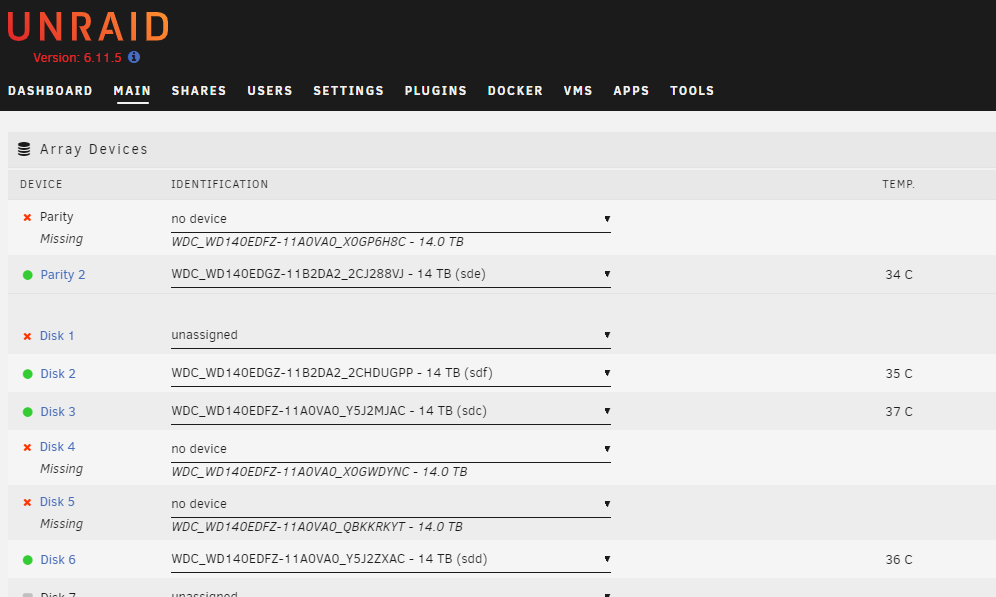
I moved migrated my server to a new enclosure, with no other changes, and when I restarted unraid I now have multiple disks showing "no device". I also can't start the array even in maintenance mode. At first I wasn't sure if it was the flashed HBA, but tried directly connecting a few of the drives to the motherboard and wasn't able to get them to show up there either. Attached is the device log. Not sure what to even do next and any help would be appreciated! 26gen-tower-diagnostics-20230223-1353.zip