



Skip to content
View in the app

A better way to browse. Learn more.

Unraid

A full-screen app on your home screen with push notifications, badges and more.

To install this app on iOS and iPadOS
  1. Tap the Share icon in Safari
  2. Scroll the menu and tap Add to Home Screen.
  3. Tap Add in the top-right corner.
To install this app on Android
  1. Tap the 3-dot menu (⋮) in the top-right corner of the browser.
  2. Tap Add to Home screen or Install app.
  3. Confirm by tapping Install.

Dreamcode

Members
  • Joined

  • Last visited

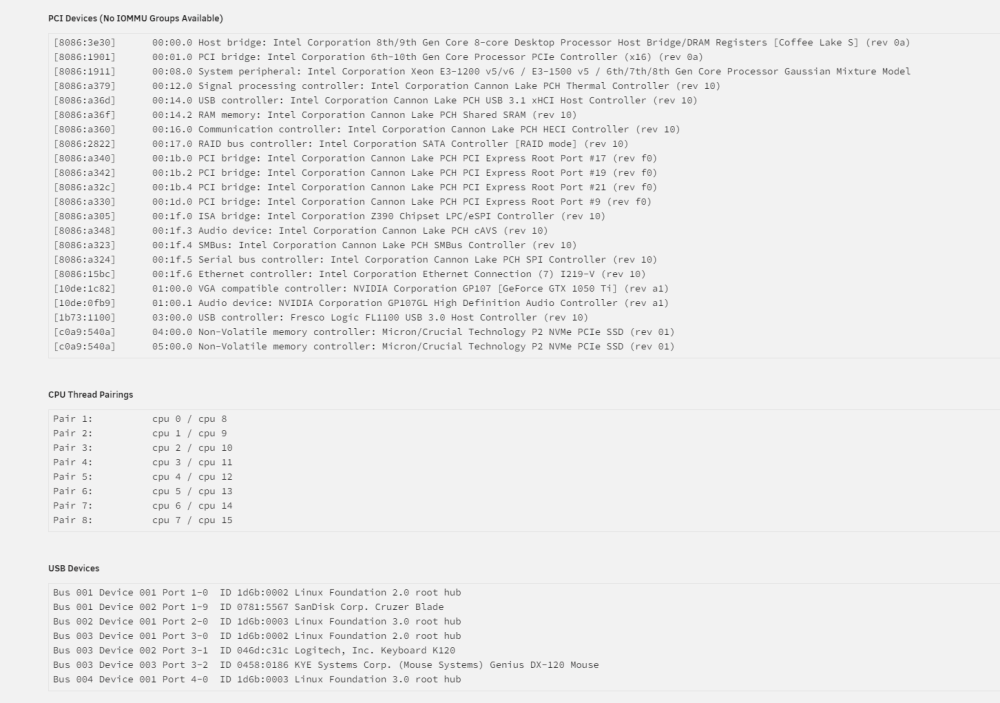
  1. nvm. I just needed to turn on Vt-d in the bios.
  2. I know I'm probably just missing something here. But maybe someone can point me in the right direction. I'm trying to pass a GPU and a PCI-E USB controller to a VM. But when I go the tools -> System Devices there are no tick boxes for me to untick. As far as I understand they need to be unticked here first before I can use them in my VM?
Account

Navigation

Search

Search

Configure browser push notifications

Chrome (Android)
  1. Tap the lock icon next to the address bar.
  2. Tap Permissions → Notifications.
  3. Adjust your preference.
Chrome (Desktop)
  1. Click the padlock icon in the address bar.
  2. Select Site settings.
  3. Find Notifications and adjust your preference.