haxellio
Members
-
Joined
-
Last visited
-
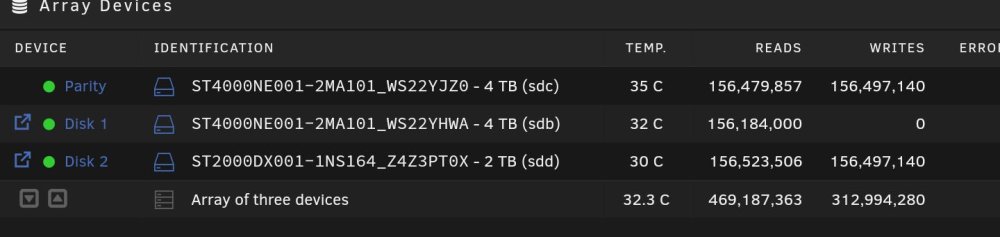
Hi! I want to convert all my array drives from xfs to zfs to utilize zfs's compression and snapshot feature. My solution to this looks like this: I have disk1 and disk2. Disk2 just got installed today and is totally empty, so I've formatted it with zfs with no problem. To convert disk1 from xfs to zfs, I want to transfer all data from it to disk2. Currently, I'm in progress of copying all data from disk1 to disk2, after that I'll count all files in disk1 and 2 and if results are the same, I'll erase disk1 and format it to zfs. My questions are: 1. Is my process valid and I didn't forget something important? The shares I'm transferring are not in use by any process and are just user shares, not system ones. 2. Is this normal that when transferring data from disk1 to disk2, I get this amount of parity reads? Thanks.