





Lacetti
Members
-
Joined
-
Last visited
-
@ghost82, I fixed it. Mac Os and Windows can now run through a virtual graphics card. But through the built-in I see only a black screen on the monitor
-
And when you try to start Windonws 10, there is also a black screenBut now in the virtual card i see this
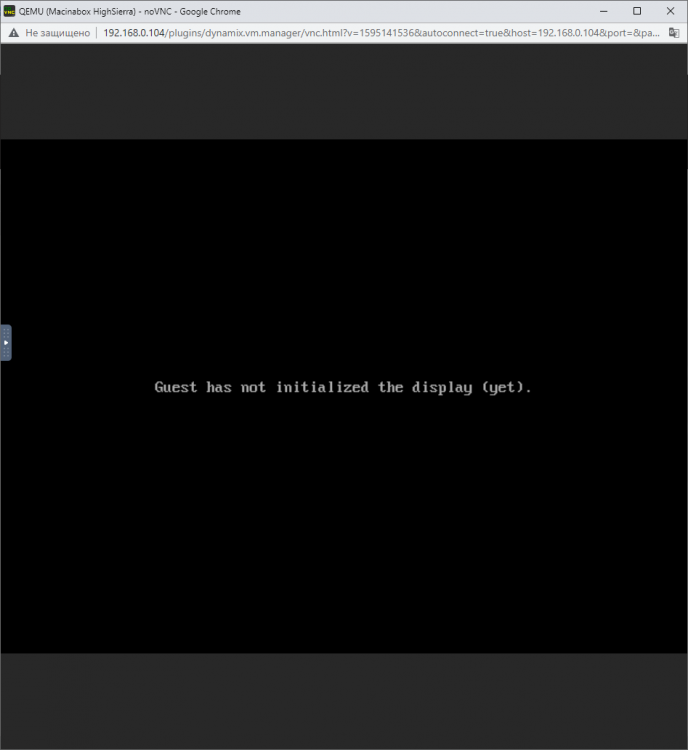 Oh i fixed this error, but only black screen@ghost82now i have this error. internal error: qemu unexpectedly closed the monitor: 2021-12-25T10:35:28.702651Z qemu-system-x86_64: warning: host doesn't support requested feature: CPUID.0DH:EAX.xsaveopt [bit 0] 2021-12-25T10:35:28.705792Z qemu-system-x86_64: warning: host doesn't support requested feature: CPUID.01H:ECX.pcid [bit 17] 2021-12-25T10:35:28.705811Z qemu-system-x86_64: warning: host doesn't support requested feature: CPUID.0DH:EAX.xsaveopt [bit 0] 2021-12-25T10:35:28.708580Z qemu-system-x86_64: warning: host doesn't support requested feature: CPUID.01H:ECX.pcid [bit 17] 2021-12-25T10:35:28.708603Z qemu-system-x86_64: warning: host doesn't support requested feature: CPUID.0DH:EAX.xsaveopt [bit 0] 2021-12-25T10:35:28.712010Z qemu-system-x86_64: warning: host doesn't support requested feature: CPUID.01H:ECX.pcid [bit 17] 2021-12-25T10:35:28.712045Z qemu-system-x86_64: warning: host doesn't support requested feature: CPUID.0DH:EAX.xsaveopt [bit 0] tower-diagnostics-20211225-1236.zip@ghost82 thanks! I try it now@ghost82Hi, the image on windows also cannot be displayed through the Gt640. Only black screenHello! tower-diagnostics-20211224-2008.zip<?xml version='1.0' encoding='UTF-8'?> <domain type='kvm' xmlns:qemu='http://libvirt.org/schemas/domain/qemu/1.0'> <name>Macinabox HighSierra</name> <uuid>0f75ad10-63be-4133-bf77-61b40a01d02d</uuid> <description>MacOS High Sierra</description> <metadata> <vmtemplate xmlns="unraid" name="Windows 10" icon="default.png" os="osx"/> </metadata> <memory unit='KiB'>4194304</memory> <currentMemory unit='KiB'>4194304</currentMemory> <memoryBacking> <nosharepages/> </memoryBacking> <vcpu placement='static'>2</vcpu> <cputune> <vcpupin vcpu='0' cpuset='0'/> <vcpupin vcpu='1' cpuset='1'/> </cputune> <os> <type arch='x86_64' machine='pc-q35-4.2'>hvm</type> <loader readonly='yes' type='pflash'>/mnt/user/system/custom_ovmf/Macinabox_CODE-pure-efi.fd</loader> <nvram>/etc/libvirt/qemu/nvram/0f75ad10-63be-4133-bf77-61b40a01d02d_VARS-pure-efi.fd</nvram> </os> <features> <acpi/> <apic/> </features> <cpu mode='host-passthrough' check='none' migratable='on'> <topology sockets='1' dies='1' cores='1' threads='2'/> <cache mode='passthrough'/> <feature policy='require' name='topoext'/> </cpu> <clock offset='utc'> <timer name='rtc' tickpolicy='catchup'/> <timer name='pit' tickpolicy='delay'/> <timer name='hpet' present='no'/> </clock> <on_poweroff>destroy</on_poweroff> <on_reboot>restart</on_reboot> <on_crash>restart</on_crash> <devices> <emulator>/usr/local/sbin/qemu</emulator> <disk type='file' device='disk'> <driver name='qemu' type='raw' cache='writeback'/> <source file='/mnt/user/isos/HighSierra-opencore.img'/> <target dev='hdc' bus='sata'/> <boot order='1'/> <address type='drive' controller='0' bus='0' target='0' unit='2'/> </disk> <disk type='file' device='disk'> <driver name='qemu' type='raw' cache='writeback'/> <source file='/mnt/user/isos/HighSierra-install.img'/> <target dev='hdd' bus='sata'/> <address type='drive' controller='0' bus='0' target='0' unit='3'/> </disk> <disk type='file' device='disk'> <driver name='qemu' type='raw' cache='writeback'/> <source file='/mnt/user/domains/Macinabox HighSierra/macos_disk.img'/> <target dev='hde' bus='sata'/> <address type='drive' controller='0' bus='0' target='0' unit='4'/> </disk> <controller type='pci' index='0' model='pcie-root'/> <controller type='pci' index='1' model='pcie-root-port'> <model name='pcie-root-port'/> <target chassis='1' port='0x8'/> <address type='pci' domain='0x0000' bus='0x00' slot='0x01' function='0x0' multifunction='on'/> </controller> <controller type='pci' index='2' model='pcie-root-port'> <model name='pcie-root-port'/> <target chassis='2' port='0x9'/> <address type='pci' domain='0x0000' bus='0x00' slot='0x01' function='0x1'/> </controller> <controller type='pci' index='3' model='pcie-root-port'> <model name='pcie-root-port'/> <target chassis='3' port='0xa'/> <address type='pci' domain='0x0000' bus='0x00' slot='0x01' function='0x2'/> </controller> <controller type='pci' index='4' model='pcie-root-port'> <model name='pcie-root-port'/> <target chassis='4' port='0x13'/> <address type='pci' domain='0x0000' bus='0x00' slot='0x02' function='0x3'/> </controller> <controller type='virtio-serial' index='0'> <address type='pci' domain='0x0000' bus='0x02' slot='0x00' function='0x0'/> </controller> <controller type='sata' index='0'> <address type='pci' domain='0x0000' bus='0x00' slot='0x1f' function='0x2'/> </controller> <controller type='usb' index='0' model='ich9-ehci1'> <address type='pci' domain='0x0000' bus='0x00' slot='0x07' function='0x7'/> </controller> <controller type='usb' index='0' model='ich9-uhci1'> <master startport='0'/> <address type='pci' domain='0x0000' bus='0x00' slot='0x07' function='0x0' multifunction='on'/> </controller> <controller type='usb' index='0' model='ich9-uhci2'> <master startport='2'/> <address type='pci' domain='0x0000' bus='0x00' slot='0x07' function='0x1'/> </controller> <controller type='usb' index='0' model='ich9-uhci3'> <master startport='4'/> <address type='pci' domain='0x0000' bus='0x00' slot='0x07' function='0x2'/> </controller> <interface type='bridge'> <mac address='52:54:00:37:97:f2'/> <source bridge='br0'/> <model type='vmxnet3'/> <address type='pci' domain='0x0000' bus='0x01' slot='0x00' function='0x0'/> </interface> <serial type='pty'> <target type='isa-serial' port='0'> <model name='isa-serial'/> </target> </serial> <console type='pty'> <target type='serial' port='0'/> </console> <channel type='unix'> <target type='virtio' name='org.qemu.guest_agent.0'/> <address type='virtio-serial' controller='0' bus='0' port='1'/> </channel> <input type='tablet' bus='usb'> <address type='usb' bus='0' port='1'/> </input> <input type='mouse' bus='ps2'/> <input type='keyboard' bus='ps2'/> <hostdev mode='subsystem' type='pci' managed='yes'> <driver name='vfio'/> <source> <address domain='0x0000' bus='0x05' slot='0x00' function='0x0'/> </source> <rom file='/mnt/disk1/isos/vbios/GT640.rom'/> <address type='pci' domain='0x0000' bus='0x03' slot='0x00' function='0x0'/> </hostdev> <hostdev mode='subsystem' type='pci' managed='yes'> <driver name='vfio'/> <source> <address domain='0x0000' bus='0x05' slot='0x00' function='0x1'/> </source> <address type='pci' domain='0x0000' bus='0x04' slot='0x00' function='0x0'/> </hostdev> <hostdev mode='subsystem' type='usb' managed='no'> <source> <vendor id='0x04d9'/> <product id='0xa09e'/> </source> <address type='usb' bus='0' port='2'/> </hostdev> <hostdev mode='subsystem' type='usb' managed='no'> <source> <vendor id='0xc0f4'/> <product id='0x07c0'/> </source> <address type='usb' bus='0' port='3'/> </hostdev> <memballoon model='none'/> </devices> <qemu:commandline> <qemu:arg value='-usb'/> <qemu:arg value='-device'/> <qemu:arg value='usb-kbd,bus=usb-bus.0'/> <qemu:arg value='-device'/> <qemu:arg value='************************'/> <qemu:arg value='-smbios'/> <qemu:arg value='type=2'/> <qemu:arg value='-cpu'/> <qemu:arg value='Penryn,kvm=on,vendor=GenuineIntel,+invtsc,vmware-cpuid-freq=on,+pcid,+ssse3,+sse4.2,+popcnt,+avx,+aes,+xsave,+xsaveopt,check'/> </qemu:commandline> </domain>tower-diagnostics-20211224-1617.zip
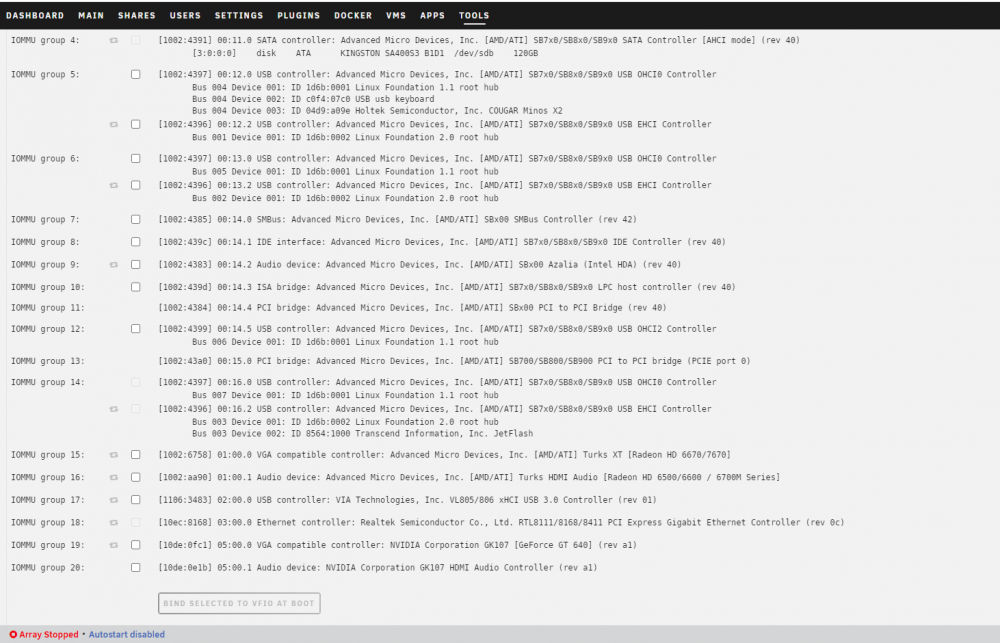 My syslinux configuration: default menu.c32 menu title Lime Technology, Inc. prompt 0 timeout 50 label Unraid OS menu default kernel /bzimage append video=efifb:off vfio-pci.ids=10de:21c4,10de:1aeb,10de:1aec,10de:1aed pcie_acs_override=downstream,multifunction initrd=/bzroot label Unraid OS GUI Mode kernel /bzimage append video=efifb:off vfio-pci.ids=10de:21c4,10de:1aeb,10de:1aec,10de:1aed pcie_acs_override=downstream,multifunction initrd=/bzroot,/bzroot-gui label Unraid OS Safe Mode (no plugins, no GUI) kernel /bzimage append initrd=/bzroot unraidsafemode label Unraid OS GUI Safe Mode (no plugins) kernel /bzimage append initrd=/bzroot video=efifb:off,/bzroot-gui unraidsafemode label Memtest86+ kernel /memtesttower-diagnostics-20211224tower-diagnostics-20211224-1617.zip-1617.zipLacetti joined the communityHello everyone. Unable to install macOS High Sierra via Macinabox. The top PCI slot has a Radeon HD 6670 graphics card. In the bottom PCI slot of the GeForce GT 640. Gigabyte GA-970A-DS3P motherboard. On the virtual video card, the High Sierra works, but when I try to turn it on with the GeForce GT 640 video card, I see only a black screen. VBios rom GeForce GT 640 was taken from GPU-Z. In VM Manager "ACS PCIe Override: Both" "VFIO Allow Insecure Interrupts: None" In System Devices, no item is checked. If anyone has encountered such a problem, please tell me a solution.


