




Skip to content
View in the app

A better way to browse. Learn more.

Unraid

A full-screen app on your home screen with push notifications, badges and more.

To install this app on iOS and iPadOS
  1. Tap the Share icon in Safari
  2. Scroll the menu and tap Add to Home Screen.
  3. Tap Add in the top-right corner.
To install this app on Android
  1. Tap the 3-dot menu (⋮) in the top-right corner of the browser.
  2. Tap Add to Home screen or Install app.
  3. Confirm by tapping Install.

heyudude

Members
  • Joined

  • Last visited

  1. Indeed I removed it via the App menu in the webinterface, same place where I did installed it. I installed it again, that failed obviously. Then another uninstall action and my issue was solved. No clue what it was, I presume my bad.
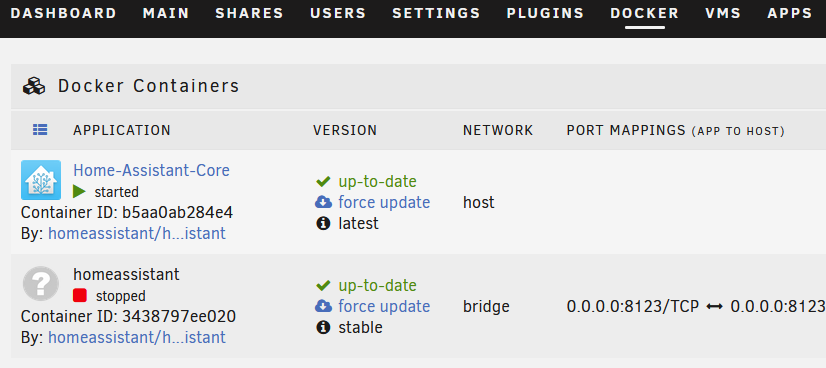
  2. Hi, I am trying Unraid (and I love it so far), I installed some dockers to try our. One of the Home Automation did not work and I tried to install the Home Automation Core (which is working fine). I uninstalled via the GUI the Home Automation docker. However it stays visible in the menu: I use Unraid Version: 6.10.0-rc2 How can I remove the entry? Manually or any other way?
Account

Navigation

Search

Search

Configure browser push notifications

Chrome (Android)
  1. Tap the lock icon next to the address bar.
  2. Tap Permissions → Notifications.
  3. Adjust your preference.
Chrome (Desktop)
  1. Click the padlock icon in the address bar.
  2. Select Site settings.
  3. Find Notifications and adjust your preference.