




Skip to content
View in the app

A better way to browse. Learn more.

Unraid

A full-screen app on your home screen with push notifications, badges and more.

To install this app on iOS and iPadOS
  1. Tap the Share icon in Safari
  2. Scroll the menu and tap Add to Home Screen.
  3. Tap Add in the top-right corner.
To install this app on Android
  1. Tap the 3-dot menu (⋮) in the top-right corner of the browser.
  2. Tap Add to Home screen or Install app.
  3. Confirm by tapping Install.

DaneNYC

Members
  • Joined

  • Last visited

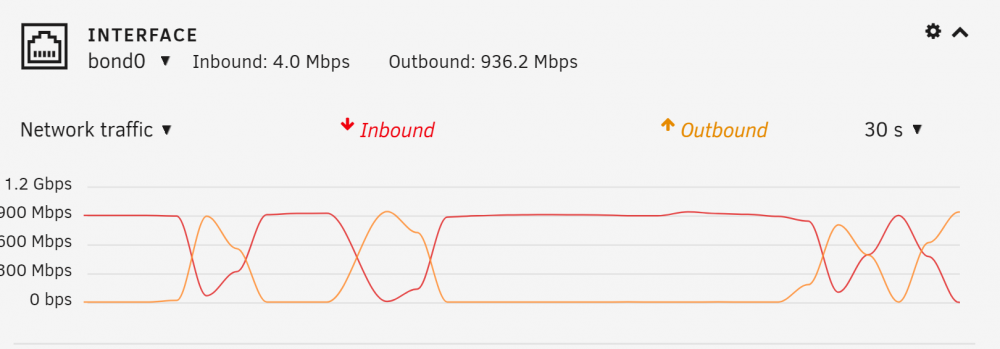
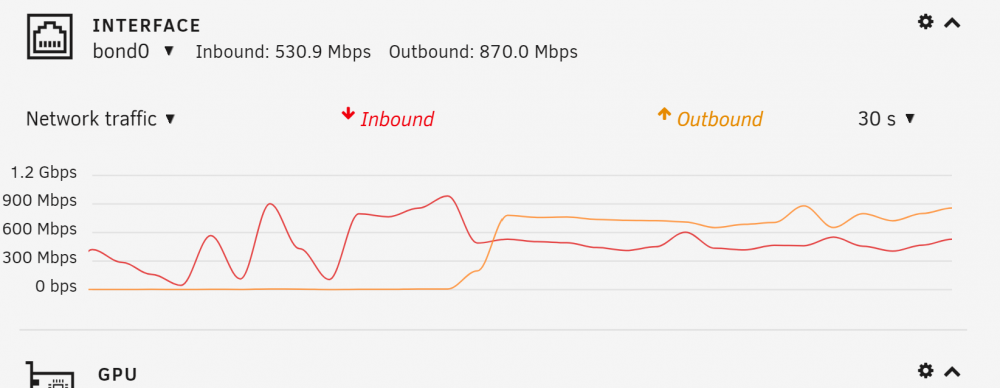
  1. I have my Unraid server setup to cache NZBGet downloads to a local SSD and then DirectUnpack to a remote share synology NAS. My problem is, it can't seem to upload & download at the same time. This is cutting my speeds in half between the two devices when downloading through NZBGet. Normal file transfers are able to maximize both up and down to near gigabit levels so I don't think it's an ethernet wire or switch issue. NZBGet example of how this looks in the Unraid dashboard, you can see it either uploads or downloads but can't do both: Vs. normal file transfers: I've tried to figure this out for quite a while to no avail, hope someone can help, thanks!
Account

Navigation

Search

Search

Configure browser push notifications

Chrome (Android)
  1. Tap the lock icon next to the address bar.
  2. Tap Permissions → Notifications.
  3. Adjust your preference.
Chrome (Desktop)
  1. Click the padlock icon in the address bar.
  2. Select Site settings.
  3. Find Notifications and adjust your preference.