





dummy dude
Members
-
Joined
-
Last visited
-
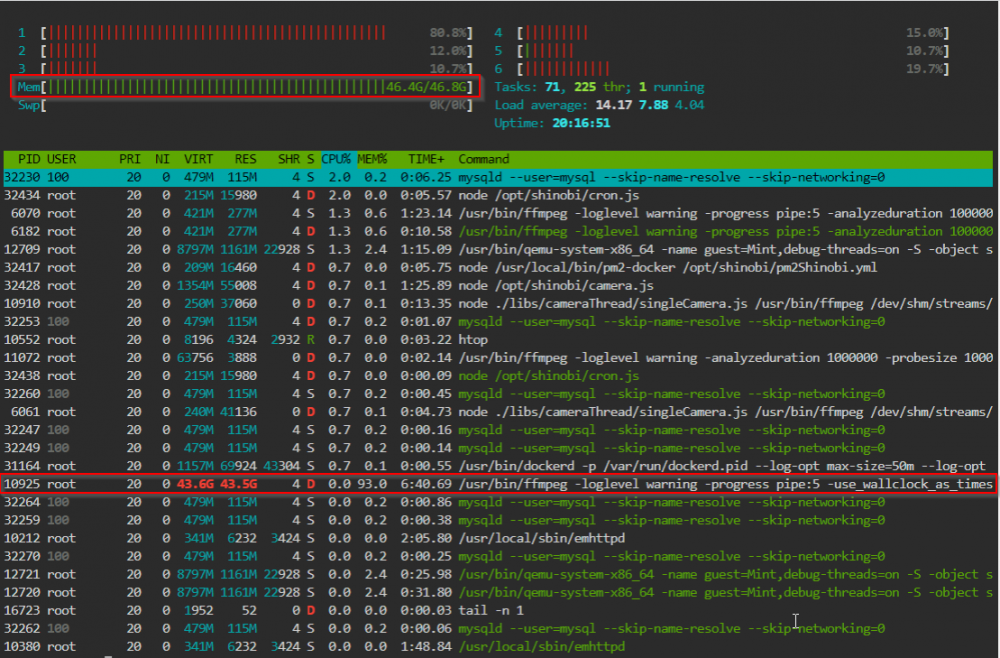
seems like the problem caused by shinobi docker. just don't know how to fix it.
-
I have two dockers: shinobi pro and netdata running, one VM window10 most of time off. But i keep getting this out of memory error from fix common problem app. Can someone help with troubleshooting? Thanks, From HTOP display: 1 [||||||| 6.0%] 4 [|||||||| 6.0%] 2 [|||||||||||||||||| 16.7%] 5 [|||||||||| 8.7%] 3 [||||||||| 7.3%] 6 [||||||||| 7.3%] Mem[||||||||||||||||||||||||||||||||||||||||||||||||||||||||||||||||||||||||||||||||||||||||||||||||18.4G/46.8G] Tasks: 79, 230 thr; 2 running Swp[ 0K/0K] Load average: 0.97 0.99 1.20 Uptime: 06:18:29 PID USER PRI NI VIRT RES SHR S CPU% MEM% TIME+ Command 15106 root 20 0 16.9G 16.1G 21596 S 37.0 34.5 2h01:40 /usr/bin/qemu-system-x86_64 -name guest=Garden,debug-threads=on -S -object secret,id=masterKey0,format=raw,file=/var/lib/libvirt/qemu/domain-3-Garden/master-key.aes -blockd 20429 root 20 0 436M 329M 17904 S 20.2 0.7 1h18:57 /usr/bin/ffmpeg -loglevel warning -progress pipe:5 -use_wallclock_as_timestamps 1 -analyzeduration 1000000 -probesize 1000000 -fflags +igndts -rtsp_transport tcp -i rtsp:// 15115 root 20 0 16.9G 16.1G 21596 S 15.5 34.5 33:39.67 /usr/bin/qemu-system-x86_64 -name guest=Garden,debug-threads=on -S -object secret,id=masterKey0,format=raw,file=/var/lib/libvirt/qemu/domain-3-Garden/master-key.aes -blockd 14470 root 20 0 426M 296M 5708 S 6.7 0.6 26:47.44 /usr/bin/ffmpeg -loglevel warning -progress pipe:5 -analyzeduration 1000000 -probesize 1000000 -fflags +igndts -rtsp_transport tcp -i rtsp://admin:[email protected] 15116 root 20 0 16.9G 16.1G 21596 S 4.7 34.5 26:55.24 /usr/bin/qemu-system-x86_64 -name guest=Garden,debug-threads=on -S -object secret,id=masterKey0,format=raw,file=/var/lib/libvirt/qemu/domain-3-Garden/master-key.aes -blockd 15118 root 20 0 16.9G 16.1G 21596 R 4.0 34.5 20:58.84 /usr/bin/qemu-system-x86_64 -name guest=Garden,debug-threads=on -S -object secret,id=masterKey0,format=raw,file=/var/lib/libvirt/qemu/domain-3-Garden/master-key.aes -blockd 15117 root 20 0 16.9G 16.1G 21596 S 3.4 34.5 25:02.59 /usr/bin/qemu-system-x86_64 -name guest=Garden,debug-threads=on -S -object secret,id=masterKey0,format=raw,file=/var/lib/libvirt/qemu/domain-3-Garden/master-key.aes -blockd 20439 root 20 0 436M 329M 17904 S 3.4 0.7 9:26.25 /usr/bin/ffmpeg -loglevel warning -progress pipe:5 -use_wallclock_as_timestamps 1 -analyzeduration 1000000 -probesize 1000000 -fflags +igndts -rtsp_transport tcp -i rtsp:// 20445 root 20 0 436M 329M 17904 S 2.7 0.7 9:25.14 /usr/bin/ffmpeg -loglevel warning -progress pipe:5 -use_wallclock_as_timestamps 1 -analyzeduration 1000000 -probesize 1000000 -fflags +igndts -rtsp_transport tcp -i rtsp:// 20441 root 20 0 436M 329M 17904 S 2.7 0.7 9:25.25 /usr/bin/ffmpeg -loglevel warning -progress pipe:5 -use_wallclock_as_timestamps 1 -analyzeduration 1000000 -probesize 1000000 -fflags +igndts -rtsp_transport tcp -i rtsp:// 20442 root 20 0 436M 329M 17904 S 2.0 0.7 9:25.41 /usr/bin/ffmpeg -loglevel warning -progress pipe:5 -use_wallclock_as_timestamps 1 -analyzeduration 1000000 -probesize 1000000 -fflags +igndts -rtsp_transport tcp -i rtsp:// 20444 root 20 0 436M 329M 17904 S 2.0 0.7 9:28.77 /usr/bin/ffmpeg -loglevel warning -progress pipe:5 -use_wallclock_as_timestamps 1 -analyzeduration 1000000 -probesize 1000000 -fflags +igndts -rtsp_transport tcp -i rtsp:// 20443 root 20 0 436M 329M 17904 S 2.0 0.7 9:25.30 /usr/bin/ffmpeg -loglevel warning -progress pipe:5 -use_wallclock_as_timestamps 1 -analyzeduration 1000000 -probesize 1000000 -fflags +igndts -rtsp_transport tcp -i rtsp:// 20440 root 20 0 436M 329M 17904 S 2.0 0.7 9:25.64 /usr/bin/ffmpeg -loglevel warning -progress pipe:5 -use_wallclock_as_timestamps 1 -analyzeduration 1000000 -probesize 1000000 -fflags +igndts -rtsp_transport tcp -i rtsp:// 14509 root 20 0 426M 296M 5708 S 1.3 0.6 3:25.71 /usr/bin/ffmpeg -loglevel warning -progress pipe:5 -analyzeduration 1000000 -probesize 1000000 -fflags +igndts -rtsp_transport tcp -i rtsp://admin:[email protected] 14513 root 20 0 426M 296M 5708 S 0.7 0.6 3:25.75 /usr/bin/ffmpeg -loglevel warning -progress pipe:5 -analyzeduration 1000000 -probesize 1000000 -fflags +igndts -rtsp_transport tcp -i rtsp://admin:[email protected] 14512 root 20 0 426M 296M 5708 S 0.7 0.6 3:25.25 /usr/bin/ffmpeg -loglevel warning -progress pipe:5 -analyzeduration 1000000 -probesize 1000000 -fflags +igndts -rtsp_transport tcp -i rtsp://admin:[email protected] 14510 root 20 0 426M 296M 5708 S 0.7 0.6 3:25.29 /usr/bin/ffmpeg -loglevel warning -progress pipe:5 -analyzeduration 1000000 -probesize 1000000 -fflags +igndts -rtsp_transport tcp -i rtsp://admin:[email protected] 14514 root 20 0 426M 296M 5708 S 0.7 0.6 3:24.82 /usr/bin/ffmpeg -loglevel warning -progress pipe:5 -analyzeduration 1000000 -probesize 1000000 -fflags +igndts -rtsp_transport tcp -i rtsp://admin:[email protected] 14511 root 20 0 426M 296M 5708 S 0.7 0.6 3:24.53 /usr/bin/ffmpeg -loglevel warning -progress pipe:5 -analyzeduration 1000000 -probesize 1000000 -fflags +igndts -rtsp_transport tcp -i rtsp://admin:[email protected] 14508 root 20 0 426M 296M 5708 S 0.7 0.6 3:26.13 /usr/bin/ffmpeg -loglevel warning -progress pipe:5 -analyzeduration 1000000 -probesize 1000000 -fflags +igndts -rtsp_transport tcp -i rtsp://admin:[email protected] 17023 root 20 0 8756 5096 3204 R 0.7 0.0 0:00.51 htop 10378 root 20 0 277M 6108 3412 S 0.7 0.0 0:03.17 /usr/local/sbin/emhttpd 14157 root 20 0 1361M 87244 17948 S 0.0 0.2 2:14.53 node /opt/shinobi/camera.js 10380 root 20 0 277M 6108 3412 S 0.0 0.0 0:34.13 /usr/local/sbin/emhttpd 14462 root 20 0 238M 35796 11080 S 0.0 0.1 1:07.53 node ./libs/cameraThread/singleCamera.js /usr/bin/ffmpeg /dev/shm/streams/MjZNmrl9q8/YlbBfhKeBS/cmd.txt 13124 root 20 0 415M 16180 724 S 0.0 0.0 0:28.48 /usr/local/sbin/shfs /mnt/user -disks 31 -o noatime,allow_other -o remember=0 13177 100 20 0 480M 112M 456 S 0.0 0.2 0:01.82 mysqld --user=mysql --skip-name-resolve --skip-networking=0 20414 root 20 0 246M 85252 27916 S 0.0 0.2 1:06.16 node ./libs/cameraThread/singleCamera.js /usr/bin/ffmpeg /dev/shm/streams/MjZNmrl9q8/zwWqznonME/cmd.txt 10594 root 20 0 415M 16180 724 S 0.0 0.0 0:28.49 /usr/local/sbin/shfs /mnt/user -disks 31 -o noatime,allow_other -o remember=0 10559 root 20 0 415M 16180 724 S 0.0 0.0 2:50.62 /usr/local/sbin/shfs /mnt/user -disks 31 -o noatime,allow_other -o remember=0 20478 root 20 0 246M 85252 27916 S 0.0 0.2 0:06.72 node ./libs/cameraThread/singleCamera.js /usr/bin/ffmpeg /dev/shm/streams/MjZNmrl9q8/zwWqznonME/cmd.txt 14531 root 20 0 426M 296M 5708 S 0.0 0.6 0:02.40 /usr/bin/ffmpeg -loglevel warning -progress pipe:5 -analyzeduration 1000000 -probesize 1000000 -fflags +igndts -rtsp_transport tcp -i rtsp://admin:[email protected] 10212 root 20 0 277M 6108 3412 S 0.0 0.0 0:39.51 /usr/local/sbin/emhttpd 15843 root 20 0 100M 18944 12748 S 0.0 0.0 0:00.12 php-fpm: pool www 15478 root 20 0 100M 19404 13068 S 0.0 0.0 0:00.19 php-fpm: pool www 10560 root 20 0 415M 16180 724 S 0.0 0.0 0:28.51 /usr/local/sbin/shfs /mnt/user -disks 31 -o noatime,allow_other -o remember=0 root@Tower:~# tower-diagnostics-20220105-2127.zip
-
Created the VM OK, however once the linux booted, clicked the installation icon, the installation hang. Previously all type of VM installations were OK. Ever since I tried the gvt-g plugin, the VM installation hang problem occurred. Even after I removed the gvt-g plugin, the problem still thtower-diagnostics-20220102-1140.zipere.
