





Shaboobala
Members
-
Joined
-
Last visited
-
thanks for the clarification and quick responses really appreciated
-
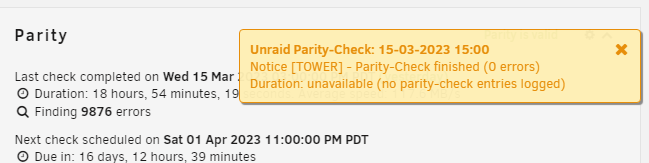
Sorry I dont mean to sound like a total idiot but how do i correct the sync errors. Also the pop up that stating parity check ended said there were 0 errors
-
I had a power outage and the server shut down. When I brought it back online it started running a parity check and now I am seeing almost 10K in sync errors. Hoping someone could help me out on what my next course of action would be. Also not sure if its relavent but I had my USB die on me the week prior and had to rebuild the system and since it was all the same drive and one new cache drive I checked the box saying that parity was valid. I suspect this is where the errors are coming from but was hoping someone could help confirm. tower-diagnostics-20230315-1410.zip
-
The bash runs the script but it appears I am having permission issues when it tries to move the file. It shows where the files are located and where it wants to move them but then I get this error. Any ideas @Meles Meles
-
Thanks @Meles Meles I am trying to use the consld8 script and earlier in the thread it says to execute it by using this comand if i were to bash would I put it before find? Sprry for my ignorance is its and obvious answer just trying to learn.
-
Thank you @itimpi for responding. I am pretty new to this. Do you know if there is a tutorial that I can read to learn how to do that. Or do you have time to help guide me through the process?
-
I am hoping for a little help I tried installing using the method described but I am getting permission denied errors. I was hoping someone could help me figure out what is wrong. Thanks

