





jasonbstanding
Members
-
Joined
-
Last visited
Everything posted by jasonbstanding
-
Many thanks @Michael_P !
-
beehouse-diagnostics-20260621-1312.zip
-
I feel like I'm not having much luck with my little server After a saga earlier in the year which this forum helped track down to a faulty power switch, I disconnected the power switch and rebooted. Once the machine came back up it reported one of my drives as Disabled. I've just tried reseating all the power & SATA cables, and then swapping the SATA cables between 2 of the drives, but it's still happening. Diagnostics attached. Any help greatly appreciated. beehouse-diagnostics-20250418-1120.zip
-
I'm really struggling to understand what's going on with my Unraid box here (7.0.0, patched & updated along the way since around Jan 2022). It was running stably for ages, then started randomly shutting down/power cycling (including shutting down then after about half an hour booting up again without anyone going near it). Some people suggested dust might be a factor so I gave it a going over with an air duster and it seemed to start behaving itself again. Then, just last week it started randomly shutting down/power cycling a LOT. I tried following the instructions on after seeing "Power key pressed short." appearing in the syslog. Last night I hooked syslog up to talk to Papertrail, and today its been logging lots of this sort of thing: Feb 26 04:16:47 Beehouse kernel docker0: port 2(veth70f363a) entered blocking state Feb 26 04:16:47 Beehouse kernel docker0: port 2(veth70f363a) entered forwarding state Feb 26 04:16:49 Beehouse kernel docker0: port 3(veth9a4e905) entered disabled state Feb 26 04:16:49 Beehouse kernel veth735cba9: renamed from eth0 Feb 26 04:16:49 Beehouse kernel docker0: port 3(veth9a4e905) entered disabled state Feb 26 04:16:49 Beehouse kernel veth9a4e905 (unregistering): left allmulticast mode Feb 26 04:16:49 Beehouse kernel veth9a4e905 (unregistering): left promiscuous mode Feb 26 04:16:49 Beehouse kernel docker0: port 3(veth9a4e905) entered disabled state Feb 26 04:16:49 Beehouse kernel docker0: port 3(veth65c51ad) entered blocking state Feb 26 04:16:49 Beehouse kernel docker0: port 3(veth65c51ad) entered disabled state Feb 26 04:16:49 Beehouse kernel veth65c51ad: entered allmulticast mode Feb 26 04:16:49 Beehouse kernel veth65c51ad: entered promiscuous mode Feb 26 04:16:49 Beehouse kernel docker0: port 3(veth65c51ad) entered blocking state Feb 26 04:16:49 Beehouse kernel docker0: port 3(veth65c51ad) entered forwarding state Feb 26 04:16:49 Beehouse kernel eth0: renamed from veth6b38cab Feb 26 04:20:12 Beehouse elogind-daemon Power key pressed short. Feb 26 04:20:12 Beehouse elogind-daemon Power key pressed short. Feb 26 04:20:12 Beehouse elogind-daemon Power key pressed short. Feb 26 04:20:18 Beehouse elogind-daemon Power key pressed short. Feb 26 04:30:34 Beehouse elogind-daemon Power key pressed short. Feb 26 04:34:38 Beehouse elogind-daemon Power key pressed short. Feb 26 04:34:38 Beehouse elogind-daemon Power key pressed short. Feb 26 04:38:27 Beehouse elogind-daemon Power key pressed short. Feb 26 04:38:27 Beehouse elogind-daemon Power key pressed short. Feb 26 04:38:27 Beehouse elogind-daemon Power key pressed short. Feb 26 04:38:27 Beehouse elogind-daemon Power key pressed short. Feb 26 04:40:01 Beehouse kernel docker0: port 8(vethba98ee7) entered blocking state Feb 26 04:40:01 Beehouse kernel docker0: port 8(vethba98ee7) entered disabled state Feb 26 04:40:01 Beehouse kernel vethba98ee7: entered allmulticast mode Feb 26 04:40:01 Beehouse kernel vethba98ee7: entered promiscuous mode Feb 26 04:40:01 Beehouse kernel eth0: renamed from vethb7ba94e Feb 26 04:40:01 Beehouse kernel docker0: port 8(vethba98ee7) entered blocking state Feb 26 04:40:01 Beehouse kernel docker0: port 8(vethba98ee7) entered forwarding state Feb 26 04:40:03 Beehouse kernel docker0: port 8(vethba98ee7) entered disabled state Feb 26 04:40:03 Beehouse kernel vethb7ba94e: renamed from eth0 Feb 26 04:40:03 Beehouse kernel docker0: port 8(vethba98ee7) entered disabled state Feb 26 04:40:03 Beehouse kernel vethba98ee7 (unregistering): left allmulticast mode I mean, it REALLY thinks someone's pushing that power key. Feb 26 07:47:01 Beehouse kernel veth0108195 (unregistering): left allmulticast mode Feb 26 07:47:01 Beehouse kernel veth0108195 (unregistering): left promiscuous mode Feb 26 07:47:01 Beehouse kernel docker0: port 8(veth0108195) entered disabled state Feb 26 07:50:37 Beehouse elogind-daemon Power key pressed short. Feb 26 07:50:37 Beehouse elogind-daemon Power key pressed short. Feb 26 07:50:37 Beehouse elogind-daemon Power key pressed short. Feb 26 07:50:37 Beehouse elogind-daemon Power key pressed short. Feb 26 07:52:02 Beehouse elogind-daemon Power key pressed short. Feb 26 08:10:38 Beehouse elogind-daemon Power key pressed short. Feb 26 08:10:38 Beehouse elogind-daemon Power key pressed short. Feb 26 08:21:39 Beehouse elogind-daemon Power key pressed short. Feb 26 08:42:40 Beehouse elogind-daemon Power key pressed short. Feb 26 08:42:40 Beehouse elogind-daemon Power key pressed short. Feb 26 08:42:41 Beehouse elogind-daemon Power key pressed short. Feb 26 08:47:01 Beehouse kernel docker0: port 8(veth3a0750e) entered blocking state Feb 26 08:47:01 Beehouse kernel docker0: port 8(veth3a0750e) entered disabled state Feb 26 08:47:01 Beehouse kernel veth3a0750e: entered allmulticast mode Feb 26 08:47:01 Beehouse kernel veth3a0750e: entered promiscuous mode Feb 26 08:47:01 Beehouse kernel eth0: renamed from veth3404e4e Feb 26 08:47:01 Beehouse kernel docker0: port 8(veth3a0750e) entered blocking state Feb 26 08:47:01 Beehouse kernel docker0: port 8(veth3a0750e) entered forwarding state Feb 26 08:47:02 Beehouse kernel docker0: port 8(veth3a0750e) entered disabled state Feb 26 08:47:02 Beehouse kernel veth3404e4e: renamed from eth0 Feb 26 08:47:02 Beehouse kernel docker0: port 8(veth3a0750e) entered disabled state Feb 26 08:47:02 Beehouse kernel veth3a0750e (unregistering): left allmulticast mode Feb 26 08:47:02 Beehouse kernel veth3a0750e (unregistering): left promiscuous mode Feb 26 08:47:02 Beehouse kernel docker0: port 8(veth3a0750e) entered disabled state Feb 26 08:48:42 Beehouse elogind-daemon Power key pressed short. Feb 26 08:48:42 Beehouse elogind-daemon Power key pressed short. Feb 26 08:48:43 Beehouse elogind-daemon Power key pressed short. Feb 26 08:52:39 Beehouse elogind-daemon Power key pressed short. Feb 26 09:35:37 Beehouse elogind-daemon Power key pressed short. Feb 26 09:36:11 Beehouse elogind-daemon Power key pressed short. Feb 26 09:36:11 Beehouse elogind-daemon Power key pressed short. Feb 26 09:47:01 Beehouse kernel docker0: port 8(veth952c5f9) entered blocking state Feb 26 09:47:01 Beehouse kernel docker0: port 8(veth952c5f9) entered disabled state Feb 26 09:47:01 Beehouse kernel veth952c5f9: entered allmulticast mode Feb 26 09:47:01 Beehouse kernel veth952c5f9: entered promiscuous mode It kept happening all day, with nobody in the house to interact with the box. Feb 26 12:47:01 Beehouse kernel docker0: port 8(vethc2875c0) entered blocking state Feb 26 12:47:01 Beehouse kernel docker0: port 8(vethc2875c0) entered forwarding state Feb 26 12:47:02 Beehouse kernel docker0: port 8(vethc2875c0) entered disabled state Feb 26 12:47:02 Beehouse kernel veth285a9d8: renamed from eth0 Feb 26 12:47:02 Beehouse kernel docker0: port 8(vethc2875c0) entered disabled state Feb 26 12:47:02 Beehouse kernel vethc2875c0 (unregistering): left allmulticast mode Feb 26 12:47:02 Beehouse kernel vethc2875c0 (unregistering): left promiscuous mode Feb 26 12:47:02 Beehouse kernel docker0: port 8(vethc2875c0) entered disabled state Feb 26 13:03:10 Beehouse elogind-daemon Power key pressed short. Feb 26 13:03:11 Beehouse elogind-daemon Power key pressed short. Feb 26 13:03:11 Beehouse elogind-daemon Power key pressed short. Feb 26 13:03:12 Beehouse elogind-daemon Power key pressed short. Feb 26 13:03:12 Beehouse elogind-daemon Power key pressed short. Feb 26 13:03:12 Beehouse elogind-daemon Power key pressed short. Feb 26 13:03:15 Beehouse elogind-daemon Power key pressed short. Feb 26 13:03:20 Beehouse elogind-daemon Power key pressed short. Feb 26 13:03:20 Beehouse elogind-daemon Power key pressed short. Feb 26 13:03:21 Beehouse elogind-daemon Power key pressed short. Feb 26 13:03:36 Beehouse elogind-daemon Power key pressed short. Feb 26 13:05:13 Beehouse elogind-daemon Power key pressed short. Feb 26 13:06:44 Beehouse elogind-daemon Power key pressed short. Feb 26 13:06:46 Beehouse elogind-daemon Power key pressed short. Feb 26 13:06:46 Beehouse elogind-daemon Power key pressed short. Feb 26 13:06:47 Beehouse elogind-daemon Power key pressed short. Feb 26 13:06:48 Beehouse elogind-daemon Power key pressed short. Feb 26 13:06:48 Beehouse elogind-daemon Power key pressed short. Feb 26 13:23:08 Beehouse elogind-daemon Power key pressed short. Feb 26 13:28:48 Beehouse elogind-daemon Power key pressed short. Feb 26 13:47:01 Beehouse kernel docker0: port 8(veth3473b46) entered blocking state Feb 26 13:47:01 Beehouse kernel docker0: port 8(veth3473b46) entered disabled state Feb 26 13:47:01 Beehouse kernel veth3473b46: entered allmulticast mode Feb 26 13:47:01 Beehouse kernel veth3473b46: entered promiscuous mode Feb 26 13:47:01 Beehouse kernel eth0: renamed from vethe6b4a4c Feb 26 13:47:01 Beehouse kernel docker0: port 8(veth3473b46) entered blocking state Feb 26 13:47:01 Beehouse kernel docker0: port 8(veth3473b46) entered forwarding state Feb 26 13:47:02 Beehouse kernel docker0: port 8(veth3473b46) entered disabled state Feb 26 13:47:02 Beehouse kernel vethe6b4a4c: renamed from eth0 I noticed the power light on while I was having dinner, and then when I've checked back afterward it was powered down, with the log around that time containing: eb 26 21:47:02 Beehouse kernel veth01dd7b3 (unregistering): left allmulticast mode Feb 26 21:47:02 Beehouse kernel veth01dd7b3 (unregistering): left promiscuous mode Feb 26 21:47:02 Beehouse kernel docker0: port 8(veth01dd7b3) entered disabled state Feb 26 21:51:02 Beehouse elogind-daemon Power key pressed short. Feb 26 21:54:49 Beehouse flash_backup adding task: /usr/local/emhttp/plugins/dynamix.my.servers/scripts/UpdateFlashBackup update Feb 26 22:08:23 Beehouse elogind-daemon Power key pressed short. Feb 26 22:09:31 Beehouse elogind-daemon Power key pressed short. Feb 26 22:09:35 Beehouse elogind-daemon Power key pressed short. Feb 26 22:13:12 Beehouse elogind-daemon Power key pressed short. Feb 26 22:16:30 Beehouse elogind-daemon Power key pressed short. Feb 26 22:16:50 Beehouse elogind-daemon Power key pressed short. Feb 26 22:17:00 Beehouse elogind-daemon Power key pressed short. Feb 26 22:17:07 Beehouse elogind-daemon Power key pressed short. Feb 26 22:17:08 Beehouse elogind-daemon Power key pressed short. Feb 26 22:17:24 Beehouse elogind-daemon Power key pressed short. Feb 26 22:17:50 Beehouse elogind-daemon Power key pressed short. Feb 26 22:19:22 Beehouse elogind-daemon Power key pressed short. Feb 26 22:37:59 Beehouse plugin-manager disklocation-master.plg installed Feb 26 22:37:59 Beehouse rsyslogd action 'action-2-builtin:omfwd' resumed (module 'builtin:omfwd') [v8.2102.0 try https://www.rsyslog.com/e/2359 ] Feb 26 22:37:59 Beehouse rc.local plugin: installing: disklocation-master.plg Feb 26 22:37:59 Beehouse rc.local Executing hook script: pre_plugin_checks Feb 26 22:37:59 Beehouse rc.local Removing old plugin data before installing, if they exists... Feb 26 22:37:59 Beehouse rc.local Installing plugin... Feb 26 22:37:59 Beehouse rc.local Plugin folder /boot/config/plugins/disklocation already exists Feb 26 22:37:59 Beehouse rc.local Plugin folder /boot/config/plugins/disklocation-master already exists Feb 26 22:37:59 Beehouse rc.local Checking existing package /boot/config/plugins/disklocation/disklocation.2025.02.17e.zip... Feb 26 22:37:59 Beehouse rc.local Extracting plugin package... Feb 26 22:37:59 Beehouse rc.local Archive: /boot/config/plugins/disklocation/disklocation.2025.02.17e.zip Feb 26 22:37:59 Beehouse rc.local cc90493085fed5521f2efee801a365569bd57955 Feb 26 22:37:59 Beehouse rc.local creating: /tmp/disklocation-packages/disklocation-master/ Feb 26 22:37:59 Beehouse rc.local inflating: /tmp/disklocation-packages/disklocation-master/COPYING Feb 26 22:37:59 Beehouse rc.local inflating: /tmp/disklocation-packages/disklocation-master/README.md which I don't think indicates a shutdown. Anyway, I'm a bit lost as to what to do next. I've just installed 7.0.1. WIll keep an eye on the logs but any suggestions accepted.
-
I don't know if this is connected, or totally unrelated - but recently my server has started shutting down seemingly randomly, and it doesn't always boot back up - sometimes a "No operating system found" type error comes up and the machine goes into a rebooting loop. The bios sometimes doesn't recognise the presence of the USB stick - I haven't yet worked out what the sequence of events is to get it to recognise: I tried powering off, moving the stick to a different port, then booting back into BIOS and it showed up there. I can try building another boot stick and see what happens - and I have a backup of /boot/config so should be able to transfer as per the instructions if that's the issue, but including my diagnostics file here in case that reveals something else. beehouse-diagnostics-20250225-2309.zip
-
Excellent! That at least directs me towards the right haystack to look for the needle in, ta. No further questions.
-
FCP's reporting Out Of Memory errors. "Your server has run out of memory, and processes (potentially required) are being killed off. You should post your diagnostics and ask for assistance on the Unraid forums" As per advice on here's my Diagnostics. Any/all help GREATLY appreciated! beehouse-diagnostics-20250128-1152.zip
-
(I'm using 6.12.6 currently and normally keep up with the latest) My box is a TS140 with a 1TB WD nvme assigned for cache and 24gb of RAM. I recently read in here about someone recommending configuring their Plex install to store its AppData on /mnt/cache/appdata/plex for speed. I considered moving my plex appdata folder onto the cache drive and noticed it already exists there. I then looked at the config for the appdata share and realised that it's set to Cache for primary storage (it was a while ago I set this up, and had forgotten...!). My understanding is that this means setting the Plex container to look at /mnt/user/appdata/plex means that in effect it's actually working with /mnt/cache/appdata/plex - would there be any performance benefit to point it directly at the cache drive instead?
-
Ah! Never mind, I figured it out! I stopped the array, removed the drive from the array, started the array again, stopped the array, added it back - and when I restarted in Maintenance Mode the Sync option was available again. All looking good so far... (and a huge sigh of relief was heard)
-
OK, I understand that. I've checked the connections and tried booting up again - I'm not sure what my next move should be though. Disk 3 is showing as unmountable. If I put the array into Maintenance mode and tick the Format Drive box I get a warning that says a format should never form part of a sync operation. If I stop the array and remove this drive it lists the drive in the "missing drives" list underneath. Is there a way to re-sync on to this drive again and hopefully see if the read errors on the other drive stop happening?

-
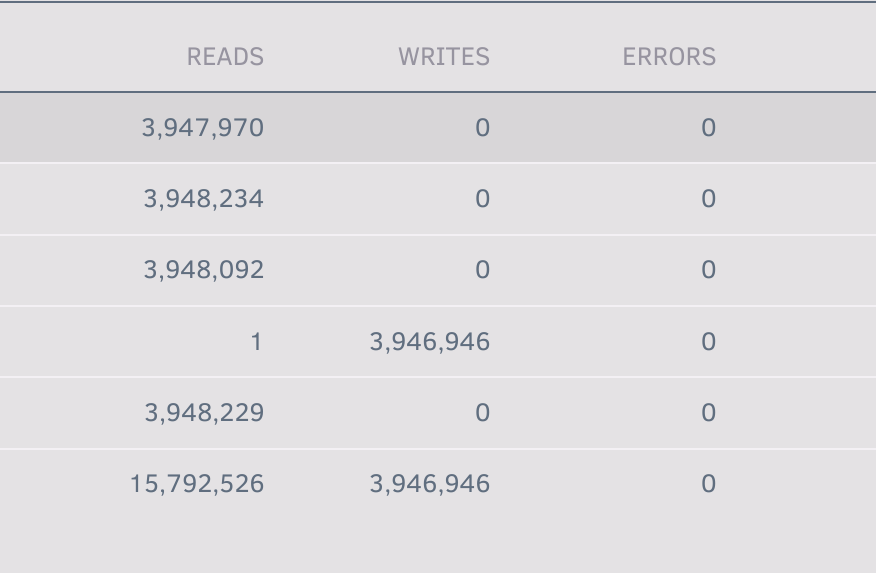
Hiya, I recently replaced a 4TB drive before discovering the issue was that the power cable needed replacing, so I thought I'd put it back into my array to replace one of the 2TB drives in there. I erased the 4TB on another machine, and then plugged it into my array replacing the 2TB drive. With a stopped array I selected the new drive to go in place of the missing drive, then started the array in Maint mode and then clicked Sync. The sync too about 8 hours but appears to have completed successfully - I noted that one of the array drives reported nearly 100% errors in the reads during the sync, but I figured I'd let it finish. I stopped the array and then started it again and now the 4TB I put in is showing as "Unmountable: Unsupported or no filesystem". Should I have formatted the drive in the array before syncing? I think I'd assumed that the sync would overwrite whatever was on the drive before. Should I correct it by formatting the drive (somehow) and then trying the sync again? And, the massive number of read errors - could that be anything to do with a cable being disturbed when I was fitting the replacement drive? Many thanks! beehouse-diagnostics-20240207-2246.zip
-
Will do! Thanks!
-
Looks like I've got a parity check scheduled in 15h time - that's not going to screw things up, is it?
-
The same disk has done it again - diagnostics attached, but no reboot this time. Hopefully it has more info? In this case it appeared to be triggered by me deleting a directory out of /mnt/disk1/appdata and then attempting to restart a docker container - not sure if it's to do with syncing catching up? beehouse-diagnostics-20231105-1051.zip
-
OK great... will give that a go!
-
6.12.4 install. For some reason one of my drives is reporting an error and appearing as disabled - when I run a read-check it comes back with no errors and I'm not really sure what to do next. Diagnostics attached! beehouse-diagnostics-20231012-2253.zip
-
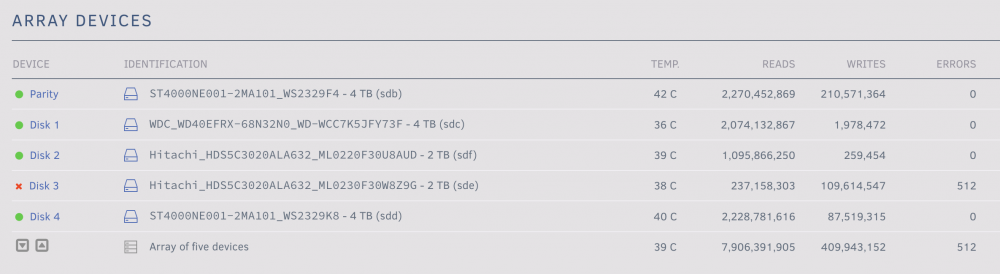
Hi there. This question looks fairly similar to one asked v. recently but I'm not savvy enough to know if it's the same... The other day one of my drives reported errors and is flagged as "disabled": I've run SMART short and extended tests on it which both returned without error, as well as the array Read Check - I'm not sure where to look to see more about these errors. In the syslog I can see a load of these: Jul 1 03:06:34 Beehouse kernel: blk_update_request: I/O error, dev sde, sector 1845904344 op 0x1:(WRITE) flags 0x800 phys_seg 94 prio class 0 Jul 1 03:06:34 Beehouse kernel: md: disk3 write error, sector=1845904280 Jul 1 03:06:34 Beehouse kernel: md: disk3 write error, sector=1845904288 Jul 1 03:06:34 Beehouse kernel: md: disk3 write error, sector=1845904296 Jul 1 03:06:34 Beehouse kernel: md: disk3 write error, sector=1845904304 Jul 1 03:06:34 Beehouse kernel: md: disk3 write error, sector=1845904312 Jul 1 03:06:34 Beehouse kernel: md: disk3 write error, sector=1845904320 Jul 1 03:06:34 Beehouse kernel: md: disk3 write error, sector=1845904328 Jul 1 03:06:34 Beehouse kernel: md: disk3 write error, sector=1845904336 Jul 1 03:06:34 Beehouse kernel: md: disk3 write error, sector=1845904344 Jul 1 03:06:34 Beehouse kernel: md: disk3 write error, sector=1845904352 Jul 1 03:06:34 Beehouse kernel: md: disk3 write error, sector=1845904360 Jul 1 03:06:34 Beehouse kernel: md: disk3 write error, sector=1845904368 Jul 1 03:06:34 Beehouse kernel: md: disk3 write error, sector=1845904376 Jul 1 03:06:34 Beehouse kernel: md: disk3 write error, sector=1845904384 Jul 1 03:06:34 Beehouse kernel: md: disk3 write error, sector=1845904392 Diagnostics attached. The drive in question is mainly just used as my TimeMachine backup. The box doesn't have anything non-standard in it (controller cards, etc) - it's just a Lenovo TS140 using the mainboard connectors, that's been ticking away nicely for years. Any ideas what I should try next? diagnostics-20220707-1631.zip
-
beehouse-diagnostics-20220113-2342.zip
-
That seems to have cheered it up - thanks a million! My new parity drive appears to be off happily building, and I can access my data again!
-
beehouse-diagnostics-20220113-1536.zip
-
Hi there, I've been really excited playing about with my new unraid setup these past few days since moving to it over Christmas, and I just took delivery of a couple of new drives after discovering how the unraid parity drive setup works. So, I just powered down by box, installed the new drives, then spun everything up again, and very worryingly for me the "main" 4TB drive that's got the bulk of my data on it has shown as unmountable. It showed as unmountable, so I put the array into maintenance mode and ran a check on it - which returned all OK and told me life was fine. So then I started the array again, and it showed as unmountable. I repeated the process, but now the check's returning: `Phase 1 - find and verify superblock... superblock read failed, offset 0, size 524288, ag 0, rval -1 fatal error -- Input/output error` I noticed the drive assignment go from sdc before the installation to sdg afterwards - but from what I can tell in this forum that's a red herring. My thoughts were: 1) power down & check all the cables are seated properly in case I knocked something 2) try unplugging the new drives & see if it sorts itself out But I wondered if there's anything else I can do? Predictably, this would happen to my main data drive on the exact same day the new drive arrives that I was planning to use as a parity drive. Many thanks!


